Dapr Scheduler control plane service overview
The Dapr Scheduler service is used to schedule different types of jobs, running in self-hosted mode or on Kubernetes.
- Jobs created through the Jobs API
- Actor reminder jobs (used by the actor reminders)
- Actor reminder jobs created by the Workflow API (which uses actor reminders): workflow start and wake-up reminders, timers, activity reminders, and, with the
WorkflowsFastPathpreview feature, one repeating janitor reminder per live workflow instance
The Scheduler service can also serve actor placement in place of the standalone Placement service. See Serving actor placement.
There is no leader Scheduler instance for jobs.
All Scheduler service replicas are considered peers.
All receive jobs to be scheduled for execution and the jobs are allocated between the available Scheduler service replicas for load balancing of the trigger events.
When the Scheduler serves actor placement, one replica is the placement leader, and its dapr_scheduler_placement_leader metric is 1.
The diagram below shows how the Scheduler service is used via the jobs API when called from your application. All the jobs that are tracked by the Scheduler service are stored in the Etcd database.
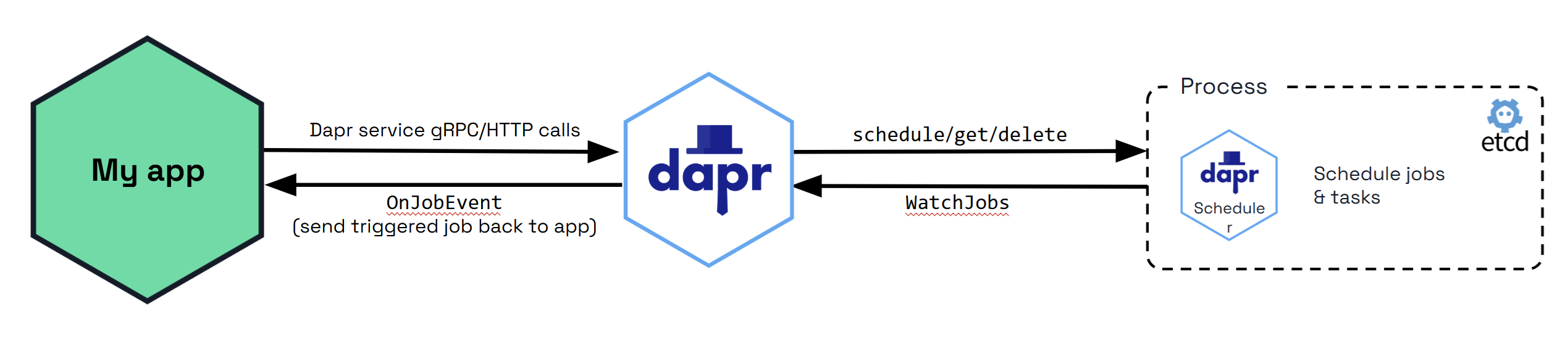
By default, Etcd is embedded in the Scheduler service, which means that the Scheduler service runs its own instance of Etcd. See Scheduler service flags for more information on how to configure the Scheduler service.
Job Locality
Default Job Behavior
When the Scheduler service triggers jobs, they are sent back to a single replica for the same app ID that scheduled the job in a randomly load balanced manner. This provides basic load balancing across your application’s replicas, which is suitable for most use cases where strict locality isn’t required.
Using Actor Reminders for Perfect Locality
For users who require perfect job locality (having jobs triggered on the exact same host that created them), actor reminders provide a solution. To enforce perfect locality for a job:
- Create an actor type with a random UUID that is unique to the specific replica
- Use this actor type to create an actor reminder
This approach ensures that the job will always be triggered on the same host which created it, rather than being randomly distributed among replicas.
Job Triggering
Job Failure Policy and Staging Queue
When the Scheduler service triggers a job and it has a client side error, the job is retried by default with a 1s interval and 3 maximum retries.
For non-client side errors, for example, when a job cannot be sent to an available Dapr sidecar at trigger time, it is placed in a staging queue within the Scheduler service. Jobs remain in this queue until a suitable sidecar instance becomes available, at which point they are automatically sent to the appropriate Dapr sidecar instance.
Self-hosted mode
The Scheduler service Docker container is started automatically as part of dapr init. It can also be run manually as a process if you are running in slim-init mode.
The Scheduler can be run in both high availability (HA) and non-HA modes in self-hosted deployments. However, non-HA mode is not recommended for production use. If switching between non-HA and HA modes, the existing data directory must be removed, which results in loss of jobs and actor reminders. Run a back-up before making this change to avoid losing data.
Kubernetes mode
The Scheduler service is deployed as part of dapr init -k, or via the Dapr Helm charts. Scheduler always runs in high availability (HA) mode in Kubernetes deployments. Scaling the Scheduler service replicas up or down is not possible without incurring data loss due to the nature of the embedded data store. Learn more about setting HA mode in your Kubernetes service.
When a Kubernetes namespace is deleted, all the Job and Actor Reminders corresponding to that namespace are deleted.
The Scheduler needs get, list and watch on pods in the Dapr control plane namespace to detect whether a Placement service is deployed. From Dapr 1.19, the Helm chart grants this with the dapr-scheduler-pods Role and RoleBinding in the release namespace, whether or not the Scheduler serves actor placement. The dapr-scheduler ClusterRole (or Role, with global.rbac.namespaced=true) keeps namespaces only. If you manage the control plane RBAC outside the Helm chart, add the pods permission before you upgrade to 1.19.
Docker Compose Example
Here’s how to expose the etcd ports in a Docker Compose configuration for standalone mode. When running in HA mode, you only need to expose the ports for one scheduler instance to perform backup operations.
version: "3.5"
services:
  scheduler-0:
    image: "docker.io/daprio/scheduler:1.19.0"
    command:
    - "./scheduler"
    - "--etcd-data-dir=/var/run/dapr/scheduler"
    - "--id=scheduler-0"
    - "--etcd-initial-cluster=scheduler-0=http://scheduler-0:2380,scheduler-1=http://scheduler-1:2380,scheduler-2=http://scheduler-2:2380"
    ports:
      - 2379:2379
    volumes:
      - ./dapr_scheduler/0:/var/run/dapr/scheduler
  scheduler-1:
    image: "docker.io/daprio/scheduler:1.19.0"
    command:
    - "./scheduler"
    - "--etcd-data-dir=/var/run/dapr/scheduler"
    - "--id=scheduler-1"
    - "--etcd-initial-cluster=scheduler-0=http://scheduler-0:2380,scheduler-1=http://scheduler-1:2380,scheduler-2=http://scheduler-2:2380"
    volumes:
      - ./dapr_scheduler/1:/var/run/dapr/scheduler
  scheduler-2:
    image: "docker.io/daprio/scheduler:1.19.0"
    command:
    - "./scheduler"
    - "--etcd-data-dir=/var/run/dapr/scheduler"
    - "--id=scheduler-2"
    - "--etcd-initial-cluster=scheduler-0=http://scheduler-0:2380,scheduler-1=http://scheduler-1:2380,scheduler-2=http://scheduler-2:2380"
    volumes:
      - ./dapr_scheduler/2:/var/run/dapr/scheduler
Managing jobs with the Dapr CLI
Dapr provides a CLI for inspecting and managing all scheduled jobs, regardless of type. The CLI is the recommended way to view, back up, and delete jobs.
There are several different types of jobs which Scheduler manages:
app/{app-id}/{job-name}: Jobs created via the Jobs APIactor/{actor-type}/{actor-id}/{reminder-name}: Actor reminder jobs created via the Actor Reminders APIactivity/{app-id}/{instance-id}::{task-id}::0: Used internally for Workflow Activity remindersworkflow/{app-id}/{instance-id}/{random-name}: Used internally for Workflows.
From Dapr 1.19, activity job names always end in ::0. Earlier runtimes used the workflow instance’s generation as the last component, for example ::1 on the first run, so update scripts that build these names.
Please see here for how to manage specifically reminders with the CLI.
List jobs
dapr scheduler list
Example output:
NAME                                           BEGIN     COUNT  LAST TRIGGER
actor/myactortype/actorid1/test1               -3.89s    1      2025-10-03T16:58:55Z
actor/myactortype/actorid2/test2               -3.89s    1      2025-10-03T16:58:55Z
app/test-scheduler/test1                       -3.89s    1      2025-10-03T16:58:55Z
app/test-scheduler/test2                       -3.89s    1      2025-10-03T16:58:55Z
activity/test-scheduler/xyz1::0::0             -888.8ms  0
activity/test-scheduler/xyz2::0::0             -888.8ms  0
workflow/test-scheduler/abc1/timer-0-TVIQGkvu  +50.0h    0
workflow/test-scheduler/abc2/timer-0-OM2xqG9m  +50.0h    0
For more detail, use the wide output format:
dapr scheduler list -o wide
NAMESPACE  NAME                                           BEGIN                 EXPIRATION            SCHEDULE         DUE TIME                   TTL     REPEATS  COUNT  LAST TRIGGER
default    actor/myactortype/actorid1/test1               2025-10-03T16:58:55Z                        @every 2h46m40s  2025-10-03T17:58:55+01:00          100      1      2025-10-03T16:58:55Z
default    actor/myactortype/actorid2/test2               2025-10-03T16:58:55Z                        @every 2h46m40s  2025-10-03T17:58:55+01:00          100      1      2025-10-03T16:58:55Z
default    app/test-scheduler/test1                       2025-10-03T16:58:55Z                        @every 100m      2025-10-03T17:58:55+01:00          1234     1      2025-10-03T16:58:55Z
default    app/test-scheduler/test2                       2025-10-03T16:58:55Z  2025-10-03T19:45:35Z  @every 100m      2025-10-03T17:58:55+01:00  10000s  56788    1      2025-10-03T16:58:55Z
default    activity/test-scheduler/xyz1::0::0             2025-10-03T16:58:58Z                                         0s                                          0
default    activity/test-scheduler/xyz2::0::0             2025-10-03T16:58:58Z                                         0s                                          0
default    workflow/test-scheduler/abc1/timer-0-TVIQGkvu  2025-10-05T18:58:58Z                                         2025-10-05T18:58:58Z                        0
default    workflow/test-scheduler/abc2/timer-0-OM2xqG9m  2025-10-05T18:58:58Z                                         2025-10-05T18:58:58Z                        0
Get job details
dapr scheduler get app/my-app/job1 -o yaml
Delete jobs
Delete one or more specific jobs:
dapr scheduler delete app/my-app/job1 actor/MyActor/123/reminder1
Bulk delete jobs with filters:
dapr scheduler delete-all all
dapr scheduler delete-all app/my-app
dapr scheduler delete-all actor/MyActorType
Backup and restore jobs
In production environments, it’s recommended to perform periodic backups of this data at an interval that aligns with your recovery point objectives.
The Dapr CLI provides a command for exporting all Scheduler data to a specific binary file.
Use the -k flag when running in Kubernetes mode.
dapr scheduler export -o scheduler-backup.bin
dapr scheduler export -k -o scheduler-backup.bin
To restore data from a backup file:
dapr scheduler import -f scheduler-backup.bin
dapr scheduler import -k -f scheduler-backup.bin
Monitoring Scheduler’s etcd Metrics
Port forward the Scheduler instance and view etcd’s metrics with the following:
curl -s http://localhost:2379/metrics
Fine tune the embedded etcd to your needs by reviewing and configuring the Scheduler’s etcd flags as needed.
Serving actor placement
The Scheduler can serve actor placement itself, so the standalone Placement service is not required to run.
In Kubernetes mode, set the Helm value:
global.scheduler.placement.enabled=true
With this value, the Helm chart fails to render unless global.scheduler.enabled=true, global.actors.enabled=true and global.actors.serviceName=placement (the defaults). The upgrade that sets the value removes the Placement StatefulSet, and the Schedulers take over placement within a few seconds. The same upgrade also restarts the Schedulers to pick up --placement-enabled=true, so expect actor and workflow activity to pause until the Schedulers are ready again.
In self-hosted mode, initialize Dapr with the --scheduler-placement flag, which skips the Placement container and starts the Scheduler with --placement-enabled=true:
dapr init --scheduler-placement
Sidecars take actor placement from whichever service the control plane advertises, so applications need no configuration of their own and the cluster always has exactly one placement authority. Toggling the setting in either direction requires no sidecar restarts. Learn more about serving placement from the Scheduler service.
To check which service a sidecar uses, look in its log for Connected to scheduler placement leader <address> (Scheduler) or Connected to placement service: <address> (Placement service). On the Scheduler, dapr_scheduler_placement_leader is 1 on the placement leader, dapr_scheduler_placement_streams_connected counts the connected sidecar placement streams, and dapr_scheduler_placement_incapable_sidecars counts connected sidecars older than 1.19. Upgrade those sidecars: without a Placement service, their actor and workflow APIs stall.
At startup, a sidecar waits for the Scheduler to advertise placement for up to --actors-placement-startup-timeout (annotation dapr.io/actors-placement-startup-timeout, default 30s), then falls back to the configured Placement service. The Scheduler advertises placement only after the sidecar’s jobs stream registers, so set the timeout higher than your app health probe budget.
The dissemination behavior of scheduler-served placement can be tuned with the following Scheduler flags:
--placement-enabled                       bool      When enabled, this scheduler serves actor placement to daprd sidecars, replacing the standalone placement service. All scheduler replicas in the cluster must set the same value. (default false)
--placement-disseminate-timeout           duration  The timeout for a placement dissemination round to daprd sidecars. Sidecars which fail to acknowledge within the timeout have their placement stream closed. (default 8s)
--placement-disseminate-coalesce-window   duration  The window in which placement membership changes are coalesced into a single dissemination round. 0 disseminates immediately. (default 0)
Disabling the Scheduler service
If you are not using any features that require the Scheduler service (Jobs API, Actor Reminders, or Workflows), you can disable it by setting global.scheduler.enabled=false.
The Scheduler service cannot be disabled while it serves actor placement (global.scheduler.placement.enabled=true).
For more information on running Dapr on Kubernetes, visit the Kubernetes hosting page.
Failure behaviour
From Dapr 1.19, when the Scheduler server stops with a runtime error, for example because its embedded Etcd is briefly unavailable, the Scheduler recreates the server in the same process after a jittered backoff from 500 ms up to 10 s. Meanwhile its healthz endpoint reports not ready, and the log shows Scheduler server failed, recreating in <delay>. The process does not exit, so alerts that count Scheduler pod restarts do not see this condition: use readiness or the logs instead.
A port bind failure is the exception: the Scheduler process exits and Kubernetes restarts it. The Scheduler port, 50006, is inside the default Linux ephemeral port range, so one of the process’s own outbound connections can hold it. Without the exit, the replica would stay not ready until its liveness probe restarts it, 230 s with the chart defaults (180 s initial delay, then 5 failed probes 10 s apart).
Flag tuning
A number of Etcd flags are exposed on Scheduler which can be used to tune for your deployment use case.
External Etcd database
Scheduler can be configured to use an external Etcd database instead of the embedded one inside the Scheduler service replicas. It may be interesting to decouple the storage volume from the Scheduler StatefulSet or container, because of how the cluster or environment is administered or what storage backend is being used. It can also be the case that moving the persistent storage outside of the scheduler runtime completely is desirable, or there is some existing Etcd cluster provider which will be reused. Externalising the Etcd database also means that the Scheduler replicas can be horizontally scaled at will, however note that during scale events, job triggering will be paused. Scheduler replica count does not need to match the Etcd node count constraints.
To use an external Etcd cluster, set the --etcd-embed flag to false and provide the --etcd-client-endpoints flag with the endpoints of your Etcd cluster.
Optionally also include --etcd-client-username and --etcd-client-password flags for authentication if the Etcd cluster requires it.
--etcd-embed              bool         When enabled, the Etcd database is embedded in the scheduler server. If false, the scheduler connects to an external Etcd cluster using the --etcd-client-endpoints flag. (default true)
--etcd-client-endpoints   stringArray  Comma-separated list of etcd client endpoints to connect to. Only used when --etcd-embed is false.
--etcd-client-username    string       Username for etcd client authentication. Only used when --etcd-embed is false.
--etcd-client-password    string       Password for etcd client authentication. Only used when --etcd-embed is false.
Helm:
dapr_scheduler.etcdEmbed=true
dapr_scheduler.etcdClientEndpoints=[]
dapr_scheduler.etcdClientUsername=""
dapr_scheduler.etcdClientPassword=""
Etcd leadership election tuning
To improve the speed of election leadership of rescue nodes in the event of a failure, the following flag may be used to speed up the election process.
--etcd-initial-election-tick-advance Whether to fast-forward initial election ticks on boot for faster election. When it is true, then local member fast-forwards election ticks to speed up “initial” leader election trigger. This benefits the case of larger election ticks. Disabling this would slow down initial bootstrap process for cross datacenter deployments. Make your own tradeoffs by configuring this flag at the cost of slow initial bootstrap.
Helm:
dapr_scheduler.etcdInitialElectionTickAdvance=true
Storage tuning
The following options can be used to tune the embedded Etcd storage to the needs of your deployment. A deeper understanding of what these flags do can be found in the Etcd documentation.
Note
Changing these flags can greatly change the performance and behaviour of the Scheduler, so caution is advised when modifying them from the default set by Dapr. Changing these settings should always been done first in a testing environment, and monitored closely before applying to production.--etcd-backend-batch-interval string Maximum time before committing the backend transaction. (default "100ms")
--etcd-backend-batch-limit int Maximum operations before committing the backend transaction. (default 10000)
--etcd-compaction-mode string Compaction mode for etcd. Can be 'periodic' or 'revision' (default "revision")
--etcd-compaction-retention string Compaction retention for etcd. Can express time or number of revisions, depending on the value of 'etcd-compaction-mode' (default "10000")
--etcd-experimental-bootstrap-defrag-threshold-megabytes uint Minimum number of megabytes needed to be freed for etcd to consider running defrag during bootstrap. Needs to be set to non-zero value to take effect. (default 100)
--etcd-max-snapshots uint Maximum number of snapshot files to retain (0 is unlimited). (default 10)
--etcd-max-txn-ops uint Maximum number of operations permitted in a single etcd transaction. (default 10000)
--etcd-max-wals uint Maximum number of write-ahead logs to retain (0 is unlimited). (default 10)
--etcd-snapshot-count uint Number of committed transactions to trigger a snapshot to disk. (default 100000)
Helm:
dapr_scheduler.etcdBackendBatchInterval="100ms"
dapr_scheduler.etcdBackendBatchLimit=10000
dapr_scheduler.etcdCompactionMode="revision"
dapr_scheduler.etcdCompactionRetention="10000"
dapr_scheduler.etcdDefragThresholdMB=100
dapr_scheduler.etcdMaxSnapshots=10
dapr_scheduler.etcdMaxTxnOps=10000
From Dapr 1.19, the default compaction retention is 10000 revisions (earlier releases: 1000000). Every revision keeps the payload of the job it wrote, so under workflow load the old default grew the database to gigabytes of disk and memory. The retention bounds the number of revisions, not their size. A value you set yourself is kept, and helm upgrade --reuse-values keeps the old 1000000, so pass the new value or drop the override. A Scheduler watch that falls more than 10,000 revisions behind, for example during a leadership change under a write burst, is cancelled by Etcd. The Scheduler then re-reads the job list and reconnects, and job API calls wait until it is ready.
Healthz listen address
--healthz-listen-address string Address the healthz server listens on. Empty (the default) listens on all interfaces.
Set this flag to bind the Scheduler’s healthz endpoint to a specific interface, for example to keep it off a public network. It has no dedicated Helm value as of Dapr 1.19. In self-hosted mode, pass it directly to the Scheduler binary, for example in a Docker Compose or systemd configuration.