More about Dapr Workflow
Learn more about how to use Dapr Workflow:
- Try the Workflow quickstart.
- Explore workflow via any of the supporting Dapr SDKs.
- Review the Workflow API reference documentation.
This is the multi-page printable view of this section. Click here to print.
Learn more about how to use Dapr Workflow:
Dapr Workflow is a durable execution engine. You write workflow logic as ordinary code with a Dapr SDK. Dapr persists the result of each completed step and resumes the workflow from the last completed step after a crash, a restart, or a redeployment. Dapr workflows are stateful, so they support long-running and fault-tolerant applications. They also orchestrate other Dapr building blocks, such as service invocation, pub/sub, state management, and bindings.
The durable, resilient Dapr Workflow capability:
Some example scenarios that Dapr Workflow can perform are:
With Dapr Workflow, you can write activities and then orchestrate those activities in a workflow. Workflow activities are:
Learn more about workflow activities.
In addition to activities, you can write workflows to schedule other workflows as child workflows. A child workflow has its own instance ID, history, and status that is independent of the parent workflow that started it, except for the fact that terminating the parent workflow terminates all of the child workflows created by it. Child workflow also supports automatic retry policies.
Learn more about child workflows.
You can also schedule a new workflow as a detached workflow: a fire-and-forget instance that runs fully independently of the workflow that started it. The calling workflow receives the new instance ID immediately and continues, and the detached workflow’s success or failure does not flow back to the caller. This is useful for triggering isolated, independent work, such as per-tenant fan-out.
Learn more about detached workflows.
Multi-application workflows, enable you to orchestrate complex business processes that span across multiple applications. This allows a workflow to call activities or start child workflows in different applications, distributing the workflow execution while maintaining the security, reliability and durability guarantees of Dapr’s workflow engine.
Learn more about multi-application workflows.
When mTLS and the WorkflowHistorySigning feature flag are enabled, Dapr cryptographically signs every workflow history event using the sidecar’s X.509 SPIFFE identity.
On each load, the full signature chain is verified, detecting any tampering of workflow state in the state store.
For example, consider an order-processing workflow that captures payment, ships the goods, and emails a receipt. Without signing, an attacker with write access to the state store could rewrite the recorded order total between the payment step and the shipping step, so the workflow ships at a lower price than was actually charged, and Dapr would have no way to know. With signing enabled, the modified event no longer matches its signature, the next load fails verification, and Dapr marks the workflow as FAILED with error type DAPR_WORKFLOW_HISTORY_TAMPERED instead of acting on the forged data. The same protection applies to approvals being flipped from denied to approved, extra recipients being added to outbound messages, or fake activity results being injected into the inbox.
Signing is a one-way commitment: once enabled for a workflow, it cannot be disabled.
Learn more about workflow history signing.
The WorkflowsFastPath preview feature drives workflow turns and activity bodies on the host that already holds the work, and folds activity completions into the next turn’s single state store commit, instead of creating a Scheduler reminder for every event. This removes the per-event Scheduler round trips and most state store commits from the workflow hot path. At-least-once execution is unchanged: a per-instance janitor reminder and automatic escalation back to durable reminders provide recovery.
Learn more about the workflow fast path.
Same as Dapr actors, you can schedule reminder-like durable delays for any time range.
Learn more about workflow timers and reminders
Workflow history propagation enables a current workflow to look back over the set of events that the workflow or a another workflow has executed and verify these actually occurred. Scenarios include fraud checks, checking compliance gates (was this activity called or not), or enabling long-running AI agents/workflows to maintain context across calls (multi-agent, multi-app workflows) to determine what the agent or workflows claims to have done, it actually true.
A parent workflow can opt to share its execution history with child workflows and activities — useful for chain-of-custody verification, fraud detection, audit, and AI-agent context that must flow across hops.
For details, read [workflow history propagation ](https://v1-19.docs.dapr.io/developing-applications/building-blocks/workflow/workflow-history-propagation/ to understand how to apply this to a workflow, child workflow and activities.
Learn more about workflow history propagation.
When you create an application with workflow code and run it with Dapr, you can call specific workflows that reside in the application. Each individual workflow can be:
Learn more about how manage a workflow using HTTP calls.
Dapr Workflow simplifies complex, stateful coordination requirements in microservice architectures. The following sections describe several application patterns that can benefit from Dapr Workflow.
Learn more about different types of workflow patterns
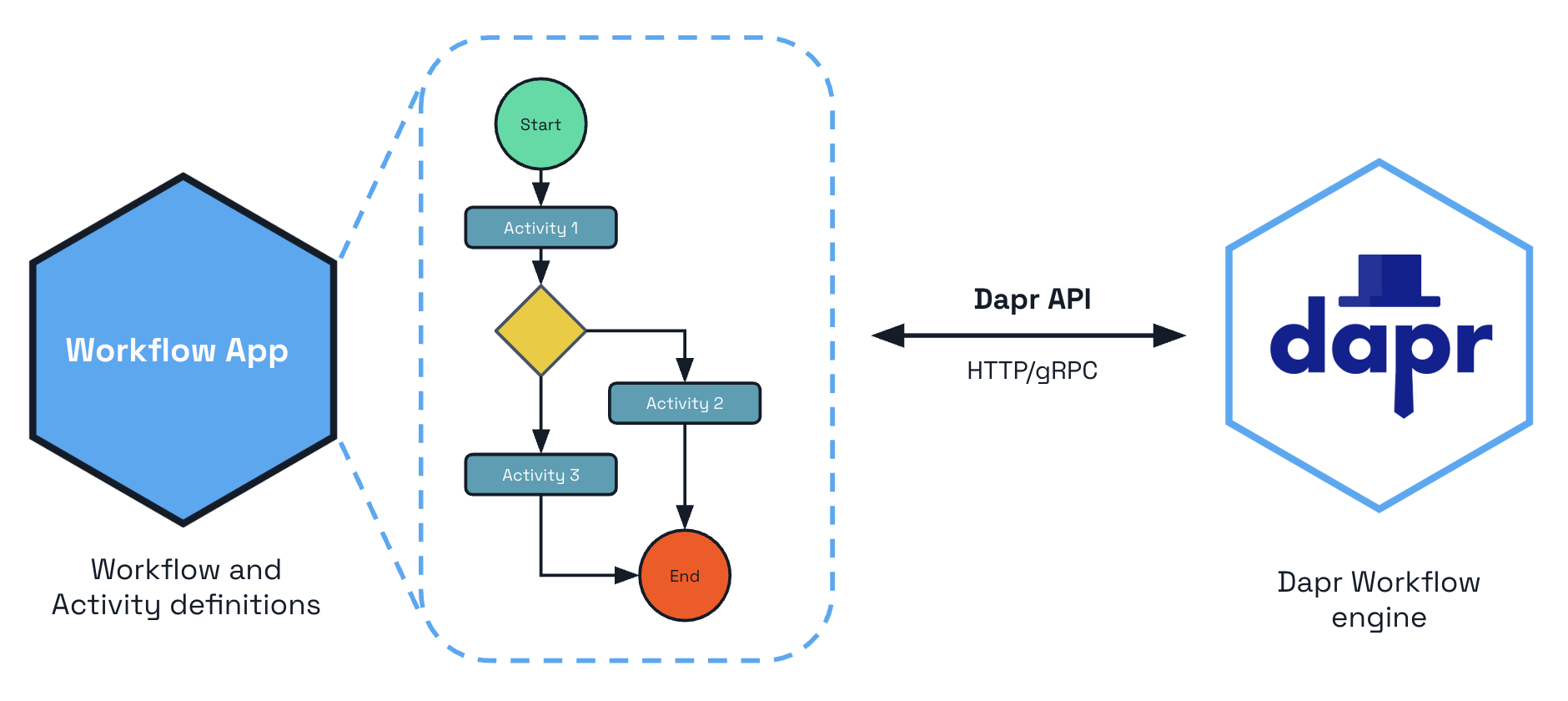
The Dapr Workflow authoring SDKs are language-specific SDKs that contain types and functions to implement workflow logic. The workflow logic lives in your application and is orchestrated by the Dapr Workflow engine running in the Dapr sidecar via a gRPC stream.
You can use the following SDKs to author a workflow.
| Language stack | Package |
|---|---|
| Python | dapr.ext.workflow, installed with pip install "dapr[workflow]" |
| JavaScript | DaprWorkflowClient |
| .NET | Dapr.Workflow |
| Java | io.dapr.workflows |
| Go | workflow |
Want to put workflows to the test? Walk through the following quickstart and tutorials to see workflows in action:
| Quickstart/tutorial | Description |
|---|---|
| Workflow quickstart | Run a workflow application with four workflow activities to see Dapr Workflow in action |
| Workflow Python SDK example | Learn how to create a Dapr Workflow and invoke it using the Python dapr.ext.workflow package. |
| Workflow JavaScript SDK example | Learn how to create a Dapr Workflow and invoke it using the JavaScript SDK. |
| Workflow .NET SDK example | Learn how to create a Dapr Workflow and invoke it using ASP.NET Core web APIs. |
| Workflow Java SDK example | Learn how to create a Dapr Workflow and invoke it using the Java io.dapr.workflows package. |
| Workflow Go SDK example | Learn how to create a Dapr Workflow and invoke it using the Go workflow package. |
Want to skip the quickstarts? Not a problem. You can try out the workflow building block directly in your application. After Dapr is installed, you can begin using workflows, starting with how to author a workflow.
Dapr provides comprehensive workflow management capabilities through both the HTTP API and the CLI.
Start Workflows
dapr workflow run MyWorkflow --app-id myapp --input '{"key": "value"}'
Monitor Workflows
# List active workflows for a given application
dapr workflow list --app-id myapp --filter-status RUNNING

# View execution history
dapr workflow history <instance-id> --app-id myapp
Control Workflows
# Suspend, resume, or terminate
dapr workflow suspend <instance-id> --app-id myapp
dapr workflow resume <instance-id> --app-id myapp
dapr workflow terminate <instance-id> --app-id myapp
Maintenance Operations
# Purge completed workflows
dapr workflow purge --app-id myapp --all-older-than 720h
See How-To: Manage workflows for detailed instructions.
Inspect Workflows Visually
During local development, you can use the Dapr Dev Dashboard to browse workflow instances, check their status, and drill down into the event history of each execution.
Dapr provides fine-grained access control for workflow and activity scheduling through the WorkflowAccessPolicy resource. You can restrict which applications are permitted to start specific workflows or call specific activities on your application.
Workflow access policies for a given application (appID) are loaded by the sidecar when the application is instantiated, and are hot-reloaded thereafter when policies are added, updated, or removed. Policies are a pure allow-list evaluated on the callee side: a cross-app schedule is permitted only if some rule in some loaded policy matches the caller and the workflow or activity name.
This is especially important for multi-application workflows, where activities and child workflows execute across application boundaries. Read How-To: Apply workflow access policies for full configuration details.
Watch this video for an overview on Dapr Workflow:
Now that you’ve learned about the workflow building block at a high level, let’s deep dive into the features and concepts included with the Dapr Workflow engine and SDKs. Dapr Workflow exposes several core features and concepts which are common across all supported languages.
Dapr Workflows are functions you write that define a series of tasks to be executed in a particular order. The Dapr Workflow engine takes care of scheduling and execution of the tasks, including managing failures and retries. If the app hosting your workflows is scaled out across multiple machines, the workflow engine load balances the execution of workflows and their tasks across multiple machines. You can configure concurrency limits to control how many workflows and activities run simultaneously, either per-sidecar or globally across all replicas.
There are several different kinds of tasks that a workflow can schedule, including
You can query workflow instances using the CLI:
# Find all running workflows
dapr workflow list --app-id myapp --filter-status RUNNING

# Find workflows by name
dapr workflow list --app-id myapp --filter-name OrderProcessing

# Find recent workflows (last 2 hours)
dapr workflow list --app-id myapp --filter-max-age 2h

# Get detailed JSON output
dapr workflow list --app-id myapp --output json
View the complete execution history:
dapr workflow history wf-12345 --app-id myapp --output json
This shows all events, activities, and state transitions.
dapr workflow raise-event wf-12345/ApprovalReceived \
  --app-id myapp \
  --input '{"approved": true, "comments": "Approved by manager"}'
# Suspend for manual intervention
dapr workflow suspend wf-12345 \
  --app-id myapp \
  --reason "Awaiting customer response"

# Resume when ready
dapr workflow resume wf-12345 \
  --app-id myapp \
  --reason "Customer responded"
Each workflow you define has a type name, and individual executions of a workflow require a unique instance ID. Workflow instance IDs can be generated by your app code, which is useful when workflows correspond to business entities like documents or jobs, or can be auto-generated UUIDs. A workflow’s instance ID is useful for debugging and also for managing workflows using the Workflow APIs.
Only one workflow instance with a given ID can exist at any given time. Attempting to create a new workflow instance with the same ID as an existing instance results in an error unless the existing instance, and every child workflow it created (checked recursively), has reached a terminal state: COMPLETED, FAILED, or TERMINATED. Once the entire workflow tree is terminal, creating a new instance with the same ID starts a fresh execution that replaces the previous one in the state store.
SDK workflow clients get the gRPC AlreadyExists status code when the instance ID belongs to an active instance (the Java SDK raises WorkflowInstanceAlreadyExistsException). A client can therefore start a workflow with a fixed instance ID as an idempotent call and treat AlreadyExists as “already running”, without parsing the error message. A completed instance ID is reused by default. It also returns AlreadyExists when a durabletask-go client sets api.WithEnforceUniqueInstanceID(), or when the old instance’s child workflows have not finished. The workflow API (HTTP and gRPC StartWorkflowBeta1) keeps its error response: HTTP 500 with error code ERR_START_WORKFLOW.
Reusing an instance ID for a new workflow execution has costs that a fresh ID does not:
Recommended patterns instead of reuse:
order-1234-<uuid> or order-1234-attempt-3. Keep the mapping from business entity to current instance ID in your own state store, or expose it through the workflow’s custom status, so callers can find the active instance.An instance ID cannot be reused while its workflow is running, or while any child workflow created by its previous execution is still running. This includes children abandoned by a parent that completed without awaiting them or that was terminated non-recursively; a still-running child from the old execution could otherwise deliver its results into the new one. The create request fails with an error naming the child workflow that is not yet terminal: gRPC AlreadyExists for SDK workflow clients, or HTTP 500 with ERR_START_WORKFLOW from the workflow HTTP API.
To free up an instance ID, purge the workflow using the purge API or configure a workflow retention policy.
The instance ID reuse policy option that was previously available in some SDKs (allowing actions like IGNORE or TERMINATE on ID conflicts) was removed in v1.18 and is deprecated in the SDKs that still expose it. Dapr 1.18+ runtimes ignore the option entirely.
Dapr Workflows maintain their execution state by using a technique known as event sourcing. Instead of storing the current state of a workflow as a snapshot, the workflow engine manages an append-only log of history events that describe the various steps that a workflow has taken. When using the workflow SDK, these history events are stored automatically whenever the workflow “awaits” for the result of a scheduled task.
When a workflow “awaits” a scheduled task, it unloads itself from memory until the task completes. Once the task completes, the workflow engine schedules the workflow function to run again. This second workflow function execution is known as a replay.
When a workflow function is replayed, it runs again from the beginning. However, when it encounters a task that already completed, instead of scheduling that task again, the workflow engine:
This “replay” behavior continues until the workflow function completes or fails with an error.
Using this replay technique, a workflow is able to resume execution from any “await” point as if it had never been unloaded from memory. Even the values of local variables from previous runs can be restored without the workflow engine knowing anything about what data they stored. This ability to restore state makes Dapr Workflows durable and fault tolerant.
As discussed in the workflow replay section, workflows maintain a write-only event-sourced history log of all its operations. To avoid runaway resource usage, workflows must limit the number of operations they schedule. For example, ensure your workflow doesn’t:
You can use the following two techniques to write workflows that may need to schedule extreme numbers of tasks:
Use the continue-as-new API:
Each workflow SDK exposes a continue-as-new API that workflows can invoke to restart themselves with a new input and history. The continue-as-new API is especially ideal for implementing “eternal workflows”, like monitoring agents, which would otherwise be implemented using a while (true)-like construct. Using continue-as-new is a great way to keep the workflow history size small.
The continue-as-new API truncates the existing history, replacing it with a new history.
Use child workflows: Each workflow SDK exposes an API for creating child workflows. A child workflow behaves like any other workflow, except that it’s scheduled by a parent workflow. Child workflows have:
If a workflow needs to schedule thousands of tasks or more, it’s recommended that those tasks be distributed across child workflows so that no single workflow’s history size grows too large.
Because workflows are long-running and durable, updating workflow code must be done with extreme care. As discussed in the workflow determinism limitation section, workflow code must be deterministic. Updates to workflow code must preserve this determinism if there are any non-completed workflow instances in the system. Otherwise, updates to workflow code can result in runtime failures the next time those workflows execute.
Workflow activities are the basic unit of work in a workflow and are the tasks that get orchestrated in the business process. For example, you might create a workflow to process an order. The tasks may involve checking the inventory, charging the customer, and creating a shipment. Each task would be a separate activity. These activities may be executed serially, in parallel, or some combination of both.
Unlike workflows, activities aren’t restricted in the type of work you can do in them. Activities are frequently used to make network calls or run CPU intensive operations. An activity can also return data back to the workflow.
The Dapr Workflow engine guarantees that each called activity is executed at least once as part of a workflow’s execution. Because activities only guarantee at-least-once execution, it’s recommended that activity logic be implemented as idempotent whenever possible.
In addition to activities, workflows can schedule other workflows as child workflows. A child workflow has its own instance ID, history, and status that is independent of the parent workflow that started it.
Child workflows have many benefits:
The return value of a child workflow is its output. If a child workflow fails with an exception, then that exception is surfaced to the parent workflow, just like it is when an activity task fails with an exception. Child workflows also support automatic retry policies.
Terminating a parent workflow terminates all of the child workflows created by the workflow instance. See the terminate workflow api for more information.
In addition to child workflows, a workflow can schedule another workflow as a detached workflow: a fire-and-forget instance that runs fully independently of the caller. The call returns the new instance ID synchronously and the scheduling workflow continues immediately, without waiting for the detached workflow. Unlike a child workflow, there is no parent linkage: the detached workflow’s success or failure does not flow back to the caller, and terminating the caller does not terminate the detached workflow.
For the comparison with child workflows, guidance on when to use them, and a code example, see Detached workflows.
Dapr Workflows allow you to schedule reminder-like durable delays for any time range, including minutes, days, or even years. These durable timers can be scheduled by workflows to implement simple delays or to set up ad-hoc timeouts on other async tasks. More specifically, a durable timer can be set to trigger on a particular date or after a specified duration. There are no limits to the maximum duration of durable timers, which are internally backed by internal actor reminders. For example, a workflow that tracks a 30-day free subscription to a service could be implemented using a durable timer that fires 30-days after the workflow is created. Workflows can be safely unloaded from memory while waiting for a durable timer to fire.
Workflows support durable retry policies for activities and child workflows. Workflow retry policies are separate and distinct from Dapr resiliency policies in the following ways.
Retries are internally implemented using durable timers. This means that workflows can be safely unloaded from memory while waiting for a retry to fire, conserving system resources. This also means that delays between retries can be arbitrarily long, including minutes, hours, or even days.
It’s possible to use both workflow retry policies and Dapr Resiliency policies together. For example, if a workflow activity uses a Dapr client to invoke a service, the Dapr client uses the configured resiliency policy. See Quickstart: Service-to-service resiliency for more information with an example. However, if the activity itself fails for any reason, including exhausting the retries on the resiliency policy, then the workflow’s resiliency policy kicks in.
Because workflow retry policies are configured in code, the exact developer experience may vary depending on the version of the workflow SDK. In general, workflow retry policies can be configured with the following parameters.
| Parameter | Description |
|---|---|
| Maximum number of attempts | The maximum number of times to execute the activity or child workflow. If set to 0, no attempts will be made. |
| First retry interval | The amount of time to wait before the first retry. |
| Backoff coefficient | The coefficient used to determine the rate of increase of back-off. For example a coefficient of 2 doubles the wait of each subsequent retry. |
| Maximum retry interval | The maximum amount of time to wait before each subsequent retry. If set to 0, no retries will happen. |
| Retry timeout | The global timeout for retries, regardless of any configured max number of attempts. No further attempts are made executing activities after this timeout expires. |
Each retry of a child workflow is a separate instance with its own instance ID. From Dapr 1.19, the ChildWorkflowInstanceCreated event of a retry attempt in the parent’s history records the instance ID of the first attempt (retryParentInstanceInfo). Tooling that reads a parent’s history can group the attempts of one call by that ID, without walking the retry timers between them.
Sometimes workflows will need to wait for events that are raised by external systems. For example, an approval workflow may require a human to explicitly approve an order request within an order processing workflow if the total cost exceeds some threshold. Another example is a trivia game orchestration workflow that pauses while waiting for all participants to submit their answers to trivia questions. These mid-execution inputs are referred to as external events.
External events have a name and a payload and are delivered to a single workflow instance. Workflows can create “wait for external event” tasks that subscribe to external events and await those tasks to block execution until the event is received. The workflow can then read the payload of these events and make decisions about which next steps to take. External events can be processed serially or in parallel. External events can be raised by other workflows or by workflow code.
Workflows can also wait for multiple external event signals of the same name, in which case they are dispatched to the corresponding workflow tasks in a first-in, first-out (FIFO) manner. If a workflow receives an external event signal but has not yet created a “wait for external event” task, the event will be saved into the workflow’s history and consumed immediately after the workflow requests the event.
Learn more about external system interaction.
Workflow history propagation enables a workflow instance to look back over the set of events that the workflow or a another workflow has executed and verify these actually occurred. Some scenarios include performance fraud checks, checking compliance gates, or enable long-running AI agents/workflows to maintain context across calls (multi-agent, multi-app workflows) to determine what the agent or workflows claims to have done, it actually true.
For example if you have a workflow that verifies a credit check for a user, you can use workflow history propagation to verify this actually happened for the named user. When this is combined with workflow history signing, you can further cryptographically confirm or attest this.
A parent workflow can opt to share its execution history with downstream child and grandchild workflows and activities. Two scopes are available:
The receiving workflow/activity reads its inherited history via the SDKs GetPropagatedHistory() API and can verify what happened upstream.
For details, the scope comparison, and code examples, see workflow history propagation.
A workflow is replayed from its history on every turn, and that history only grows. Rather than sending the whole thing each time, the workflow SDK keeps the history it has already replayed in memory and the sidecar sends only the events added since the previous turn. The per-turn payload therefore stops growing with the length of the workflow, which matters most for long-running, monitor-pattern, and large fan-out workflows.
This is enabled by default, requires no configuration or code changes, and never affects correctness: if the worker’s cached history does not match what the sidecar expects, the full history is fetched instead.
Learn more about the stateful workflow client.
Workflow state can be purged from a state store, purging all its history and removing all metadata related to a specific workflow instance. The purge capability is used for workflows that have run to a COMPLETED, FAILED, or TERMINATED state.
Learn more in the workflow API reference guide.
Workflow code is long-running and must remain deterministic during updates. For details on patching and named workflow versioning, see Workflow versioning.
A single workflow or activity dispatch is bounded by the sidecar’s --max-body-size setting (default 4 MiB). If a workflow’s PastEvents + NewEvents + PropagatedHistory would exceed 95% of that limit, the workflow is stalled rather than tearing down the dispatch stream. Metrics expose how close each workflow and activity is to the limit so operators can act before a stall. See Workflow payload size for details and remediation steps.
The WorkflowsFastPath preview feature disables itself when Scheduler-enforced concurrency limits (globalMaxConcurrentWorkflowInvocations, globalMaxConcurrentActivityInvocations, or per-name workflowConcurrencyLimits and activityConcurrencyLimits) are configured, because those limits gate each Scheduler job delivery and the fast path drives work without Scheduler jobs. Per-sidecar limits are compatible. See Workflow fast path and Workflow concurrency limits.
To take advantage of the workflow replay technique, your workflow code needs to be deterministic. For your workflow code to be deterministic, you may need to work around some limitations.
APIs that generate random numbers, random UUIDs, or the current date are non-deterministic. To work around this limitation, you can:
For example, instead of this:
// DON'T DO THIS!
DateTime currentTime = DateTime.UtcNow;
Guid newIdentifier = Guid.NewGuid();
string randomString = GetRandomString();
// DON'T DO THIS!
Instant currentTime = Instant.now();
UUID newIdentifier = UUID.randomUUID();
String randomString = getRandomString();
// DON'T DO THIS!
const currentTime = new Date();
const newIdentifier = uuidv4();
const randomString = getRandomString();
// DON'T DO THIS!
const currentTime = time.Now()
Do this:
// Do this!!
DateTime currentTime = context.CurrentUtcDateTime;
Guid newIdentifier = context.NewGuid();
string randomString = await context.CallActivityAsync<string>(nameof("GetRandomString")); //Use "nameof" to prevent specifying an activity name that does not exist in your application
// Do this!!
Instant currentTime = context.getCurrentInstant();
Guid newIdentifier = context.newGuid();
String randomString = context.callActivity(GetRandomString.class.getName(), String.class).await();
// Do this!!
const currentTime = context.getCurrentUtcDateTime();
const randomString = yield context.callActivity(getRandomString);
const currentTime = ctx.CurrentUTCDateTime()
External data includes any data that isn’t stored in the workflow state. Workflows must not interact with global variables, environment variables, the file system, or make network calls.
Instead, workflows should interact with external state indirectly using workflow inputs, activity tasks, and through external event handling.
For example, instead of this:
// DON'T DO THIS!
string configuration = Environment.GetEnvironmentVariable("MY_CONFIGURATION")!;
string data = await new HttpClient().GetStringAsync("https://example.com/api/data");
// DON'T DO THIS!
String configuration = System.getenv("MY_CONFIGURATION");

HttpRequest request = HttpRequest.newBuilder().uri(new URI("https://postman-echo.com/post")).GET().build();
HttpResponse<String> response = HttpClient.newBuilder().build().send(request, HttpResponse.BodyHandlers.ofString());
// DON'T DO THIS!
// Accessing an Environment Variable (Node.js)
const configuration = process.env.MY_CONFIGURATION;

fetch('https://postman-echo.com/get')
  .then(response => response.text())
  .then(data => {
    console.log(data);
  })
  .catch(error => {
    console.error('Error:', error);
  });
// DON'T DO THIS!
resp, err := http.Get("http://example.com/api/data")
Do this:
// Do this!!
string configuration = workflowInput.Configuration; // imaginary workflow input argument
string data = await context.CallActivityAsync<string>(nameof("MakeHttpCall"), "https://example.com/api/data");
// Do this!!
String configuration = ctx.getInput(InputType.class).getConfiguration(); // imaginary workflow input argument
String data = ctx.callActivity(MakeHttpCall.class, "https://example.com/api/data", String.class).await();
// Do this!!
const configuration = workflowInput.getConfiguration(); // imaginary workflow input argument
const data = yield ctx.callActivity(makeHttpCall, "https://example.com/api/data");
// Do this!!
err := ctx.CallActivity(MakeHttpCallActivity, workflow.ActivityInput("https://example.com/api/data")).Await(&output)
The implementation of each language SDK requires that all workflow function operations operate on the same thread (goroutine, etc.) that the function was scheduled on. Workflow functions must never:
Failure to follow this rule could result in undefined behavior. Any background processing should instead be delegated to activity tasks, which can be scheduled to run serially or concurrently.
For example, instead of this:
// DON'T DO THIS!
Task t = Task.Run(() => context.CallActivityAsync("DoSomething"));
await context.CreateTimer(5000).ConfigureAwait(false);
// DON'T DO THIS!
new Thread(() -> {
    ctx.callActivity(DoSomethingActivity.class.getName()).await();
}).start();
ctx.createTimer(Duration.ofSeconds(5)).await();
Don’t declare JavaScript workflow as async. The Node.js runtime doesn’t guarantee that asynchronous functions are deterministic.
// DON'T DO THIS!
go func() {
  err := ctx.CallActivity(DoSomething).Await(nil)
}()
err := ctx.CreateTimer(time.Second).Await(nil)
Do this:
// Do this!!
Task t = context.CallActivityAsync(nameof("DoSomething"));
await context.CreateTimer(5000).ConfigureAwait(true);
// Do this!!
ctx.callActivity(DoSomethingActivity.class.getName()).await();
ctx.createTimer(Duration.ofSeconds(5)).await();
Since the Node.js runtime doesn’t guarantee that asynchronous functions are deterministic, always declare JavaScript workflow as synchronous generator functions.
// Do this!
task := ctx.CallActivity(DoSomething)
task.Await(nil)
Make sure updates you make to the workflow code maintain its determinism. Here are a few example of code updates that can break workflow determinism:
To work around these constraints, use the workflow versioning concepts described in the versioning guide to patch and introduce new named workflow versions to incorporate changes to your workflows deterministically.
By default, a child workflow or activity only sees the input it was scheduled with. The parent’s execution history — what activities ran, what child workflows it spawned, what events it observed — is invisible. Workflow history propagation lets a parent opt-in to share that history with the workflows it schedules.
This is useful for:
ContinueAsNew or fan out to sub-agents can carry context (tool calls, model outputs, intermediate decisions) forward without re-prompting expensive calls from scratch.Two scopes are exposed. The default is no propagation.
| Option helper | Scope value carried | What gets sent | When to use it |
|---|---|---|---|
workflow.PropagateLineage() | LINEAGE (HISTORY_PROPAGATION_SCOPE_LINEAGE) | Caller’s own events plus the full ancestor chain inherited from the caller’s parent | Full chain-of-custody, downstream wants to see everything that happened before, all the way to the root |
workflow.PropagateOwnHistory() | OWN_HISTORY (HISTORY_PROPAGATION_SCOPE_OWN_HISTORY) | Caller’s own events only, ancestral (parents) lineage is dropped | Trust boundary — the caller is willing to vouch for what it did but the receiver shouldn’t see further upstream |
The helpers (PropagateLineage / PropagateOwnHistory) are what you pass when scheduling — each SDK has its own equivalent (see the examples below). The scope values (LINEAGE / OWN_HISTORY) are the runtime enum names carried on the propagation.
PropagateOwnHistory is the trust boundary: choosing it tells the runtime to stop forwarding any history the caller itself received. This is the right choice when the receiver is a less-trusted app, a third party, or operates under different compliance rules.
PropagateLineage is the most common choice, as most workflows will want the receiver to see the full chain of what happened upstream — that’s what makes the chain-of-custody, audit, and agent-context use cases above work. The decision is about how far down the chain you’re willing to share.
Use PropagateOwnHistory only when you’re crossing a trust boundary: the receiver is a less-trusted app, a third party, or runs under different compliance rules, and you’re willing to vouch for your own steps but not forward everything you inherited from your own parent. Outside those cases, prefer lineage.
PropagateLineage the payload grows with the depth of the ancestor chain — deep workflow trees and long-running orchestrations can approach Dapr’s default gRPC message limit (4 MB), which is configurable. PropagateOwnHistory keeps the payload smaller by dropping the inherited ancestor chain.A parent enables propagation for a single child workflow or activity with a per-call option. Other calls in the same workflow are unaffected, and the default remains no propagation.
import dapr.ext.workflow as wf

@wfr.workflow(name='MerchantCheckout')
def merchant_checkout(ctx: wf.DaprWorkflowContext, order_json: str):
    # The validate_merchant activity does NOT receive propagated history (default).
    yield ctx.call_activity(validate_merchant, input=order_json)

    # The process_payment child workflow DOES receive parent's history (LINEAGE).
    result = yield ctx.call_child_workflow(
        process_payment,
        input=order_json,
        propagation=wf.PropagationScope.LINEAGE,
    )
    return result
using Dapr.Workflow;

public sealed class MerchantCheckoutWorkflow : Workflow<Order, string>
{
    public override async Task<string> RunAsync(WorkflowContext ctx, Order order)
    {
        // The ValidateMerchantActivity does NOT receive propagated history (default).
        await ctx.CallActivityAsync<bool>(nameof(ValidateMerchantActivity), order);

        // The ProcessPaymentWorkflow child workflow DOES receive parent's history (Lineage).
        var childOptions = new ChildWorkflowTaskOptions()
            .WithHistoryPropagation(HistoryPropagationScope.Lineage);
        return await ctx.CallChildWorkflowAsync<string>(
            nameof(ProcessPaymentWorkflow),
            order,
            options: childOptions);
    }
}
import (
    "github.com/dapr/durabletask-go/workflow"
)

func MerchantCheckout(ctx *workflow.WorkflowContext) (any, error) {
    // Activity does NOT receive propagated history (default).
    if err := ctx.CallActivity("ValidateMerchant").Await(nil); err != nil {
        return nil, err
    }

    // Child workflow DOES receive parent's history (LINEAGE).
    var result string
    if err := ctx.CallChildWorkflow("ProcessPayment",
        workflow.WithHistoryPropagation(workflow.PropagateLineage()),
    ).Await(&result); err != nil {
        return nil, err
    }
    return result, nil
}
Inside a child workflow or activity, call GetPropagatedHistory() (Go / .NET) or get_propagated_history() (Python). It returns the propagated history if the caller opted in, or None / nil if it didn’t.
What you get back is a point-in-time snapshot of the caller’s execution at the moment it scheduled this call — the steps that had already run, not anything the caller does afterward. In the MerchantCheckout parent above, ValidateMerchant completed before the child workflow was scheduled, so it appears in the propagated history the child receives.
The example below assumes the parent workflow shown above is registered as MerchantCheckout with an activity ValidateMerchant and a child workflow ProcessPayment (called with Lineage).
import dapr.ext.workflow as wf

@wfr.workflow(name='FraudDetection')
def fraud_detection(ctx: wf.DaprWorkflowContext, order_json: str):
    history = ctx.get_propagated_history()
    if history is None:
        return 'no upstream history'

    # Logs once instead of repeatedly during replays — not required, just keeps logging clean.
    if not ctx.is_replaying:
        print(f'scope={history.scope}, workflows={[w.name for w in history.get_workflows()]}')

    try:
        merchant_wf = history.get_last_workflow_by_name('MerchantCheckout')
        validation = merchant_wf.get_last_activity_by_name('ValidateMerchant')
    except wf.PropagationNotFoundError as exc:
        return f'missing required upstream step: {exc}'

    if not validation.completed:
        return 'merchant validation did not complete, rejecting'
    return 'approved'
using Dapr.Workflow;

public sealed class FraudDetectionWorkflow : Workflow<Order, string>
{
    public override Task<string> RunAsync(WorkflowContext ctx, Order order)
    {
        var history = ctx.GetPropagatedHistory();
        if (history is null)
            return Task.FromResult("no upstream history");

        // Logs once instead of repeatedly during replays — not required, just keeps logging clean.
        if (!ctx.IsReplaying)
            Console.WriteLine($"received {history.Events.Count} ancestor workflow event(s)");

        // Verify MerchantCheckout is present in the ancestor chain.
        if (!history.TryGetLastWorkflowEventByName(nameof(MerchantCheckoutWorkflow), out _))
            return Task.FromResult("MerchantCheckout missing from propagated history, rejecting");

        return Task.FromResult("approved");
    }
}
import (
    "fmt"

    "github.com/dapr/durabletask-go/workflow"
)

func FraudDetection(ctx *workflow.WorkflowContext) (any, error) {
    propagatedHistory := ctx.GetPropagatedHistory()
    if propagatedHistory == nil {
        return "no upstream history", nil
    }

    // The history exposes both raw events and per-app/per-instance chunks.
    fmt.Printf("scope: %s, %d events from apps %v\n",
        propagatedHistory.Scope(), len(propagatedHistory.Events()), propagatedHistory.GetAppIDs())

    // Drill into a specific upstream workflow's activities.
    merchantWf, err := propagatedHistory.GetLastWorkflowByName("MerchantCheckout")
    if err != nil {
        return nil, fmt.Errorf("expected MerchantCheckout in propagated history: %w", err)
    }
    validation, err := merchantWf.GetLastActivityByName("ValidateMerchant")
    if err != nil {
        return nil, fmt.Errorf("expected ValidateMerchant in propagated history: %w", err)
    }
    if !validation.Completed {
        return "merchant validation didn't complete, rejecting", nil
    }
    return "approved", nil
}
Every SDK gives you the same underlying model — an execution-ordered chain of ancestor workflows, each carrying its identity (app ID, instance ID, name) plus the activities and child workflows it ran. From the returned object you can:
LINEAGE or OWN_HISTORY), where the SDK exposes it on the receiver.For exact method signatures in each language see the runnable examples linked under Related links.
When a parent workflow in App A calls a child workflow in App B using multi-app workflow calling, the propagated context travels across the network between the two sidecars. Two things secure that hop: the channel it travels over, and the signature on the context itself.
The propagated context rides the inter-sidecar gRPC channel, so it inherits whatever protects that channel. When Dapr runs with mTLS — the default for Helm and dapr init -k — that traffic is encrypted and the two sidecars are mutually authenticated, so the context can’t be read or injected by anything sitting between App A and App B. mTLS is also the prerequisite for signing below: the SPIFFE X.509 identity it provides is the key the producer signs with.
mTLS protects the context in transit, but says nothing about whether the contents are authentic once they arrive. Signing closes that gap. With the WorkflowHistorySigning Configuration feature enabled, the producing app signs each propagated chunk with its SPIFFE identity, and the receiver can cryptographically verify the chunk wasn’t tampered with after it left the producer. For the full mechanism — how signatures are chained, stored, and verified on load — see Workflow history signing.
If WorkflowHistorySigning is not enabled, daprd logs a warning per dispatch:
propagating unsigned workflow history to child workflow '...' (signing is not configured; context cannot be cryptographically verified by the receiver)
WorkflowHistorySigning for production deployments that depend on chain-of-custody.Propagated history is correctly maintained with both ContinueAsNew and Rerun workflow operations.
ContinueAsNew passes the same incoming context to its next generation.LINEAGE stays LINEAGE, OWN_HISTORY stays OWN_HISTORY.This makes long-running agents and crash-recovery scenarios behave the way you’d expect: the receiving generation/rerun sees the same history the original run did.
Discover how to apply workflow history signing to cryptographically attest the validity of a previous workflow or activity step.
Workflow patterns >>There are many scenarios where it is necessary to introduce changes to workflow code while workflows are actively running. In cases where these changes are non-deterministic, a versioning strategy is required so that existing workflows can continue executing with the original code, while new workflows use the updated version.
Workflows can be versioned using two complementary approaches and it’s intended that both are used in conjunction with one another. These are:
In either versioning strategy, workflows can reach the stalled state. This typically occurs during rollouts, when both old and new versions of the workflow code are running at the same time.
A versioned workflow will become stalled when it is started on a new replica, but a subsequent replay is attempted on an old replica.
Workflows can remain stalled for the entire duration of the rollout, until there are only new replicas available. Once a stalled workflow is scheduled on a new replica, it will continue executing.
If a workflow never continues it means the conditions for getting stalled are still present and will need to be addressed. See the specific reasons for getting stalled in the each of the versioning approaches below.
To best understand how versioning works and how to use it effectively, it helps to first understand what it’s solving and why versioning is necesssary at all. Workflows are required to be deterministic meaning that every time they are run, they produce precisely the same output as the last time.
This is a key concept because Dapr Workflows are implemented to use an event sourcing approach to persist the workflow state. As activities and child workflows are executed within the workflow, Dapr is maintaining a history that logs the inputs and outputs at each of those boundary executions. As each completes, we persist the updated event history then re-invoke the workflow from the top (this is called a “replay”). This time, when it hits one of these activities or child workflows, it substitutes in the already-realized output and skips re-executing it and repeats.
Because of this, it’s critical that no code be arbitrarily introduced into a workflow while it’s in-flight because when the engine replays the workflow, your changes risk the workflow no longer matching with its history and failing.
Patches are the first of our two versioning approaches that allow you to introduce changes to your workflow while
keeping it deterministic between replays. It works by allowing you to insert branched logic associated with named
identifiers via if statements. The workflow history keeps track of where these named identifiers have been
observed while replaying the workflow ensuring that a consistent logical path is followed between replays.
This enables you to apply targeted changes to your workflow code in only those specific places where a tweak is necessary.
To add a patch, select a stable, unique name that identifies the patch. This can be something
descriptive like use-sms that characterizes what the patch changes or something that’s inherently different like
the current timestamp or date. The specific value you use doesn’t matter so long as you don’t use an identifier that you’ve already deployed into production. You’ll insert the patch by adding an if statement that evaluates if the workflow has applied this patch or not - if so, the patch’s code is used and if not, the original code path is taken.
The uniqueness requirement for the patch identifier only extends to this workflow; patches between workflows are not evaluated, so a duplicate identifier can be used across multiple workflows without conflict.
The following example demonstrates this by checking if the use-sms patch has been applied to this workflow
instance. If so, ths SendSMS activity is executed; otherwise, it falls back to the original path and uses the
SendEmail activity.
public sealed class MyWorkflow : Workflow<string, object?>
{
    public overrride async Task<object?> RunAsync(WorkflowContext context, string input)
    {
        // ...
        if (context.IsPatched("use-sms"))
        {
            // Patched code
            await context.CallActivityAsync(nameof(SendSMS), input);
        }
        else {
            // Original code
            await context.CallActivityAsync(nameof(SendEmail), input);
        }
        return null;
    }
}
import "github.com/dapr/durabletask-go/workflow"

func Workflow(ctx *workflow.WorkflowContext) error {
  // ...
  if ctx.IsPatched("use-sms") {
    if err := ctx.CallActivity("SendSMS", ctx.GetInput()).Await(); err != nil {
      return err
    }
  } else {
    if err := ctx.CallActivity("SendEmail", ctx.GetInput()).Await(); err != nil {
      return err
    }
  }
  // ...
}
from dapr.ext.workflow import DaprWorkflowContext, WorkflowRuntime

wfr = WorkflowRuntime()

@wfr.workflow
def my_workflow(ctx: DaprWorkflowContext, wf_input: str):
  # ...
  if ctx.is_patched("use-sms"):
    yield ctx.call_activity(send_sms)
  else:
    yield ctx.call_activity(send_email)
  # ...
Using this approach, new workflow instances will take the patched code path but existing workflows that are in-flight when the patch is introduced will continue to use the original code path. Patch checks are recorded in the workflow instance history the first time they are evaluated, meaning that it’s safe to use the same identifier in different places throughout your workflow.
Again, it’s imperative that once your patched workflow is running in production, you do not repurpose that identifier again though. Once deployed, it should be assumed that the engine will handle the workflow deterministically, but adding a new patch with a previously used identifier would break that contract: if your new code was inserted earlier than an in-flight workflow instance had evaluated to that point, when it replayed, it would take your patch branch, but your changes may no longer match the existing workflow history and cause the workflow to stall indefinitely (at least until you removed the new or updated it to use a different unique identifier).
The list of patches applied to a workflow are stored in the workflow’s history, so it’s important to be mindful that the more patches you use, the larger your workflow state history. This will increasingly have a negative impact on workflow performance because it needs to be retrieved every replay and as the state grows, this incurs added retrieval and parsing overhead.
In addition to the re-use of an identifier as described above, there are several other reasons for workflows to stall when using patches:
You can use the workflow commands in the Dapr CLI to check for stalled workflows. For example, the following is what the dapr workflow list command would look like if a workflow is stalled:
> dapr workflow list
NAME           ID          STATUS     AGE
workflow       <ID>        STALLED    9m39s
The following is what the dapr workflow history command would look like when a workflow is stalled:
> dapr workflow history <ID> -k -o wide
PLAY  TYPE                 NAME      TIMESTAMP    ELAPSED    STATUS   DETAILS        ROUTER     EXECUTION ID  ATTRS
0     ExecutionStarted     workflow  <TIMESTAMP>  Age:15.8h  RUNNING  workflowStart  workflows  <EXEC_ID>     input=2026-01-22T14:44:02.728101
1     OrchestratorStarted            <TIMESTAMP>  25.3ms     RUNNING  replay                                  versionName=workflow_v1
1     ExecutionStalled               <TIMESTAMP>  8.9m       STALLED                                          reason=VERSION_NAME_MISMATCH;description=Version not available: workflow_v1
The following represents some additional suggestions that should be considered to eliminate the possibility of a stalled or failed workflow as a result of using patches:
else branch when applying your patch, it will make it easier to apply future patches.
While this generally can’t be avoided if you’re replacing existing code, it’s certainly manageable if you’re
simply adding new logic to your workflow.else branch. Doing so would other mean that the originally code cannot be accessed by
in-flight workflows, breaking the determinism guarantee.Named workflow versioning represents our second approach to facilitating a means of versioning your workflows in a deterministically safe way. In this approach, you introduce a new workflow version by duplicating an existing workflow and assigning it a new “versioned” name. Because you can then refactor your workflow logic from scratch to remove any patches and otherwise introduce any other changes you want, this approach offers a clean break from previous workflows versions.
While the particulars of how this is achieved will vary depending on the language SDK you’re using, generally, the idea is that you’ll duplicate your latest workflow, assign it a unique name that reflects the newer version and register this with your SDK. A registry will be built of each workflow so that at runtime, Dapr will call in with a workflow name to execute and the SDK will either route to the old workflow (if in-flight) or to the newer version.
Do note that across all SDKs, the runtime does not migrate workflows between versions sequentially. Rather, when the SDKs receive a request to run a new workflow, it chooses to run the latest version, not simply the “next” one, so there’s is no need to handle any compensation logic between versions.
The language SDKs may expose a way to register versions when using the same workflow name, but this varies by SDK,
so refer to the documentation for a specific SDK for more information. For example, some may use a mechanism
by which you would explicitly supply an is_latest flag to indicate which version is the latest.
When the SDK receives a request to run a workflow in a version that is not registered, the workflow will stall. This can happen naturally during application rollouts, but can also happen if a version is removed while some workflow instances are still using it. The recommendation is that older named workflow versions should not be deleted at all unless you’ve independently confirmed that there are no outstanding (in-flight or dormant) workflow instances that are running against that version.
.NET uses a source generator to automatically identify and register your workflow versions, so no manual registration of workflows is necessary (the activities do need to be registered). By default, .NET uses a built-in and configurably numerical versioning strategy where the version is provided as a suffix on the name. See the .NET SDK documentation on how to change versioning strategies or configuration and how to set up versioning in your application.
Since .NET applications do not allow multiple types to exist with the same name, that’s not an option in this SDK.
To create a new named workflow version, duplicate an existing workflow and modify the name of the class to use the same prefix, but change the version identifier in the suffix to reflect a later version. Rebuild your application and the SDK will automatically handle the rest.
Given the following workflow definitions:
import "github.com/dapr/durabletask-go/workflow"

func WorkflowV1(ctx *workflow.WorkflowContext) error {
  // ...
  return nil
}

func WorkflowV2(ctx *workflow.WorkflowContext) error {
  // ...
  return nil
}
This is how you would register the two workflows:
import "github.com/dapr/durabletask-go/workflow"

registry := workflow.NewRegistry()
// This is the previous workflow version, so `isLatest` is false
registry.AddVersionedWorkflow("Workflow", false, WorkflowV1)
// This is the latest workflow version, so `isLatest` is true
registry.AddVersionedWorkflow("Workflow", true, WorkflowV2)
This is the same example, but setting the version name explicitly:
import "github.com/dapr/durabletask-go/workflow"

registry := workflow.NewRegistry()
// This is the previous workflow version, so `isLatest` is false
registry.AddVersionedWorkflow("Workflow", "WorkflowV1", false, WorkflowV1)
// This is the latest workflow version, so `isLatest` is true
registry.AddVersionedWorkflow("Workflow", "WorkflowV2", true, WorkflowV2)
Note: The boolean argument to AddVersionedOrchestrator and AddVersionedOrchestratorN indicates whether the workflow is the latest version.
This would be your workflow using different versions:
from dapr.ext.workflow import DaprWorkflowContext, WorkflowRuntime

wfr = WorkflowRuntime()

@wfr.versioned_workflow(name="workflow")
def workflow_v1(ctx: DaprWorkflowContext, wf_input: str):
  # ...

@wfr.versioned_workflow(name="workflow", is_latest=True)
def workflow_v2(ctx: DaprWorkflowContext, wf_input: str):
  # ...
This is the same example, but setting the version name explicitly:
from dapr.ext.workflow import DaprWorkflowContext, WorkflowRuntime

wfr = WorkflowRuntime()

@wfr.versioned_workflow(name="workflow", version_name="workflow_v1")
def workflow_v1(ctx: DaprWorkflowContext, wf_input: str):
  # ...

@wfr.versioned_workflow(name="workflow", version_name="workflow_v2", is_latest=True)
def workflow_v2(ctx: DaprWorkflowContext, wf_input: str):
  # ...
Because named workflows are fully compatible with patches, the approach is that changes to your workflow are initially made by applying patches to your existing workflow logic. Eventually you’ll hit one of the following problems after applying several patches:
At this point, the recommendation is that you introduce a named version of your workflow. Copy your existing workflow, change its name to reflect whatever versioning strategy you’re using in your SDK and refactor to remove all your patches and retain only your intended “latest” logic. Apply your new changes (no need for a patch here – it’s a new workflow) and deploy it.
Here, apply patches again as needed to address future changes and when necessary, introduce another named workflow version and continue. Repeat this process indefinitely.
It is recommended that you retain old workflow versions until you’re completely confident that nothing is in-flight (including deferred with a long-running timer) that uses any of your old workflow versions.
Workflow versioning doesn’t address changing the types of inputs and outputs of the workflows themselves. As general guidance, it is recommended to either return serialized values like strings (making the consumer of the output responsible for being able to deserialize different outputs over time) or adopt complex types that incorporate optional properties to include new expected output values.
In addition to child workflows, a workflow can schedule another workflow as a detached workflow. With a detached workflow, however, the relationship is fire-and-forget: the calling workflow asks the runtime to start a new, fully independent workflow instance and then immediately continues with the rest of its own logic, without waiting for the detached workflow to complete.
When you schedule a detached workflow, the call returns the new instance ID synchronously. The detached workflow then runs as its own top-level instance, with its own instance ID, history, and lifecycle, exactly as if it had been scheduled directly by a client. There is no parent linkage: the detached workflow’s success or failure does not flow back to the caller, and terminating the caller does not terminate the detached workflow.
This reference is one-directional. The calling workflow records the spawn as a single event in its own history, so it keeps a reference to the detached instance it created. The detached workflow, however, holds no reference back to its caller: it has no parent instance and behaves like a standalone, top-level workflow.
Recording the spawn in the caller’s history is also what keeps the calling workflow deterministic. As with any workflow action, the spawn must be captured in the history so that, when the workflow replays, the runtime knows the detached workflow was already created and does not schedule it a second time. Without this event, a replay would have no way to know whether the detached workflow had already been started.
| Child workflow | Detached workflow | |
|---|---|---|
| Relationship to caller | Coupled to the caller’s lifecycle | Fully independent (fire-and-forget) |
| Caller behavior | Receives an awaitable task and typically awaits its completion | Receives the new instance ID synchronously and continues immediately |
| Return value and errors | Output and exceptions surface back to the caller | Nothing flows back to the caller |
| Parent termination | Terminating the caller terminates the child workflow | Terminating the caller has no effect on the detached workflow |
| Retry policies | Supported | Not applicable, as the caller does not track the outcome |
If you need the result of the scheduled workflow, want its failures to propagate, or want it to be terminated alongside its parent, use a child workflow instead.
Detached workflows are a good fit when a workflow needs to trigger independent work that should be isolated from the caller, such as:
The following example schedules a detached AuditWorkflow from within ParentWorkflow. Unlike a child workflow, there is no task to await: the call returns the new instance ID synchronously and the scheduling workflow continues immediately. Both the scheduling workflow and the detached workflow must be registered with the worker, the same way as any other workflow.
// ParentWorkflow schedules a detached workflow and continues immediately,
// without waiting for it to finish.
func ParentWorkflow(ctx *workflow.WorkflowContext) (any, error) {
	// ScheduleNewDetachedWorkflow starts a detached, fire-and-forget workflow
	// and returns its instance ID synchronously. There is no task to await.
	instanceID, err := ctx.ScheduleNewDetachedWorkflow(AuditWorkflow,
		workflow.WithDetachedWorkflowInput("order-1234"),
	)
	if err != nil {
		return nil, err
	}

	// The parent continues without waiting. The detached workflow's success
	// or failure does not affect this workflow.
	return instanceID, nil
}

// AuditWorkflow runs independently as its own top-level workflow instance.
func AuditWorkflow(ctx *workflow.WorkflowContext) (any, error) {
	var orderID string
	if err := ctx.GetInput(&orderID); err != nil {
		return nil, err
	}
	if err := ctx.CreateTimer(3 * time.Second).Await(nil); err != nil {
		return nil, err
	}
	return "audit completed for " + orderID, nil
}
ScheduleNewDetachedWorkflowAsync takes the workflow name and optional instanceId, input, and startTime arguments. When instanceId is omitted, the SDK generates a deterministic GUID. The .NET SDK does not take an app ID or app namespace for detached workflows.
// ParentWorkflow schedules a detached workflow and continues immediately,
// without waiting for it to finish.
public sealed class ParentWorkflow : Workflow<string, string>
{
    public override async Task<string> RunAsync(WorkflowContext context, string orderId)
    {
        // Returns the new instance ID. There is no result to await.
        string instanceId = await context.ScheduleNewDetachedWorkflowAsync(
            nameof(AuditWorkflow), input: orderId);
        return instanceId;
    }
}

// AuditWorkflow runs independently as its own top-level workflow instance.
public sealed class AuditWorkflow : Workflow<string, string>
{
    public override async Task<string> RunAsync(WorkflowContext context, string orderId)
    {
        await context.CreateTimer(TimeSpan.FromSeconds(3));
        return $"audit completed for {orderId}";
    }
}
When scheduling a detached workflow, you can set the following options to control the new instance. The exact API and naming depend on the SDK.
| Option | Description |
|---|---|
| Instance ID | The instance ID of the detached workflow. When omitted, a deterministic ID of the form <caller-instance-id>-<n> is generated. |
| Input | The input passed to the detached workflow. |
| Start time | Defers the start of the detached workflow until the given time. |
| App ID | Schedules the detached workflow on a different application by target app ID, subject to the multi-application workflow rules. |
| App namespace | The Dapr namespace of the target application. Must be combined with the app ID and, per the multi-application rules, must match the caller’s namespace. |
Every time a workflow makes progress, the Dapr sidecar hands the workflow SDK the history it needs to replay the workflow back to its current point. Historically that meant sending the instance’s entire committed history on every turn, so the same events were serialized, transferred, and deserialized again and again as the workflow grew.
The stateful workflow client removes that repetition. The SDK’s workflow worker keeps the history it has already replayed in memory, tells the sidecar it can do so, and the sidecar then sends only the events added since the last turn.
A workflow’s history only grows. Each activity call, timer, and external event appends to it, and the workflow is replayed from that history on every turn.
When the full history is sent every turn, the cost of a single turn grows with the length of the whole workflow. A workflow on its hundredth turn re-receives everything from the previous ninety-nine. The work is paid three times over: the sidecar serializes the history, the connection carries it, and the worker deserializes it.
With the stateful workflow client, a warm worker receives only the events committed since its previous turn, which is typically a handful regardless of how long the workflow has been running. The per-turn history payload stops growing with the length of the workflow.
The workflows that benefit most are the ones where history accumulates:
As a concrete illustration, Dapr’s integration tests run a workflow with 40 sequential activities. At most two of its turns are sent as a full history, and every remaining turn is sent as a delta.
When the worker opens its work item stream, it advertises that it retains history between turns. The sidecar records this per stream, then tracks how much committed history each connected stream has been given. On later turns it omits the prefix the worker already holds and tells the worker how many events it left out.
Two separate pieces of state make this work:
Both are scoped to a single work item stream and neither is persisted.
The sidecar records its watermark only after it has prepared a work item, which produces a short warm-up:
This warm-up repeats whenever a worker starts cold, including after a reconnect.
The worker validates every delta before using it: the number of events it has cached must exactly match the count the sidecar says it omitted. If it does not match, or nothing is cached at all, the worker treats it as a cache miss and fetches the full history from the sidecar with a GetInstanceHistory call.
A cache miss costs one extra call and is always safe, which is what lets the cache be evicted freely.
The worker releases an instance’s cached history when:
Your workflow code. This is a transport optimization between the sidecar and the SDK. Workflow and activity code is unaffected, and replay behaves exactly as before.
Correctness. The sidecar only ever omits a prefix that it sent to that same stream in the first place, so the cached prefix plus the delta is, by construction, the history the sidecar holds. Three independent fallbacks protect the rest:
The payload size limit. Delta sends shrink what crosses the wire, but they do not raise the effective ceiling on history size. The sidecar checks a workflow’s size against the maximum body size using the full history held in state, before the work item is reduced to a delta. A workflow with a very large history still stalls at the same point, even though the delta that would have been sent was small. The check is deliberately conservative: at the point it runs, the sidecar does not yet know which worker will receive the turn, and a worker that is cold for that instance is always sent the full history.
When several workers, or several replicas of the same app, are connected to a sidecar, the sidecar prefers to route an instance’s turns back to the stream that already holds its history. It does this with rendezvous hashing, so when a worker joins or leaves, only a small fraction of instances change owner and most caches survive the change.
A few properties are worth knowing:
The stateful workflow client is enabled by default. You may want to disable it if your workers are memory constrained, or to rule it out while debugging.
from dapr.ext.workflow import WorkflowRuntime

runtime = WorkflowRuntime(disable_stateful_history=True)
builder.Services.AddDaprWorkflow(options =>
{
    options.RegisterWorkflow<MyWorkflow>();
    options.DisableStatefulHistory = true;
});
WorkflowRuntime runtime = new WorkflowRuntimeBuilder()
    .registerWorkflow(MyWorkflow.class)
    .withStatefulHistoryDisabled(true)
    .build();
The Go SDK workflow client (client.NewWorkflowClient) has no option to disable the feature. To disable it, run the worker on the durabletask-go client and pass WithStatefulHistoryDisabled. This client registers workflows on a task.TaskRegistry, so workflow functions take a *task.WorkflowContext.
import (
	"context"
	"log"

	"github.com/dapr/durabletask-go/backend"
	dtclient "github.com/dapr/durabletask-go/client"
	"github.com/dapr/durabletask-go/task"
	"github.com/dapr/go-sdk/client"
)

daprClient, err := client.NewClient()
if err != nil {
	log.Fatal(err)
}

registry := task.NewTaskRegistry()
if err := registry.AddWorkflow(MyWorkflow); err != nil {
	log.Fatal(err)
}

worker := dtclient.NewTaskHubGrpcClient(daprClient.GrpcClientConn(), backend.DefaultLogger(),
	dtclient.WithStatefulHistoryDisabled(),
)
if err := worker.StartWorkItemListener(context.Background(), registry); err != nil {
	log.Fatal(err)
}
A worker that disables the feature does not advertise it, so the sidecar sends the full history on every turn and the worker keeps no cache.
The defaults suit most applications and you should not normally need to change them.
| Setting | Default | Description |
|---|---|---|
| Stateful history | Enabled | Whether the worker retains history between turns. |
| Cache time-to-live | 1 hour | Sliding expiry for an instance’s cached history, refreshed on every turn. |
| Maximum instances | 100,000 | How many instances may be cached on one stream. Least recently used entries are evicted first. |
| Maximum bytes | Unlimited | Optional memory budget for the cache. Least recently used entries are evicted first. |
Every bound is safe to hit: an evicted entry costs one GetInstanceHistory call the next time that instance runs.
from dapr.ext.workflow import WorkflowRuntime

runtime = WorkflowRuntime(
    history_cache_ttl=600,
    history_cache_max_instances=10_000,
    history_cache_max_bytes=256 * 1024 * 1024,
)
builder.Services.AddDaprWorkflow(options =>
{
    options.RegisterWorkflow<MyWorkflow>();
    options.HistoryCacheTtl = TimeSpan.FromMinutes(10);
    options.HistoryCacheMaxInstances = 10_000;
    options.HistoryCacheMaxBytes = 256L * 1024 * 1024;
});
WorkflowRuntime runtime = new WorkflowRuntimeBuilder()
    .registerWorkflow(MyWorkflow.class)
    .withHistoryCacheTtl(Duration.ofMinutes(10))
    .withHistoryCacheMaxInstances(10_000)
    .withHistoryCacheMaxBytes(256L * 1024 * 1024)
    .build();
The cache options are also on the durabletask-go client constructor. Start the worker with worker.StartWorkItemListener, as in the example under Enabling and disabling.
import (
	"log"
	"time"

	"github.com/dapr/durabletask-go/backend"
	dtclient "github.com/dapr/durabletask-go/client"
	"github.com/dapr/go-sdk/client"
)

daprClient, err := client.NewClient()
if err != nil {
	log.Fatal(err)
}

worker := dtclient.NewTaskHubGrpcClient(daprClient.GrpcClientConn(), backend.DefaultLogger(),
	dtclient.WithWorkflowHistoryCacheTTL(10*time.Minute),
	dtclient.WithWorkflowHistoryCacheMaxInstances(10_000),
	dtclient.WithWorkflowHistoryCacheMaxBytes(256*1024*1024),
)
Go also exposes the janitor sweep interval, which the other SDKs keep fixed at one minute:
dtclient.WithWorkflowHistoryCacheSweepInterval(30 * time.Second)
The stateful workflow client needs a Dapr v1.19 or later sidecar and a worker built with one of these SDKs:
The feature is negotiated per connection, so mixed versions degrade to the previous behavior with no configuration and no errors:
Learn how the sidecar and the workflow SDK communicate in the workflow architecture overview.
Workflow patterns >>Dapr Workflows simplify complex, stateful coordination requirements in microservice architectures. The following sections describe several application patterns that can benefit from Dapr Workflows.
In the task chaining pattern, multiple steps in a workflow are run in succession, and the output of one step may be passed as the input to the next step. Task chaining workflows typically involve creating a sequence of operations that need to be performed on some data, such as filtering, transforming, and reducing.

In some cases, the steps of the workflow may need to be orchestrated across multiple microservices. For increased reliability and scalability, you’re also likely to use queues to trigger the various steps.
While the pattern is simple, there are many complexities hidden in the implementation. For example:
Dapr Workflow solves these complexities by allowing you to implement the task chaining pattern concisely as a simple function in the programming language of your choice, as shown in the following example.
import dapr.ext.workflow as wf


def task_chain_workflow(ctx: wf.DaprWorkflowContext, wf_input: int):
    try:
        result1 = yield ctx.call_activity(step1, input=wf_input)
        result2 = yield ctx.call_activity(step2, input=result1)
        result3 = yield ctx.call_activity(step3, input=result2)
    except Exception as e:
        yield ctx.call_activity(error_handler, input=str(e))
        raise
    return [result1, result2, result3]


def step1(ctx, activity_input):
    print(f'Step 1: Received input: {activity_input}.')
    # Add step-specific logic here (e.g. data transformation)
    return activity_input + 1


def step2(ctx, activity_input):
    print(f'Step 2: Received input: {activity_input}.')
    # Add step-specific logic here (e.g. data transformation)
    return activity_input * 2


def step3(ctx, activity_input):
    print(f'Step 3: Received input: {activity_input}.')
    # Add step-specific logic here (e.g. data transformation)
    return activity_input ^ 2


def error_handler(ctx, error):
    print(f'Executing error handler: {error}.')
    # Add logic here to undo partial changes (e.g., release inventory)
Note Workflow retry policies will be available in a future version of the Python SDK.
import { DaprWorkflowClient, WorkflowActivityContext, WorkflowContext, WorkflowRuntime, TWorkflow } from "@dapr/dapr";

async function start() {
  // Update the gRPC client and worker to use a local address and port
  const daprHost = "localhost";
  const daprPort = "50001";
  const workflowClient = new DaprWorkflowClient({
    daprHost,
    daprPort,
  });
  const workflowRuntime = new WorkflowRuntime({
    daprHost,
    daprPort,
  });

  const hello = async (_: WorkflowActivityContext, name: string) => {
    return `Hello ${name}!`;
  };

  const sequence: TWorkflow = async function* (ctx: WorkflowContext): any {
    const cities: string[] = [];

    const result1 = yield ctx.callActivity(hello, "Tokyo");
    cities.push(result1);
    const result2 = yield ctx.callActivity(hello, "Seattle");
    cities.push(result2);
    const result3 = yield ctx.callActivity(hello, "London");
    cities.push(result3);

    return cities;
  };

  workflowRuntime.registerWorkflow(sequence).registerActivity(hello);

  // Wrap the worker startup in a try-catch block to handle any errors during startup
  try {
    await workflowRuntime.start();
    console.log("Workflow runtime started successfully");
  } catch (error) {
    console.error("Error starting workflow runtime:", error);
  }

  // Schedule a new orchestration
  try {
    const id = await workflowClient.scheduleNewWorkflow(sequence);
    console.log(`Orchestration scheduled with ID: ${id}`);

    // Wait for orchestration completion
    const state = await workflowClient.waitForWorkflowCompletion(id, undefined, 30);

    console.log(`Orchestration completed! Result: ${state?.serializedOutput}`);
  } catch (error) {
    console.error("Error scheduling or waiting for orchestration:", error);
  }

  await workflowRuntime.stop();
  await workflowClient.stop();

  // stop the dapr side car
  process.exit(0);
}

start().catch((e) => {
  console.error(e);
  process.exit(1);
  // Add logic here to undo partial changes (e.g., refund payment)
});
// Expotential backoff retry policy that survives long outages
var retryOptions = new WorkflowTaskOptions
{
    RetryPolicy = new WorkflowRetryPolicy(
        firstRetryInterval: TimeSpan.FromMinutes(1),
        backoffCoefficient: 2.0,
        maxRetryInterval: TimeSpan.FromHours(1),
        maxNumberOfAttempts: 10),
};

try
{
    var result1 = await context.CallActivityAsync<string>("Step1", wfInput, retryOptions);
    var result2 = await context.CallActivityAsync<byte[]>("Step2", result1, retryOptions);
    var result3 = await context.CallActivityAsync<long[]>("Step3", result2, retryOptions);
    return string.Join(", ", result4);
}
catch (TaskFailedException) // Task failures are surfaced as TaskFailedException
{
    // Retries expired - apply custom compensation logic
    await context.CallActivityAsync<long[]>("MyCompensation", options: retryOptions);
    throw;
}
Note In the example above,
"Step1","Step2","Step3", and"MyCompensation"represent workflow activities, which are functions in your code that actually implement the steps of the workflow. For brevity, these activity implementations are left out of this example.
public class ChainWorkflow extends Workflow {
    @Override
    public WorkflowStub create() {
        return ctx -> {
            StringBuilder sb = new StringBuilder();
            String wfInput = ctx.getInput(String.class);
            String result1 = ctx.callActivity("Step1", wfInput, String.class).await();
            String result2 = ctx.callActivity("Step2", result1, String.class).await();
            String result3 = ctx.callActivity("Step3", result2, String.class).await();
            String result = sb.append(result1).append(',').append(result2).append(',').append(result3).toString();
            ctx.complete(result);
        };
    }
}

    class Step1 implements WorkflowActivity {

        @Override
        public Object run(WorkflowActivityContext ctx) {
            Logger logger = LoggerFactory.getLogger(Step1.class);
            logger.info("Starting Activity: " + ctx.getName());
            // Add step-specific logic here (e.g. data transformation)
            return null;
        }
    }

    class Step2 implements WorkflowActivity {

        @Override
        public Object run(WorkflowActivityContext ctx) {
            Logger logger = LoggerFactory.getLogger(Step2.class);
            logger.info("Starting Activity: " + ctx.getName());
            // Add step-specific logic here (e.g. data transformation)
            return null;
        }
    }

    class Step3 implements WorkflowActivity {

        @Override
        public Object run(WorkflowActivityContext ctx) {
            Logger logger = LoggerFactory.getLogger(Step3.class);
            logger.info("Starting Activity: " + ctx.getName());
            // Add step-specific logic here (e.g. data transformation)
            return null;
        }
    }
func TaskChainWorkflow(ctx *workflow.WorkflowContext) (any, error) {
	var input int
	if err := ctx.GetInput(&input); err != nil {
		return "", err
	}
	var result1 int
	if err := ctx.CallActivity(Step1, workflow.ActivityInput(input)).Await(&result1); err != nil {
		return nil, err
	}
	var result2 int
	if err := ctx.CallActivity(Step2, workflow.ActivityInput(input)).Await(&result2); err != nil {
		return nil, err
	}
	var result3 int
	if err := ctx.CallActivity(Step3, workflow.ActivityInput(input)).Await(&result3); err != nil {
		return nil, err
	}
	return []int{result1, result2, result3}, nil
}
func Step1(ctx workflow.ActivityContext) (any, error) {
	var input int
	if err := ctx.GetInput(&input); err != nil {
		return "", err
	}
	fmt.Printf("Step 1: Received input: %s", input)
	return input + 1, nil
}
func Step2(ctx workflow.ActivityContext) (any, error) {
	var input int
	if err := ctx.GetInput(&input); err != nil {
		return "", err
	}
	fmt.Printf("Step 2: Received input: %s", input)
	return input * 2, nil
}
func Step3(ctx workflow.ActivityContext) (any, error) {
	var input int
	if err := ctx.GetInput(&input); err != nil {
		return "", err
	}
	fmt.Printf("Step 3: Received input: %s", input)
	return int(math.Pow(float64(input), 2)), nil
}
As you can see, the workflow is expressed as a simple series of statements in the programming language of your choice. This allows any engineer in the organization to quickly understand the end-to-end flow without necessarily needing to understand the end-to-end system architecture.
Behind the scenes, the Dapr Workflow runtime:
In the fan-out/fan-in design pattern, you execute multiple tasks simultaneously across potentially multiple workers, wait for them to finish, and perform some aggregation on the result.
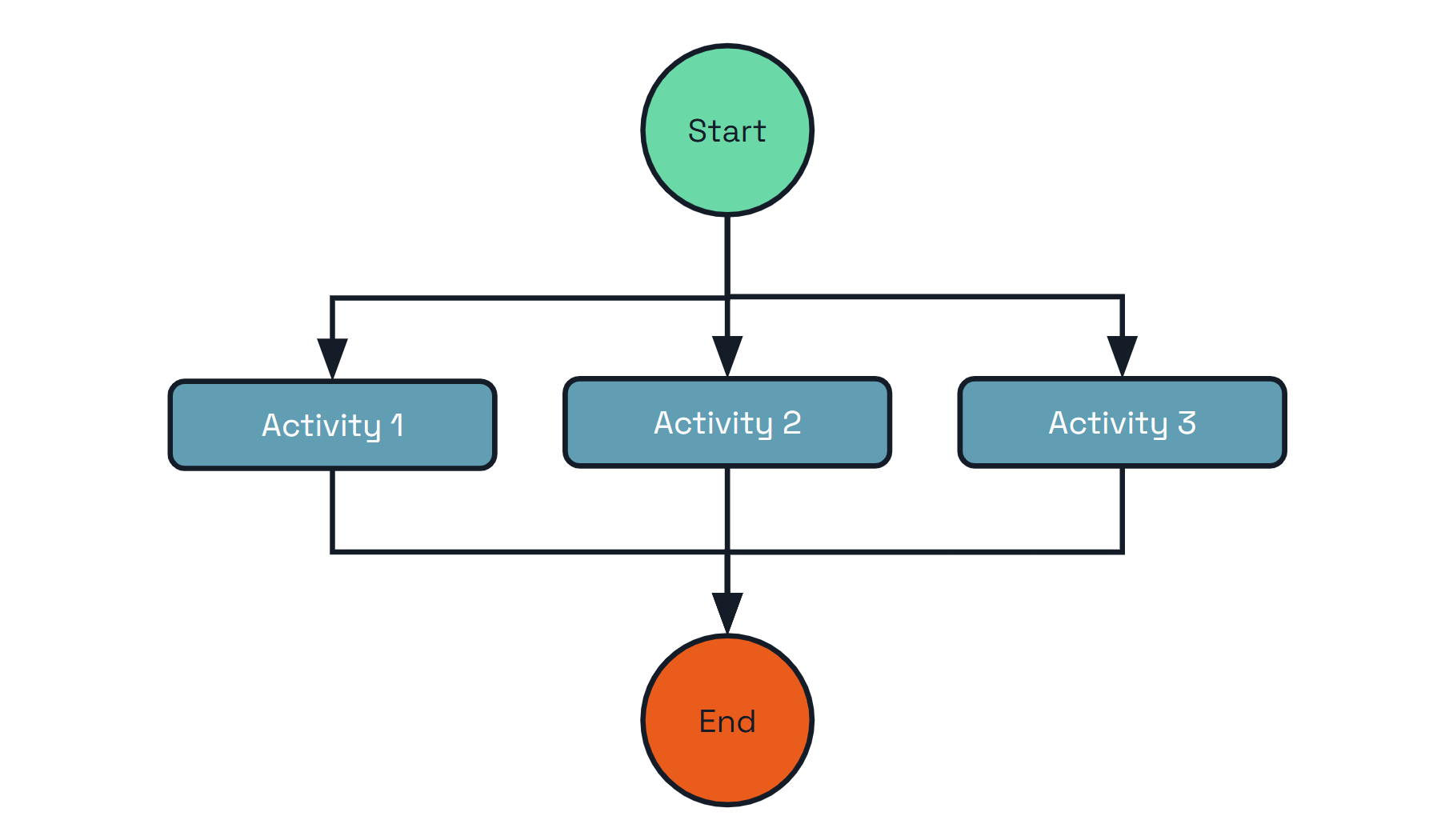
In addition to the challenges mentioned in the previous pattern, there are several important questions to consider when implementing the fan-out/fan-in pattern manually:
Dapr Workflows provides a way to express the fan-out/fan-in pattern as a simple function, as shown in the following example:
# Start the workflow
dapr workflow run DataProcessingWorkflow \
  --app-id processor \
  --input '{"items": ["item1", "item2", "item3"]}'

# Monitor parallel execution
dapr workflow history <instance-id> --app-id processor --output json
import time
from typing import List
import dapr.ext.workflow as wf


def batch_processing_workflow(ctx: wf.DaprWorkflowContext, wf_input: int):
    # get a batch of N work items to process in parallel
    work_batch = yield ctx.call_activity(get_work_batch, input=wf_input)

    # schedule N parallel tasks to process the work items and wait for all to complete
    parallel_tasks = [ctx.call_activity(process_work_item, input=work_item) for work_item in work_batch]
    outputs = yield wf.when_all(parallel_tasks)

    # aggregate the results and send them to another activity
    total = sum(outputs)
    yield ctx.call_activity(process_results, input=total)


def get_work_batch(ctx, batch_size: int) -> List[int]:
    return [i + 1 for i in range(batch_size)]


def process_work_item(ctx, work_item: int) -> int:
    print(f'Processing work item: {work_item}.')
    time.sleep(5)
    result = work_item * 2
    print(f'Work item {work_item} processed. Result: {result}.')
    return result


def process_results(ctx, final_result: int):
    print(f'Final result: {final_result}.')
import {
  Task,
  DaprWorkflowClient,
  WorkflowActivityContext,
  WorkflowContext,
  WorkflowRuntime,
  TWorkflow,
} from "@dapr/dapr";

// Wrap the entire code in an immediately-invoked async function
async function start() {
  // Update the gRPC client and worker to use a local address and port
  const daprHost = "localhost";
  const daprPort = "50001";
  const workflowClient = new DaprWorkflowClient({
    daprHost,
    daprPort,
  });
  const workflowRuntime = new WorkflowRuntime({
    daprHost,
    daprPort,
  });

  function getRandomInt(min: number, max: number): number {
    return Math.floor(Math.random() * (max - min + 1)) + min;
  }

  async function getWorkItemsActivity(_: WorkflowActivityContext): Promise<string[]> {
    const count: number = getRandomInt(2, 10);
    console.log(`generating ${count} work items...`);

    const workItems: string[] = Array.from({ length: count }, (_, i) => `work item ${i}`);
    return workItems;
  }

  function sleep(ms: number): Promise<void> {
    return new Promise((resolve) => setTimeout(resolve, ms));
  }

  async function processWorkItemActivity(context: WorkflowActivityContext, item: string): Promise<number> {
    console.log(`processing work item: ${item}`);

    // Simulate some work that takes a variable amount of time
    const sleepTime = Math.random() * 5000;
    await sleep(sleepTime);

    // Return a result for the given work item, which is also a random number in this case
    // For more information about random numbers in workflow please check
    // https://learn.microsoft.com/azure/azure-functions/durable/durable-functions-code-constraints?tabpane=csharp#random-numbers
    return Math.floor(Math.random() * 11);
  }

  const workflow: TWorkflow = async function* (ctx: WorkflowContext): any {
    const tasks: Task<any>[] = [];
    const workItems = yield ctx.callActivity(getWorkItemsActivity);
    for (const workItem of workItems) {
      tasks.push(ctx.callActivity(processWorkItemActivity, workItem));
    }
    const results: number[] = yield ctx.whenAll(tasks);
    const sum: number = results.reduce((accumulator, currentValue) => accumulator + currentValue, 0);
    return sum;
  };

  workflowRuntime.registerWorkflow(workflow);
  workflowRuntime.registerActivity(getWorkItemsActivity);
  workflowRuntime.registerActivity(processWorkItemActivity);

  // Wrap the worker startup in a try-catch block to handle any errors during startup
  try {
    await workflowRuntime.start();
    console.log("Worker started successfully");
  } catch (error) {
    console.error("Error starting worker:", error);
  }

  // Schedule a new orchestration
  try {
    const id = await workflowClient.scheduleNewWorkflow(workflow);
    console.log(`Orchestration scheduled with ID: ${id}`);

    // Wait for orchestration completion
    const state = await workflowClient.waitForWorkflowCompletion(id, undefined, 30);

    console.log(`Orchestration completed! Result: ${state?.serializedOutput}`);
  } catch (error) {
    console.error("Error scheduling or waiting for orchestration:", error);
  }

  // stop worker and client
  await workflowRuntime.stop();
  await workflowClient.stop();

  // stop the dapr side car
  process.exit(0);
}

start().catch((e) => {
  console.error(e);
  process.exit(1);
});
// Get a list of N work items to process in parallel.
object[] workBatch = await context.CallActivityAsync<object[]>("GetWorkBatch", null);

// Schedule the parallel tasks, but don't wait for them to complete yet.
var parallelTasks = new List<Task<int>>(workBatch.Length);
for (int i = 0; i < workBatch.Length; i++)
{
    Task<int> task = context.CallActivityAsync<int>("ProcessWorkItem", workBatch[i]);
    parallelTasks.Add(task);
}

// Everything is scheduled. Wait here until all parallel tasks have completed.
await Task.WhenAll(parallelTasks);

// Aggregate all N outputs and publish the result.
int sum = parallelTasks.Sum(t => t.Result);
await context.CallActivityAsync("PostResults", sum);
public class FaninoutWorkflow extends Workflow {
    @Override
    public WorkflowStub create() {
        return ctx -> {
            // Get a list of N work items to process in parallel.
            Object[] workBatch = ctx.callActivity("GetWorkBatch", Object[].class).await();
            // Schedule the parallel tasks, but don't wait for them to complete yet.
            List<Task<Integer>> tasks = Arrays.stream(workBatch)
                    .map(workItem -> ctx.callActivity("ProcessWorkItem", workItem, int.class))
                    .collect(Collectors.toList());
            // Everything is scheduled. Wait here until all parallel tasks have completed.
            List<Integer> results = ctx.allOf(tasks).await();
            // Aggregate all N outputs and publish the result.
            int sum = results.stream().mapToInt(Integer::intValue).sum();
            ctx.complete(sum);
        };
    }
}
func BatchProcessingWorkflow(ctx *workflow.WorkflowContext) (any, error) {
	var input int
	if err := ctx.GetInput(&input); err != nil {
		return 0, err
	}
	var workBatch []int
	if err := ctx.CallActivity(GetWorkBatch, workflow.ActivityInput(input)).Await(&workBatch); err != nil {
		return 0, err
	}
	parallelTasks := workflow.NewTaskSlice(len(workBatch))
	for i, workItem := range workBatch {
		parallelTasks[i] = ctx.CallActivity(ProcessWorkItem, workflow.ActivityInput(workItem))
	}
	var outputs int
	for _, task := range parallelTasks {
		var output int
		err := task.Await(&output)
		if err == nil {
			outputs += output
		} else {
			return 0, err
		}
	}
	if err := ctx.CallActivity(ProcessResults, workflow.ActivityInput(outputs)).Await(nil); err != nil {
		return 0, err
	}
	return 0, nil
}
func GetWorkBatch(ctx workflow.ActivityContext) (any, error) {
	var batchSize int
	if err := ctx.GetInput(&batchSize); err != nil {
		return 0, err
	}
	batch := make([]int, batchSize)
	for i := 0; i < batchSize; i++ {
		batch[i] = i
	}
	return batch, nil
}
func ProcessWorkItem(ctx workflow.ActivityContext) (any, error) {
	var workItem int
	if err := ctx.GetInput(&workItem); err != nil {
		return 0, err
	}
	fmt.Printf("Processing work item: %d\n", workItem)
	time.Sleep(time.Second * 5)
	result := workItem * 2
	fmt.Printf("Work item %d processed. Result: %d\n", workItem, result)
	return result, nil
}
func ProcessResults(ctx workflow.ActivityContext) (any, error) {
	var finalResult int
	if err := ctx.GetInput(&finalResult); err != nil {
		return 0, err
	}
	fmt.Printf("Final result: %d\n", finalResult)
	return finalResult, nil
}
The key takeaways from this example are:
Furthermore, the execution of the workflow is durable. If a workflow starts 100 parallel task executions and only 40 complete before the process crashes, the workflow restarts itself automatically and only schedules the remaining 60 tasks.
It’s possible to go further and limit the degree of concurrency using simple, language-specific constructs. The sample code below illustrates how to restrict the degree of fan-out to just 5 concurrent activity executions:
//Revisiting the earlier example...
// Get a list of N work items to process in parallel.
object[] workBatch = await context.CallActivityAsync<object[]>("GetWorkBatch", null);

const int MaxParallelism = 5;
var results = new List<int>();
var inFlightTasks = new HashSet<Task<int>>();
foreach(var workItem in workBatch)
{
  if (inFlightTasks.Count >= MaxParallelism)
  {
    var finishedTask = await Task.WhenAny(inFlightTasks);
    results.Add(finishedTask.Result);
    inFlightTasks.Remove(finishedTask);
  }

  inFlightTasks.Add(context.CallActivityAsync<int>("ProcessWorkItem", workItem));
}
results.AddRange(await Task.WhenAll(inFlightTasks));

var sum = results.Sum(t => t);
await context.CallActivityAsync("PostResults", sum);
You can process workflow activities in parallel while putting an upper cap on concurrency by using the following extension methods on the WorkflowContext:
//Revisiting the earlier example...
// Get a list of work items to process
var workBatch = await context.CallActivityAsync<object[]>("GetWorkBatch", null);

// Process deterministically in parallel with an upper cap of 5 activities at a time
var results = await context.ProcessInParallelAsync(workBatch, workItem => context.CallActivityAsync<int>("ProcessWorkItem", workItem), maxConcurrency: 5);

var sum = results.Sum(t => t);
await context.CallActivityAsync("PostResults", sum);
Limiting the degree of concurrency in this way can be useful for limiting contention against shared resources. For example, if the activities need to call into external resources that have their own concurrency limits, like a databases or external APIs, it can be useful to ensure that no more than a specified number of activities call that resource concurrently.
Asynchronous HTTP APIs are typically implemented using the Asynchronous Request-Reply pattern. Implementing this pattern traditionally involves the following:
The end-to-end flow is illustrated in the following diagram.
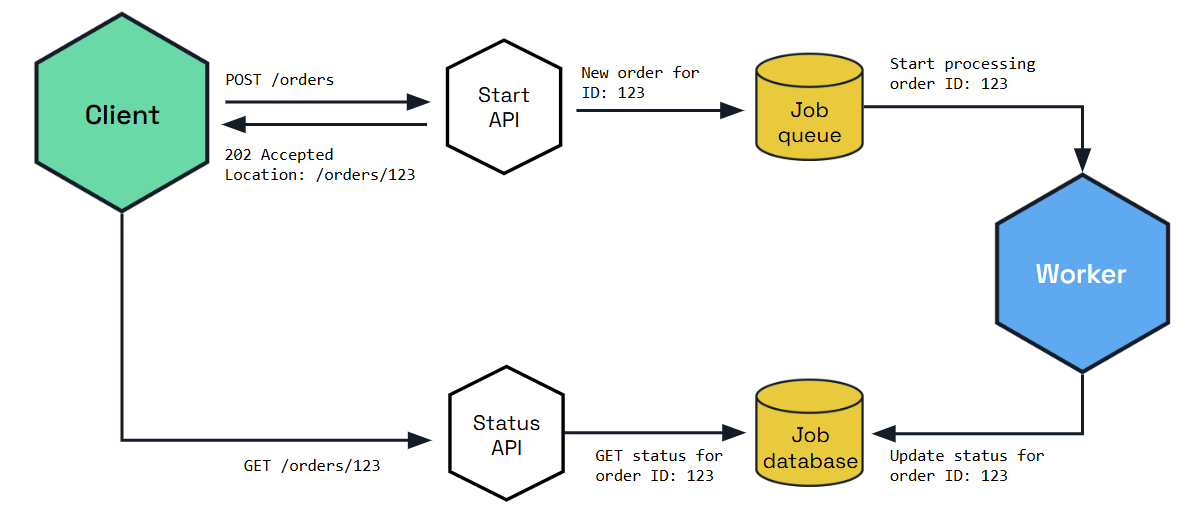
The challenge with implementing the asynchronous request-reply pattern is that it involves the use of multiple APIs and state stores. It also involves implementing the protocol correctly so that the client knows how to automatically poll for status and know when the operation is complete.
The Dapr workflow HTTP API supports the asynchronous request-reply pattern out-of-the box, without requiring you to write any code or do any state management.
The following curl commands illustrate how the workflow APIs support this pattern.
curl -X POST http://localhost:3500/v1.0/workflows/dapr/OrderProcessingWorkflow/start?instanceID=12345678 -d '{"Name":"Paperclips","Quantity":1,"TotalCost":9.95}'
The previous command will result in the following response JSON:
{"instanceID":"12345678"}
The HTTP client can then construct the status query URL using the workflow instance ID and poll it repeatedly until it sees the “COMPLETE”, “FAILURE”, or “TERMINATED” status in the payload.
curl http://localhost:3500/v1.0/workflows/dapr/12345678
The following is an example of what an in-progress workflow status might look like.
{
  "instanceID": "12345678",
  "workflowName": "OrderProcessingWorkflow",
  "createdAt": "2023-05-03T23:22:11.143069826Z",
  "lastUpdatedAt": "2023-05-03T23:22:22.460025267Z",
  "runtimeStatus": "RUNNING",
  "properties": {
    "dapr.workflow.custom_status": "",
    "dapr.workflow.input": "{\"Name\":\"Paperclips\",\"Quantity\":1,\"TotalCost\":9.95}"
  }
}
As you can see from the previous example, the workflow’s runtime status is RUNNING, which lets the client know that it should continue polling.
If the workflow has completed, the status might look as follows.
{
  "instanceID": "12345678",
  "workflowName": "OrderProcessingWorkflow",
  "createdAt": "2023-05-03T23:30:11.381146313Z",
  "lastUpdatedAt": "2023-05-03T23:30:52.923870615Z",
  "runtimeStatus": "COMPLETED",
  "properties": {
    "dapr.workflow.custom_status": "",
    "dapr.workflow.input": "{\"Name\":\"Paperclips\",\"Quantity\":1,\"TotalCost\":9.95}",
    "dapr.workflow.output": "{\"Processed\":true}"
  }
}
As you can see from the previous example, the runtime status of the workflow is now COMPLETED, which means the client can stop polling for updates.
The monitor pattern is recurring process that typically:
The following diagram provides a rough illustration of this pattern.
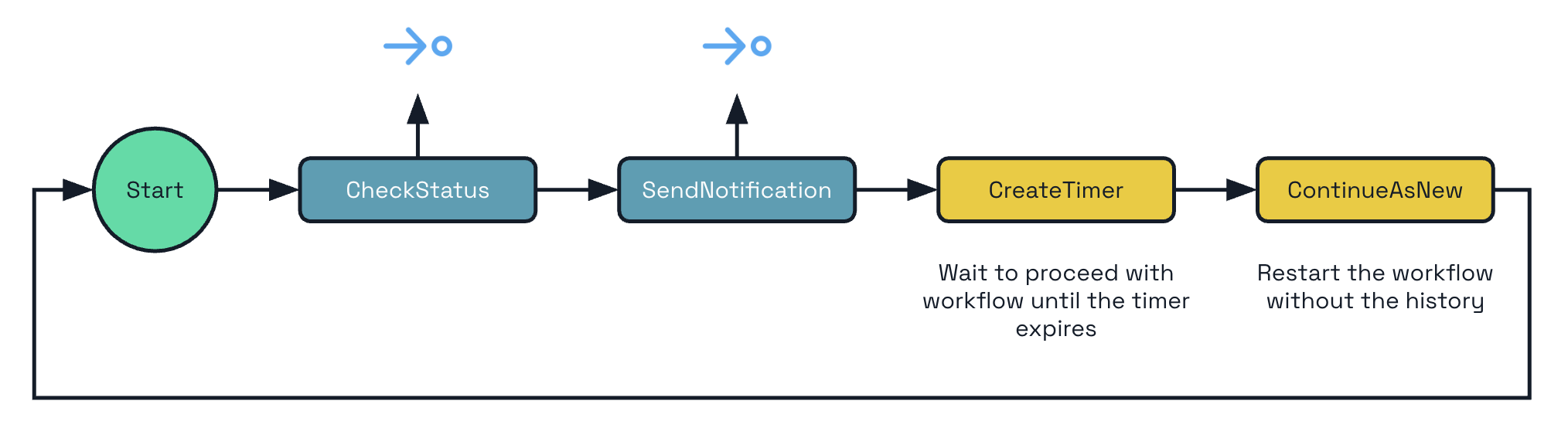
Depending on the business needs, there may be a single monitor or there may be multiple monitors, one for each business entity (for example, a stock). Furthermore, the amount of time to sleep may need to change, depending on the circumstances. These requirements make using cron-based scheduling systems impractical.
Dapr Workflow supports this pattern natively by allowing you to implement eternal workflows. Rather than writing infinite while-loops (which is an anti-pattern), Dapr Workflow exposes a continue-as-new API that workflow authors can use to restart a workflow function from the beginning with a new input.
from dataclasses import dataclass
from datetime import timedelta
import random
import dapr.ext.workflow as wf


@dataclass
class JobStatus:
    job_id: str
    is_healthy: bool


def status_monitor_workflow(ctx: wf.DaprWorkflowContext, job: JobStatus):
    # poll a status endpoint associated with this job
    status = yield ctx.call_activity(check_status, input=job)
    if not ctx.is_replaying:
        print(f"Job '{job.job_id}' is {status}.")

    if status == "healthy":
        job.is_healthy = True
        next_sleep_interval = 60  # check less frequently when healthy
    else:
        if job.is_healthy:
            job.is_healthy = False
            ctx.call_activity(send_alert, input=f"Job '{job.job_id}' is unhealthy!")
        next_sleep_interval = 5  # check more frequently when unhealthy

    yield ctx.create_timer(fire_at=ctx.current_utc_datetime + timedelta(minutes=next_sleep_interval))

    # restart from the beginning with a new JobStatus input
    ctx.continue_as_new(job)


def check_status(ctx, _) -> str:
    return random.choice(["healthy", "unhealthy"])


def send_alert(ctx, message: str):
    print(f'*** Alert: {message}')
const statusMonitorWorkflow: TWorkflow = async function* (ctx: WorkflowContext): any {
    let duration;
    const status = yield ctx.callActivity(checkStatusActivity);
    if (status === "healthy") {
      // Check less frequently when in a healthy state
      duration = 60 * 60;
    } else {
      yield ctx.callActivity(alertActivity, "job unhealthy");
      // Check more frequently when in an unhealthy state
      duration = 5 * 60;
    }

    // Put the workflow to sleep until the determined time
    ctx.createTimer(duration);

    // Restart from the beginning with the updated state
    ctx.continueAsNew();
  };
public override async Task<object> RunAsync(WorkflowContext context, MyEntityState myEntityState)
{
    TimeSpan nextSleepInterval;

    var status = await context.CallActivityAsync<string>("GetStatus");
    if (status == "healthy")
    {
        myEntityState.IsHealthy = true;

        // Check less frequently when in a healthy state
        nextSleepInterval = TimeSpan.FromMinutes(60);
    }
    else
    {
        if (myEntityState.IsHealthy)
        {
            myEntityState.IsHealthy = false;
            await context.CallActivityAsync("SendAlert", myEntityState);
        }

        // Check more frequently when in an unhealthy state
        nextSleepInterval = TimeSpan.FromMinutes(5);
    }

    // Put the workflow to sleep until the determined time
    await context.CreateTimer(nextSleepInterval);

    // Restart from the beginning with the updated state
    context.ContinueAsNew(myEntityState);
    return null;
}
This example assumes you have a predefined
MyEntityStateclass with a booleanIsHealthyproperty.
public class MonitorWorkflow extends Workflow {

  @Override
  public WorkflowStub create() {
    return ctx -> {

      Duration nextSleepInterval;

      var status = ctx.callActivity(DemoWorkflowStatusActivity.class.getName(), DemoStatusActivityOutput.class).await();
      var isHealthy = status.getIsHealthy();

      if (isHealthy) {
        // Check less frequently when in a healthy state
        nextSleepInterval = Duration.ofMinutes(60);
      } else {

        ctx.callActivity(DemoWorkflowAlertActivity.class.getName()).await();

        // Check more frequently when in an unhealthy state
        nextSleepInterval = Duration.ofMinutes(5);
      }

      // Put the workflow to sleep until the determined time
      try {
        ctx.createTimer(nextSleepInterval);
      } catch (InterruptedException e) {
        throw new RuntimeException(e);
      }

      // Restart from the beginning with the updated state
      ctx.continueAsNew();
    }
  }
}
type JobStatus struct {
	JobID     string `json:"job_id"`
	IsHealthy bool   `json:"is_healthy"`
}
func StatusMonitorWorkflow(ctx *workflow.WorkflowContext) (any, error) {
	var sleepInterval time.Duration
	var job JobStatus
	if err := ctx.GetInput(&job); err != nil {
		return "", err
	}
	var status string
	if err := ctx.CallActivity(CheckStatus, workflow.ActivityInput(job)).Await(&status); err != nil {
		return "", err
	}
	if status == "healthy" {
		job.IsHealthy = true
		sleepInterval = time.Minutes * 60
	} else {
		if job.IsHealthy {
			job.IsHealthy = false
			err := ctx.CallActivity(SendAlert, workflow.ActivityInput(fmt.Sprintf("Job '%s' is unhealthy!", job.JobID))).Await(nil)
			if err != nil {
				return "", err
			}
		}
		sleepInterval = time.Minutes * 5
	}
	if err := ctx.CreateTimer(sleepInterval).Await(nil); err != nil {
		return "", err
	}
	ctx.ContinueAsNew(job, false)
	return "", nil
}
func CheckStatus(ctx workflow.ActivityContext) (any, error) {
	statuses := []string{"healthy", "unhealthy"}
	return statuses[rand.Intn(1)], nil
}
func SendAlert(ctx workflow.ActivityContext) (any, error) {
	var message string
	if err := ctx.GetInput(&message); err != nil {
		return "", err
	}
	fmt.Printf("*** Alert: %s", message)
	return "", nil
}
A workflow implementing the monitor pattern can loop forever or it can terminate itself gracefully by not calling continue-as-new.
In some cases, a workflow may need to pause and wait for an external system to perform some action. For example, a workflow may need to pause and wait for a payment to be received. In this case, a payment system might publish an event to a pub/sub topic on receipt of a payment, and a listener on that topic can raise an event to the workflow using the raise event workflow API.
Another very common scenario is when a workflow needs to pause and wait for a human, for example when approving a purchase order. Dapr Workflow supports this event pattern via the external events feature.
Here’s an example workflow for a purchase order involving a human:
The following diagram illustrates this flow.
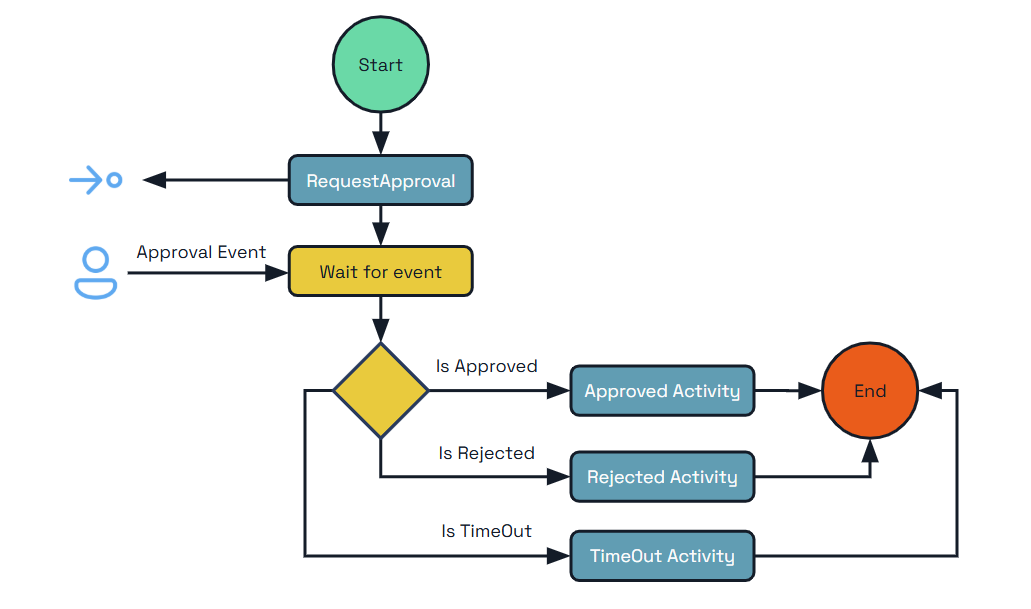
The following example code shows how this pattern can be implemented using Dapr Workflow.
from dataclasses import dataclass
from datetime import timedelta
import dapr.ext.workflow as wf


@dataclass
class Order:
    cost: float
    product: str
    quantity: int

    def __str__(self):
        return f'{self.product} ({self.quantity})'


@dataclass
class Approval:
    approver: str

    @staticmethod
    def from_dict(dict):
        return Approval(**dict)


def purchase_order_workflow(ctx: wf.DaprWorkflowContext, order: Order):
    # Orders under $1000 are auto-approved
    if order.cost < 1000:
        return "Auto-approved"

    # Orders of $1000 or more require manager approval
    yield ctx.call_activity(send_approval_request, input=order)

    # Approvals must be received within 24 hours or they will be canceled.
    approval_event = ctx.wait_for_external_event("approval_received")
    timeout_event = ctx.create_timer(timedelta(hours=24))
    winner = yield wf.when_any([approval_event, timeout_event])
    if winner == timeout_event:
        return "Cancelled"

    # The order was approved
    yield ctx.call_activity(place_order, input=order)
    approval_details = Approval.from_dict(approval_event.get_result())
    return f"Approved by '{approval_details.approver}'"


def send_approval_request(_, order: Order) -> None:
    print(f'*** Sending approval request for order: {order}')


def place_order(_, order: Order) -> None:
    print(f'*** Placing order: {order}')
import {
  Task,
  DaprWorkflowClient,
  WorkflowActivityContext,
  WorkflowContext,
  WorkflowRuntime,
  TWorkflow,
} from "@dapr/dapr";
import * as readlineSync from "readline-sync";

// Wrap the entire code in an immediately-invoked async function
async function start() {
  class Order {
    cost: number;
    product: string;
    quantity: number;
    constructor(cost: number, product: string, quantity: number) {
      this.cost = cost;
      this.product = product;
      this.quantity = quantity;
    }
  }

  function sleep(ms: number): Promise<void> {
    return new Promise((resolve) => setTimeout(resolve, ms));
  }

  // Update the gRPC client and worker to use a local address and port
  const daprHost = "localhost";
  const daprPort = "50001";
  const workflowClient = new DaprWorkflowClient({
    daprHost,
    daprPort,
  });
  const workflowRuntime = new WorkflowRuntime({
    daprHost,
    daprPort,
  });

  // Activity function that sends an approval request to the manager
  const sendApprovalRequest = async (_: WorkflowActivityContext, order: Order) => {
    // Simulate some work that takes an amount of time
    await sleep(3000);
    console.log(`Sending approval request for order: ${order.product}`);
  };

  // Activity function that places an order
  const placeOrder = async (_: WorkflowActivityContext, order: Order) => {
    console.log(`Placing order: ${order.product}`);
  };

  // Orchestrator function that represents a purchase order workflow
  const purchaseOrderWorkflow: TWorkflow = async function* (ctx: WorkflowContext, order: Order): any {
    // Orders under $1000 are auto-approved
    if (order.cost < 1000) {
      return "Auto-approved";
    }

    // Orders of $1000 or more require manager approval
    yield ctx.callActivity(sendApprovalRequest, order);

    // Approvals must be received within 24 hours or they will be cancelled.
    const tasks: Task<any>[] = [];
    const approvalEvent = ctx.waitForExternalEvent("approval_received");
    const timeoutEvent = ctx.createTimer(24 * 60 * 60);
    tasks.push(approvalEvent);
    tasks.push(timeoutEvent);
    const winner = ctx.whenAny(tasks);

    if (winner == timeoutEvent) {
      return "Cancelled";
    }

    yield ctx.callActivity(placeOrder, order);
    const approvalDetails = approvalEvent.getResult();
    return `Approved by ${approvalDetails.approver}`;
  };

  workflowRuntime
    .registerWorkflow(purchaseOrderWorkflow)
    .registerActivity(sendApprovalRequest)
    .registerActivity(placeOrder);

  // Wrap the worker startup in a try-catch block to handle any errors during startup
  try {
    await workflowRuntime.start();
    console.log("Worker started successfully");
  } catch (error) {
    console.error("Error starting worker:", error);
  }

  // Schedule a new orchestration
  try {
    const cost = readlineSync.questionInt("Cost of your order:");
    const approver = readlineSync.question("Approver of your order:");
    const timeout = readlineSync.questionInt("Timeout for your order in seconds:");
    const order = new Order(cost, "MyProduct", 1);
    const id = await workflowClient.scheduleNewWorkflow(purchaseOrderWorkflow, order);
    console.log(`Orchestration scheduled with ID: ${id}`);

    // prompt for approval asynchronously
    promptForApproval(approver, workflowClient, id);

    // Wait for orchestration completion
    const state = await workflowClient.waitForWorkflowCompletion(id, undefined, timeout + 2);

    console.log(`Orchestration completed! Result: ${state?.serializedOutput}`);
  } catch (error) {
    console.error("Error scheduling or waiting for orchestration:", error);
  }

  // stop worker and client
  await workflowRuntime.stop();
  await workflowClient.stop();

  // stop the dapr side car
  process.exit(0);
}

async function promptForApproval(approver: string, workflowClient: DaprWorkflowClient, id: string) {
  if (readlineSync.keyInYN("Press [Y] to approve the order... Y/yes, N/no")) {
    const approvalEvent = { approver: approver };
    await workflowClient.raiseEvent(id, "approval_received", approvalEvent);
  } else {
    return "Order rejected";
  }
}

start().catch((e) => {
  console.error(e);
  process.exit(1);
});
public override async Task<OrderResult> RunAsync(WorkflowContext context, OrderPayload order)
{
    // Initial business logic (e.g. inventory check)

    // Require orders over a certain threshold to be approved
    if (order.TotalCost > OrderApprovalThreshold)
    {
        try
        {
            // Request human approval for this order
            await context.CallActivityAsync(nameof(RequestApprovalActivity), order);

            // Pause and wait for a human to approve the order
            ApprovalResult approvalResult = await context.WaitForExternalEventAsync<ApprovalResult>(
                eventName: "ManagerApproval",
                timeout: TimeSpan.FromDays(3));
            if (approvalResult == ApprovalResult.Rejected)
            {
                // The order was rejected, end the workflow here
                return new OrderResult(Processed: false);
            }
        }
        catch (TaskCanceledException)
        {
            // An approval timeout results in automatic order cancellation
            return new OrderResult(Processed: false);
        }
    }

    // Final business logic (e.g. shipping confirmation)

    // End the workflow with a success result
    return new OrderResult(Processed: true);
}
Note In the example above,
RequestApprovalActivityis the name of a workflow activity to invoke andApprovalResultis an enumeration defined by the workflow app. For brevity, these definitions were left out of the example code.
public class ExternalSystemInteractionWorkflow extends Workflow {
    @Override
    public WorkflowStub create() {
        return ctx -> {
            // Initial business logic (e.g. inventory check)
            Integer orderCost = ctx.getInput(int.class);
            // Require orders over a certain threshold to be approved
            if (orderCost > ORDER_APPROVAL_THRESHOLD) {
                try {
                    // Request human approval for this order
                    ctx.callActivity("RequestApprovalActivity", orderCost, Void.class).await();
                    // Pause and wait for a human to approve the order
                    boolean approved = ctx.waitForExternalEvent("ManagerApproval", Duration.ofDays(3), boolean.class).await();
                    if (!approved) {
                        // The order was rejected, end the workflow here
                        ctx.complete("Process reject");
                    }
                } catch (TaskCanceledException e) {
                    // An approval timeout results in automatic order cancellation
                    ctx.complete("Process cancel");
                }
            }
            // Final business logic (e.g. shipping confirmation)

            // End the workflow with a success result
            ctx.complete("Process approved");
        };
    }
}
type Order struct {
	Cost     float64 `json:"cost"`
	Product  string  `json:"product"`
	Quantity int     `json:"quantity"`
}
type Approval struct {
	Approver string `json:"approver"`
}
func PurchaseOrderWorkflow(ctx *workflow.WorkflowContext) (any, error) {
	var order Order
	if err := ctx.GetInput(&order); err != nil {
		return "", err
	}
	// Orders under $1000 are auto-approved
	if order.Cost < 1000 {
		return "Auto-approved", nil
	}
	// Orders of $1000 or more require manager approval
	if err := ctx.CallActivity(SendApprovalRequest, workflow.ActivityInput(order)).Await(nil); err != nil {
		return "", err
	}
	// Approvals must be received within 24 hours or they will be cancelled
	var approval Approval
	if err := ctx.WaitForExternalEvent("approval_received", time.Hour*24).Await(&approval); err != nil {
		// Assuming that a timeout has taken place - in any case; an error.
		return "error/cancelled", err
	}
	// The order was approved
	if err := ctx.CallActivity(PlaceOrder, workflow.ActivityInput(order)).Await(nil); err != nil {
		return "", err
	}
	return fmt.Sprintf("Approved by %s", approval.Approver), nil
}
func SendApprovalRequest(ctx workflow.ActivityContext) (any, error) {
	var order Order
	if err := ctx.GetInput(&order); err != nil {
		return "", err
	}
	fmt.Printf("*** Sending approval request for order: %v\n", order)
	return "", nil
}
func PlaceOrder(ctx workflow.ActivityContext) (any, error) {
	var order Order
	if err := ctx.GetInput(&order); err != nil {
		return "", err
	}
	fmt.Printf("*** Placing order: %v", order)
	return "", nil
}
The code that delivers the event to resume the workflow execution is external to the workflow. Workflow events can be delivered to a waiting workflow instance using the raise event workflow management API, as shown in the following example:
from dapr.clients import DaprClient
from dataclasses import asdict

with DaprClient() as d:
    d.raise_workflow_event(
        instance_id=instance_id,
        workflow_component="dapr",
        event_name="approval_received",
        event_data=asdict(Approval("Jane Doe")))
import { DaprClient } from "@dapr/dapr";

  public async raiseEvent(workflowInstanceId: string, eventName: string, eventPayload?: any) {
    this._innerClient.raiseOrchestrationEvent(workflowInstanceId, eventName, eventPayload);
  }
// Raise the workflow event to the waiting workflow
await daprClient.RaiseWorkflowEventAsync(
    instanceId: orderId,
    workflowComponent: "dapr",
    eventName: "ManagerApproval",
    eventData: ApprovalResult.Approved);
System.out.println("**SendExternalMessage: RestartEvent**");
client.raiseEvent(restartingInstanceId, "RestartEvent", "RestartEventPayload");
func raiseEvent() {
  daprClient, err := client.NewClient()
  if err != nil {
    log.Fatalf("failed to initialize the client")
  }
  err = daprClient.RaiseEventWorkflow(context.Background(), &client.RaiseEventWorkflowRequest{
    InstanceID: "instance_id",
    WorkflowComponent: "dapr",
    EventName: "approval_received",
    EventData: Approval{
      Approver: "Jane Doe",
    },
  })
  if err != nil {
    log.Fatalf("failed to raise event on workflow")
  }
  log.Println("raised an event on specified workflow")
}
External events don’t have to be directly triggered by humans. They can also be triggered by other systems. For example, a workflow may need to pause and wait for a payment to be received. In this case, a payment system might publish an event to a pub/sub topic on receipt of a payment, and a listener on that topic can raise an event to the workflow using the raise event workflow API.
The compensation pattern (also known as the saga pattern) provides a mechanism for rolling back or undoing operations that have already been executed when a workflow fails partway through. This pattern is particularly important for long-running workflows that span multiple microservices where traditional database transactions are not feasible.
In distributed microservice architectures, you often need to coordinate operations across multiple services. When these operations cannot be wrapped in a single transaction, the compensation pattern provides a way to maintain consistency by defining compensating actions for each step in the workflow.
The compensation pattern addresses several critical challenges:
Common use cases for the compensation pattern include:
Dapr Workflow provides support for the compensation pattern, allowing you to register compensation activities for each step and execute them in reverse order when needed.
Here’s an example workflow for an e-commerce process:
The following diagram illustrates this flow.
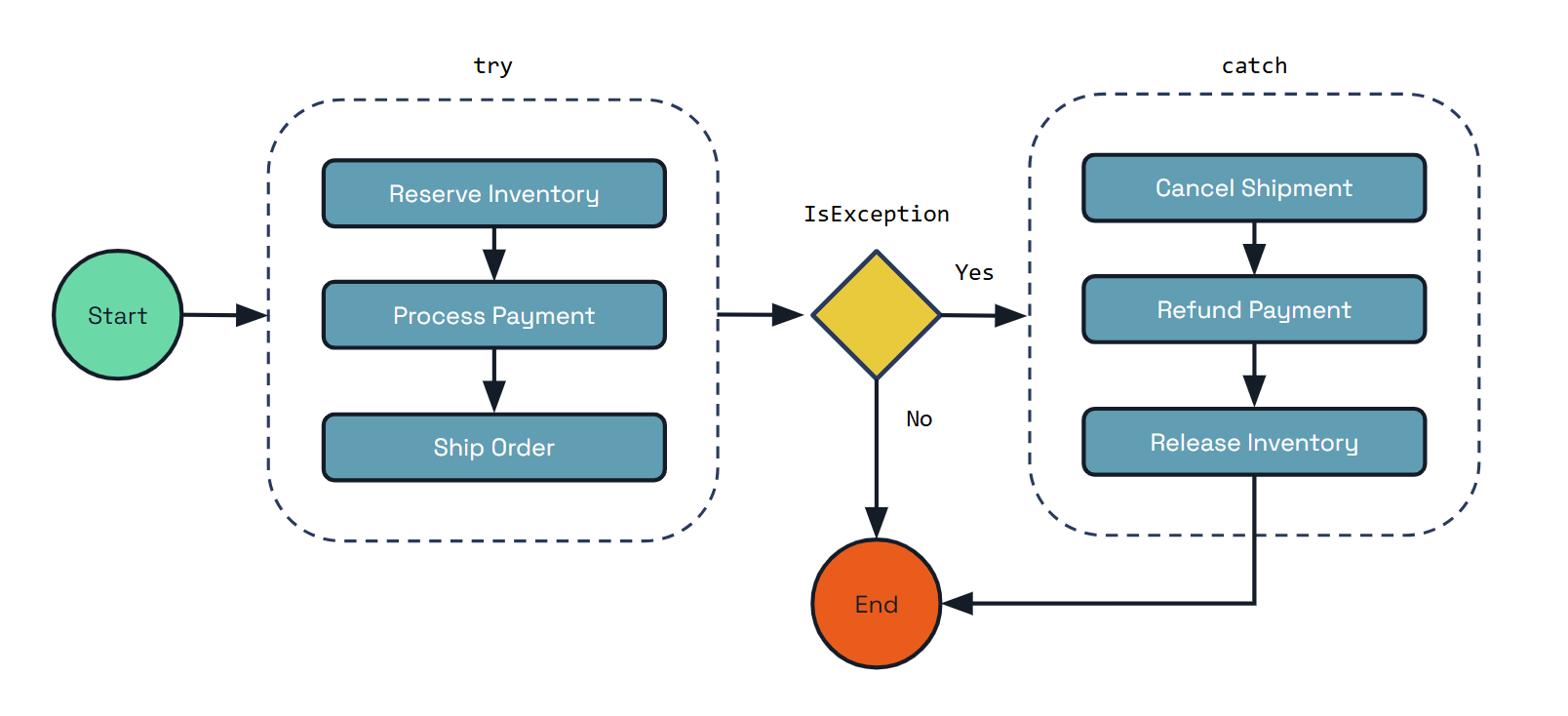
public class PaymentProcessingWorkflow implements Workflow {

    @Override
    public WorkflowStub create() {
        return ctx -> {
            ctx.getLogger().info("Starting Workflow: " + ctx.getName());
            var orderId = ctx.getInput(String.class);
            List<String> compensations = new ArrayList<>();

            try {
                // Step 1: Reserve inventory
                String reservationId = ctx.callActivity(ReserveInventoryActivity.class.getName(), orderId, String.class).await();
                ctx.getLogger().info("Inventory reserved: {}", reservationId);
                compensations.add("ReleaseInventory");

                // Step 2: Process payment
                String paymentId = ctx.callActivity(ProcessPaymentActivity.class.getName(), orderId, String.class).await();
                ctx.getLogger().info("Payment processed: {}", paymentId);
                compensations.add("RefundPayment");

                // Step 3: Ship order
                String shipmentId = ctx.callActivity(ShipOrderActivity.class.getName(), orderId, String.class).await();
                ctx.getLogger().info("Order shipped: {}", shipmentId);
                compensations.add("CancelShipment");

            } catch (TaskFailedException e) {
                ctx.getLogger().error("Activity failed: {}", e.getMessage());

                // Execute compensations in reverse order
                Collections.reverse(compensations);
                for (String compensation : compensations) {
                    try {
                        switch (compensation) {
                            case "CancelShipment":
                                String shipmentCancelResult = ctx.callActivity(
                                    CancelShipmentActivity.class.getName(),
                                    orderId,
                                    String.class).await();
                                ctx.getLogger().info("Shipment cancellation completed: {}", shipmentCancelResult);
                                break;

                            case "RefundPayment":
                                String refundResult = ctx.callActivity(
                                    RefundPaymentActivity.class.getName(),
                                    orderId,
                                    String.class).await();
                                ctx.getLogger().info("Payment refund completed: {}", refundResult);
                                break;

                            case "ReleaseInventory":
                                String releaseResult = ctx.callActivity(
                                    ReleaseInventoryActivity.class.getName(),
                                    orderId,
                                    String.class).await();
                                ctx.getLogger().info("Inventory release completed: {}", releaseResult);
                                break;
                        }
                    } catch (TaskFailedException ex) {
                        ctx.getLogger().error("Compensation activity failed: {}", ex.getMessage());
                    }
                }
                ctx.complete("Order processing failed, compensation applied");
            }

			// Step 4: Send confirmation
			ctx.callActivity(SendConfirmationActivity.class.getName(), orderId, Void.class).await();
            ctx.getLogger().info("Confirmation sent for order: {}", orderId);

            ctx.complete("Order processed successfully: " + orderId);
        };
    }
}

// Example activities
class ReserveInventoryActivity implements WorkflowActivity {
    @Override
    public Object run(WorkflowActivityContext ctx) {
        String orderId = ctx.getInput(String.class);
        // Logic to reserve inventory
        String reservationId = "reservation_" + orderId;
        System.out.println("Reserved inventory for order: " + orderId);
        return reservationId;
    }
}

class ReleaseInventoryActivity implements WorkflowActivity {
    @Override
    public Object run(WorkflowActivityContext ctx) {
        String reservationId = ctx.getInput(String.class);
        // Logic to release inventory reservation
        System.out.println("Released inventory reservation: " + reservationId);
        return "Released: " + reservationId;
    }
}

class ProcessPaymentActivity implements WorkflowActivity {
    @Override
    public Object run(WorkflowActivityContext ctx) {
        String orderId = ctx.getInput(String.class);
        // Logic to process payment
        String paymentId = "payment_" + orderId;
        System.out.println("Processed payment for order: " + orderId);
        return paymentId;
    }
}

class RefundPaymentActivity implements WorkflowActivity {
    @Override
    public Object run(WorkflowActivityContext ctx) {
        String paymentId = ctx.getInput(String.class);
        // Logic to refund payment
        System.out.println("Refunded payment: " + paymentId);
        return "Refunded: " + paymentId;
    }
}

class ShipOrderActivity implements WorkflowActivity {
    @Override
    public Object run(WorkflowActivityContext ctx) {
        String orderId = ctx.getInput(String.class);
        // Logic to ship order
        String shipmentId = "shipment_" + orderId;
        System.out.println("Shipped order: " + orderId);
        return shipmentId;
    }
}

class CancelShipmentActivity implements WorkflowActivity {
    @Override
    public Object run(WorkflowActivityContext ctx) {
        String shipmentId = ctx.getInput(String.class);
        // Logic to cancel shipment
        System.out.println("Canceled shipment: " + shipmentId);
        return "Canceled: " + shipmentId;
    }
}

class SendConfirmationActivity implements WorkflowActivity {
    @Override
    public Object run(WorkflowActivityContext ctx) {
        String orderId = ctx.getInput(String.class);
        // Logic to send confirmation
        System.out.println("Sent confirmation for order: " + orderId);
        return null;
    }
}
The key benefits of using Dapr Workflow’s compensation pattern include:
The compensation pattern ensures that your distributed workflows can maintain consistency and recover gracefully from failures, making it an essential tool for building reliable microservice architectures.
Dapr Workflows allow developers to define workflows using ordinary code in a variety of programming languages. The workflow engine runs inside of the Dapr sidecar and orchestrates workflow code deployed as part of your application. Dapr Workflows are built on top of Dapr Actors providing durability and scalability for workflow execution.
This article describes:
For more information on how to author Dapr Workflows in your application, see How to: Author a workflow.
The Dapr Workflow engine is internally powered by Dapr’s actor runtime. The following diagram illustrates the Dapr Workflow architecture in Kubernetes mode:
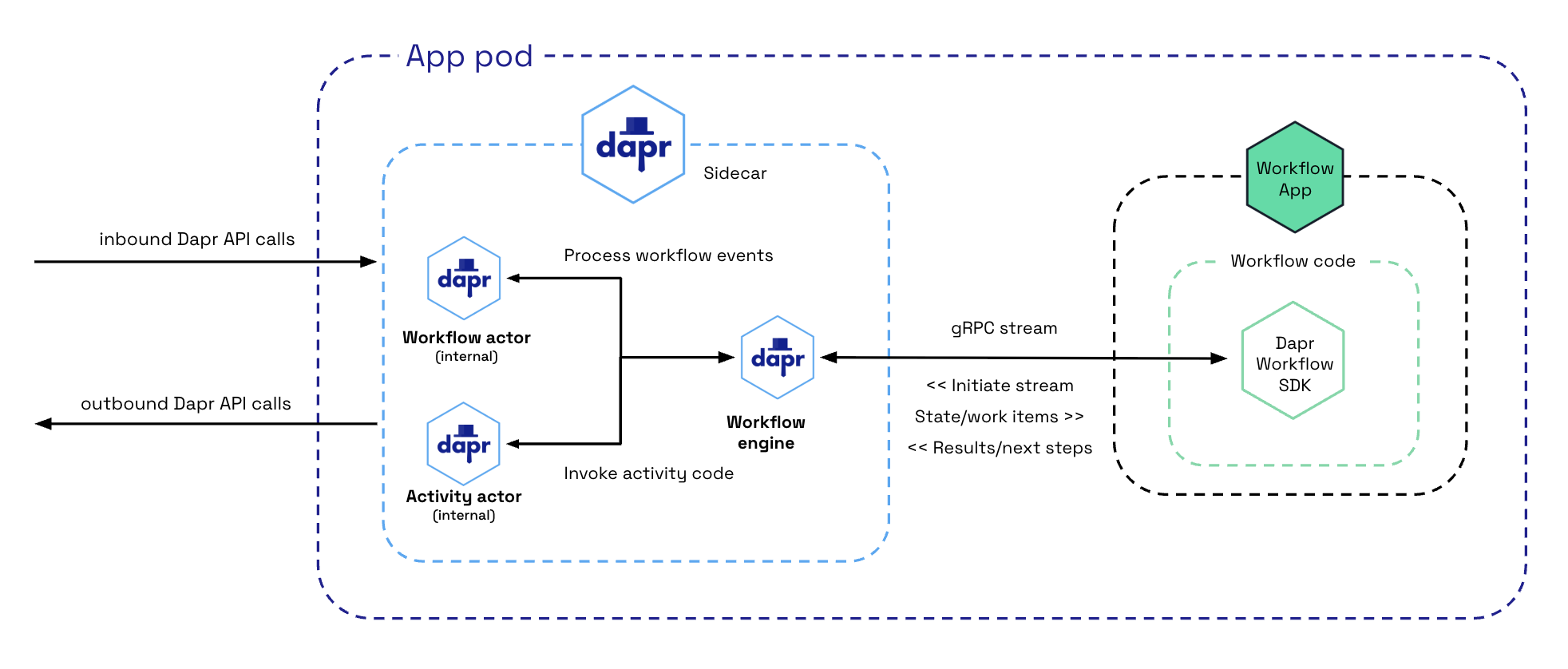
To use the Dapr Workflow building block, you write workflow code in your application using the Dapr Workflow SDK, which internally connects to the sidecar using a gRPC stream. This registers the workflow and any workflow activities, or tasks that workflows can schedule.
The engine is embedded directly into the sidecar and implemented using the durabletask-go framework library. This framework allows you to swap out different storage providers, including a storage provider created for Dapr that leverages internal actors behind the scenes. Since Dapr Workflows use actors, you can store workflow state in state stores.
When a workflow application starts up, it uses a workflow authoring SDK to send a gRPC request to the Dapr sidecar and get back a stream of workflow work items, following the server streaming RPC pattern. These work items can be anything from “start a new X workflow” (where X is the type of a workflow) to “schedule activity Y with input Z to run on behalf of workflow X”.
The workflow app executes the appropriate workflow code and then sends a gRPC request back to the sidecar with the execution results.
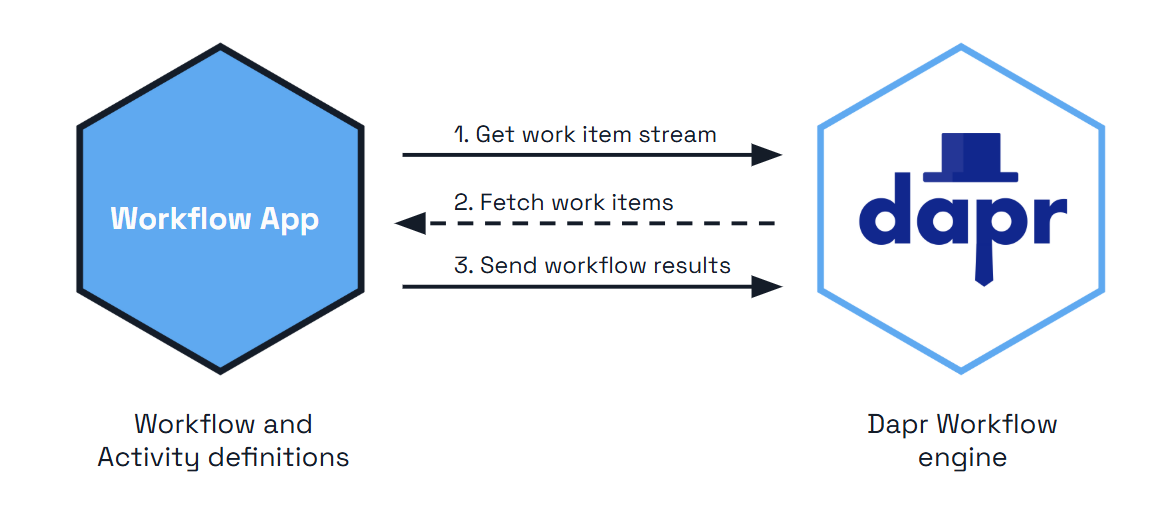
All interactions happen over a single gRPC channel and are initiated by the application, which means the application doesn’t need to open any inbound ports. The details of these interactions are internally handled by the language-specific Dapr Workflow authoring SDK.
The history the sidecar sends over this stream is incremental: once a worker is warm for an instance, it is sent only the events added since its previous turn rather than the whole history. See the stateful workflow client.
A load balancer or proxy between the app and the sidecar can close a stream that carries no traffic. AWS ALB and nginx, for example, close an idle stream after 60 seconds, which costs the worker a reconnect and a full history resend. To keep the stream open, a worker can advertise the WORKER_CAPABILITY_HEALTH_PING capability when it opens the stream, and the sidecar then sends it a health ping every 30 seconds. Workers built with the 1.19 Python, Java, and .NET SDKs, or with the Go SDK v1.16 (durabletask-go v0.15), advertise it. The sidecar reads a DAPR_WORKFLOW_HEALTH_PING_INTERVAL environment variable that overrides the interval, but it exists for Dapr’s integration tests and is not a supported setting. See the environment variable reference.
If you’re familiar with Dapr actors, you may notice a few differences in terms of how sidecar interactions works for workflows compared to application defined actors.
| Actors | Workflows |
|---|---|
| Actors created by the application can interact with the sidecar using either HTTP or gRPC. | Workflows only use gRPC. Due to the workflow gRPC protocol’s complexity, an SDK is required when implementing workflows. |
| Actor operations are pushed to application code from the sidecar. This requires the application to listen on a particular app port. | For workflows, operations are pulled from the sidecar by the application using a streaming protocol. The application doesn’t need to listen on any ports to run workflows. |
| Actors explicitly register themselves with the sidecar. | Workflows do not register themselves with the sidecar. The embedded engine doesn’t keep track of workflow types. This responsibility is instead delegated to the workflow application and its SDK. |
The durabletask-go core used by the workflow engine writes distributed traces using Open Telemetry SDKs.
These traces are captured automatically by the Dapr sidecar and exported to the configured Open Telemetry provider, such as Zipkin.
Each workflow instance managed by the engine is represented as one or more spans. There is a single parent span representing the full workflow execution and child spans for the various tasks, including spans for activity task execution and durable timers.
Workflow activity code currently does not have access to the trace context.
Upon the workflow client connecting to the sidecar, there are two types of actors that are registered in support of the workflow engine:
dapr.internal.{namespace}.{appID}.workflowdapr.internal.{namespace}.{appID}.activityThe {namespace} value is the Dapr namespace and defaults to default if no namespace is configured.
The {appID} value is the app’s ID.
For example, if you have a workflow app named “wfapp”, then the type of the workflow actor would be dapr.internal.default.wfapp.workflow and the type of the activity actor would be dapr.internal.default.wfapp.activity.
The following diagram demonstrates how workflow actors operate in a Kubernetes scenario:
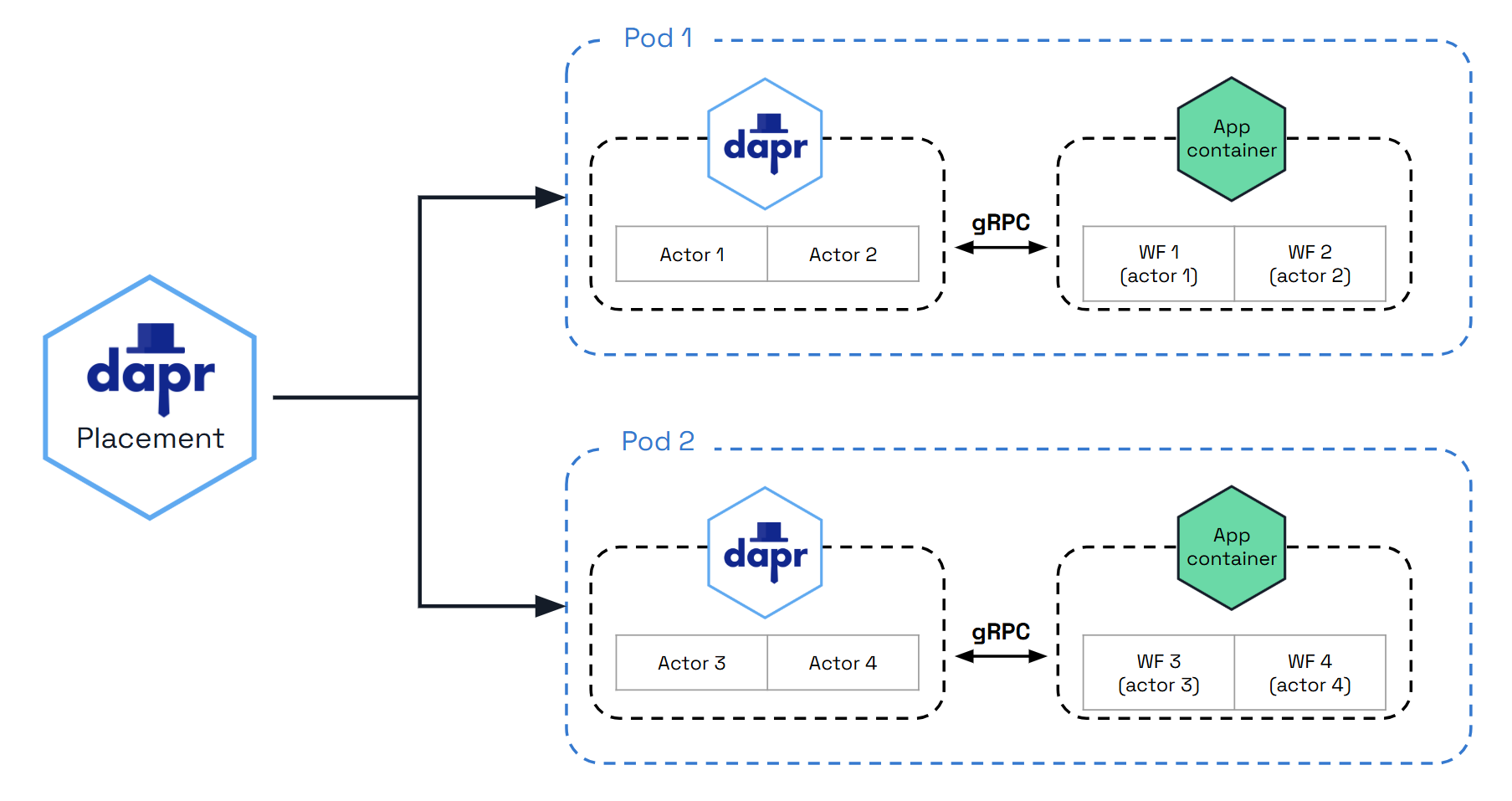
Just like user-defined actors, workflow actors are distributed across the cluster by the hashing lookup table provided by the actor placement service. They also maintain their own state and make use of reminders. However, unlike actors that live in application code, these workflow actors are embedded into the Dapr sidecar. Application code is completely unaware that these actors exist.
There are 2 different types of actors used with workflows: workflow actors and activity actors. Workflow actors are responsible for managing the state and placement of all workflows running in the app. A new instance of the workflow actor is activated for every workflow instance that gets scheduled. The ID of the workflow actor is the ID of the workflow. This workflow actor stores the state of the workflow as it progresses, and determines the node on which the workflow code executes via the actor lookup table.
As workflows are based on actors, all workflow and activity work is distributed across all replicas of the application implementing workflows by the actor placement table. By default there is no locality or relationship between where a workflow is started and where each work item is executed. With the workflow fast path preview feature enabled, the host that commits an event also drives the resulting turn, and activity bodies are driven on their target host without a reminder round trip through the Scheduler.
Each workflow actor saves its state using the following keys in the configured actor state store:
| Key | Description |
|---|---|
inbox-NNNNNN | A workflow’s inbox is effectively a FIFO queue of messages that drive a workflow’s execution. Example messages include workflow creation messages, activity task completion messages, etc. Each message is stored in its own key in the state store with the name inbox-NNNNNN where NNNNNN is a 6-digit number indicating the ordering of the messages. These state keys are removed once the corresponding messages are consumed by the workflow. |
history-NNNNNN | A workflow’s history is an ordered list of events that represent a workflow’s execution history. Each key in the history holds the data for a single history event. Like an append-only log, workflow history events are only added and never removed (except when a workflow performs a “continue as new” operation, which purges all history and restarts a workflow with a new input). |
customStatus | Contains a user-defined workflow status value. There is exactly one customStatus key for each workflow actor instance. |
metadata | Contains meta information about the workflow as a JSON blob and includes details such as the length of the inbox, the length of the history, and a 64-bit integer representing the workflow generation. The length information is used to determine which keys need to be read or written to when loading or saving workflow state updates. |
parent-notify | A marker written in the same transaction as a child workflow’s terminal state, recording that the parent workflow has not yet been notified of the completion. It is cleared once the parent acknowledges. While it is present, purging the child or reusing its instance ID is refused as “not completed”. |
creation-input | Written only for child workflows when history signing is enabled: the input the parent created the child with, kept separately from the history so it survives continue as new and can be verified against the parent when the completion is attested. |
The following diagram illustrates the typical lifecycle of a workflow actor.
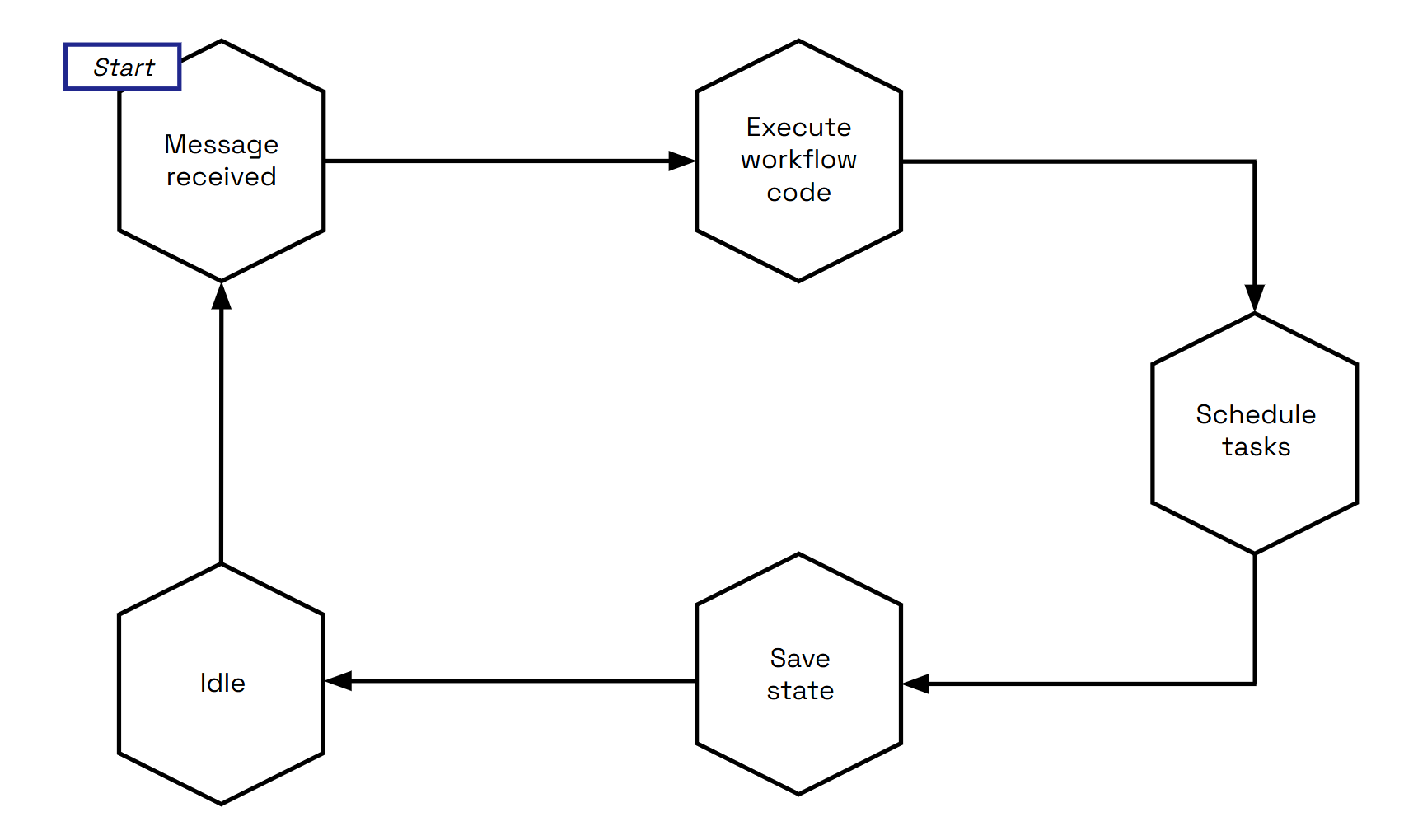
To summarize:
Activity actors are responsible for managing the state and placement of all workflow activity invocations.
A new instance of the activity actor is activated for every activity task that gets scheduled by a workflow.
The ID of the activity actor is the ID of the workflow, the task ID of the activity (task IDs start at 0) and a constant trailing 0, joined by ::.
For example, if a workflow has an ID of 876bf371 and schedules its third activity, the activity actor’s ID is 876bf371::2::0.
The third component is kept for compatibility with earlier releases, which wrote the workflow generation there; it no longer carries information.
Task IDs restart from 0 when a workflow uses continue as new, so a later generation reuses the same activity actor IDs; the engine tells the executions apart by the task execution ID carried on the scheduling and completion events.
Activity actors store no state of their own, and instead all resulting data is sent back to the parent workflow actor. The one exception is the workflow fast path, where an activity actor writes a short-lived execution-claim record while actor placement moves a running execution to another host.
The following diagram illustrates the typical lifecycle of an activity actor.
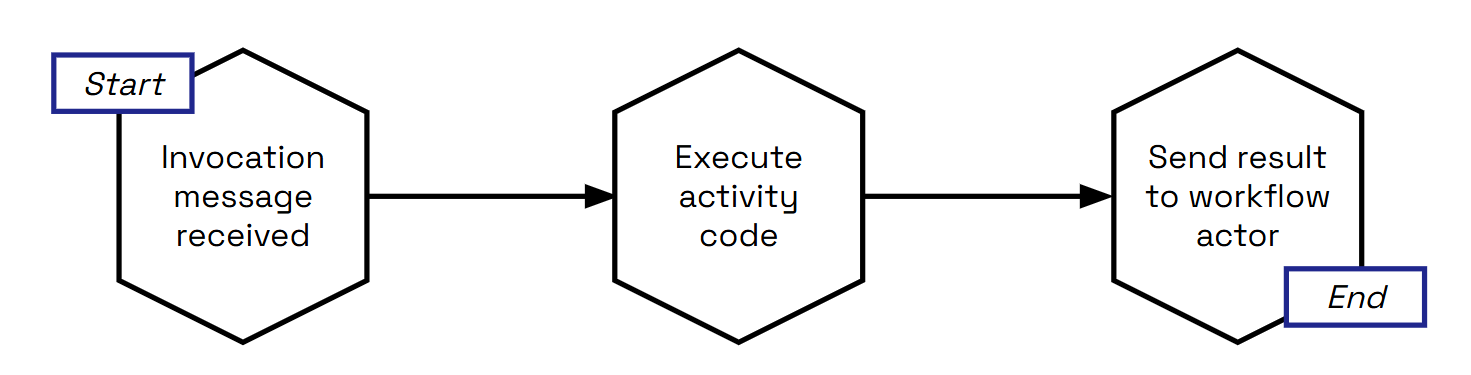
Activity actors are short-lived:
With the workflow fast path enabled, the activity body runs as soon as the dispatch arrives, without the one-shot reminder, whenever the workflow actor certifies that its janitor backstop is armed. During a placement change the activity actor may write a small execution-claim record so that the new owner can tell a live execution from one that died with its host.
The Dapr Workflow ensures workflow fault-tolerance by using actor reminders to recover from transient system failures. By default, prior to invoking application workflow code, the workflow or activity actor will create a new reminder. These reminders are made “one shot”, meaning that they will expire after successful triggering. If the application code executes without interruption, the reminder is triggered and expired. However, if the node or the sidecar hosting the associated workflow or activity crashes, the reminder will reactivate the corresponding actor and the execution will be retried, forever. Retries of a failed delivery are paced with a decorrelated jittered exponential backoff between 50 ms and 2 s, so that many instances failing at once do not retry in lockstep.
With the workflow fast path preview feature enabled, the per-event reminders are replaced by a single repeating “janitor” reminder per live workflow instance, which fires every 20 seconds, drives any turn or activity that lost its local driver, and deletes itself when the instance completes. A wake whose local drive keeps failing is left to the janitor; a failed activity drive escalates back to the one-shot run-activity reminder described above. Either way the recovery guarantees are the same on both paths.
An instance whose state was saved but whose start can never be processed (for example because its committed start event was lost) is failed with the error type DAPR_WORKFLOW_UNSTARTABLE_STATE instead of remaining PENDING forever, and a pending start whose reminder is overdue is re-driven when the instance’s status is read.
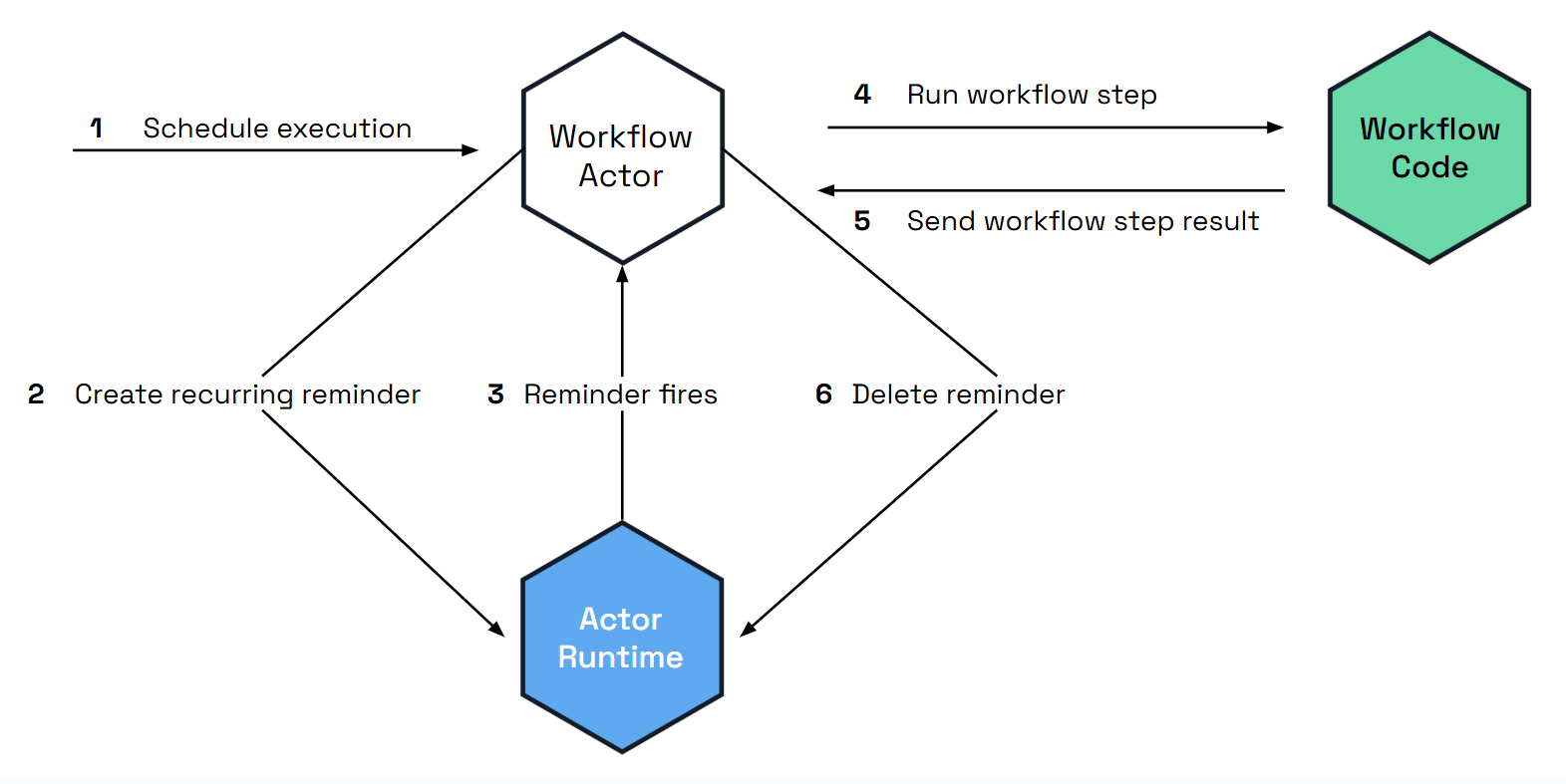
Dapr Workflows use actors internally to drive the execution of workflows.
Like any actors, these workflow actors store their state in the configured actor state store.
This is done by specifying a state store component in your Dapr configuration and then referencing that state store in the actorStateStore property of the configuration’s actors section.
Read the state API reference and the actors API reference to learn more about state stores for actors.
Any state store that supports actors implicitly supports Dapr Workflow.
As discussed in the workflow actors section, workflows save their state incrementally by appending to a history log. The history log for a workflow is distributed across multiple state store keys so that each “checkpoint” only needs to append the newest entries.
The size of each checkpoint is determined by the number of concurrent actions scheduled by the workflow before it goes into an idle state. Sequential workflows will therefore make smaller batch updates to the state store, while fan-out/fan-in workflows will require larger batches. The size of the batch is also impacted by the size of inputs and outputs when workflows invoke activities or child workflows.
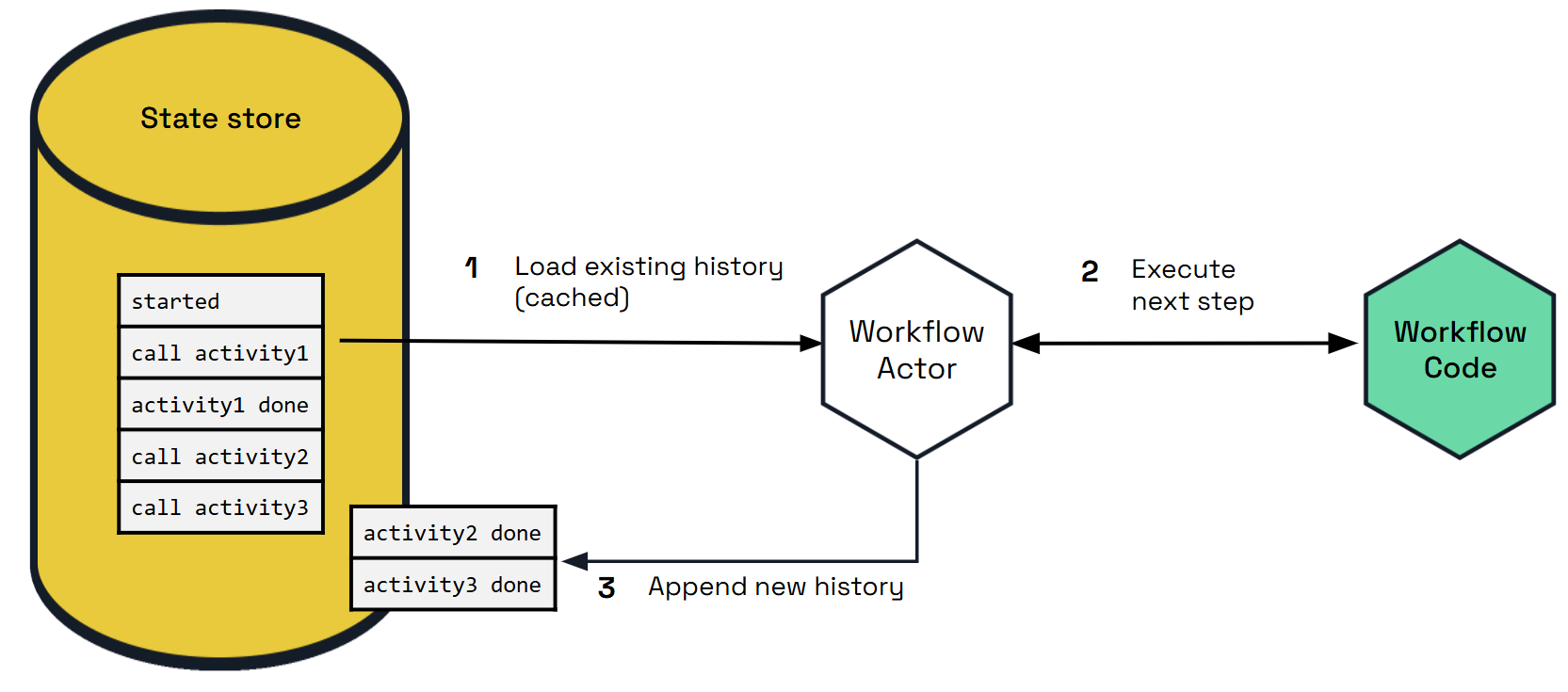
Different state store implementations may implicitly put restrictions on the types of workflows you can author. For example, the Azure Cosmos DB state store limits item sizes to 2 MB of UTF-8 encoded JSON (source). The input or output payload of an activity or child workflow is stored as a single record in the state store, so a item limit of 2 MB means that workflow and activity inputs and outputs can’t exceed 2 MB of JSON-serialized data.
Similarly, if a state store imposes restrictions on the size of a batch transaction, that may limit the number of parallel actions that can be scheduled by a workflow.
Workflow state can be purged from a state store, including all its history. Each Dapr SDK exposes APIs for purging all metadata related to specific workflow instances.
The number of records which are saved as history in the state store per workflow run is determined by its complexity or “shape”. In other words, the number of activities, timers, sub-workflows etc. The following table shows a general guide to the number of records that are saved by different workflow tasks. This number may be larger or smaller depending on retries or concurrency.
| Task type | Number of records saved |
|---|---|
| Start workflow | 5 records |
| Call activity | 3 records |
| Timer | 3 records |
| Raise event | 3 records |
| Start child workflow | 8 records |
Every instance also carries the metadata and customStatus keys, which do not grow with the history. Child workflows additionally carry a transient parent-notify marker between their terminal commit and the parent’s acknowledgement, and, when history signing is enabled, a creation-input row.
dapr workflow --app-id myapp list
dapr workflow --app-id myapp history <instance-id>
The workflow engine supports these state stores:
Because Dapr Workflows are internally implemented using actors, Dapr Workflows have the same scalability characteristics as actors. The placement service:
The expected scalability of a workflow is determined by the following factors:
The implementation details of the workflow code in the target application also plays a role in the scalability of individual workflow instances. Each workflow instance executes on a single node at a time, but a workflow can schedule activities and child workflows which run on other nodes.
Workflows can also schedule these activities and child workflows to run in parallel, allowing a single workflow to potentially distribute compute tasks across all available nodes in the cluster.
You can configure the maximum concurrency of workflows and activities using the Dapr configuration as described in the next section.
Workflows don’t control the specifics of how load is distributed across the cluster. For example, if a workflow schedules 10 activity tasks to run in parallel, all 10 tasks may run on as many as 10 different compute nodes or as few as a single compute node. The actual scale behavior is determined by the actor placement service, which manages the distribution of the actors that represent each of the workflow’s tasks.
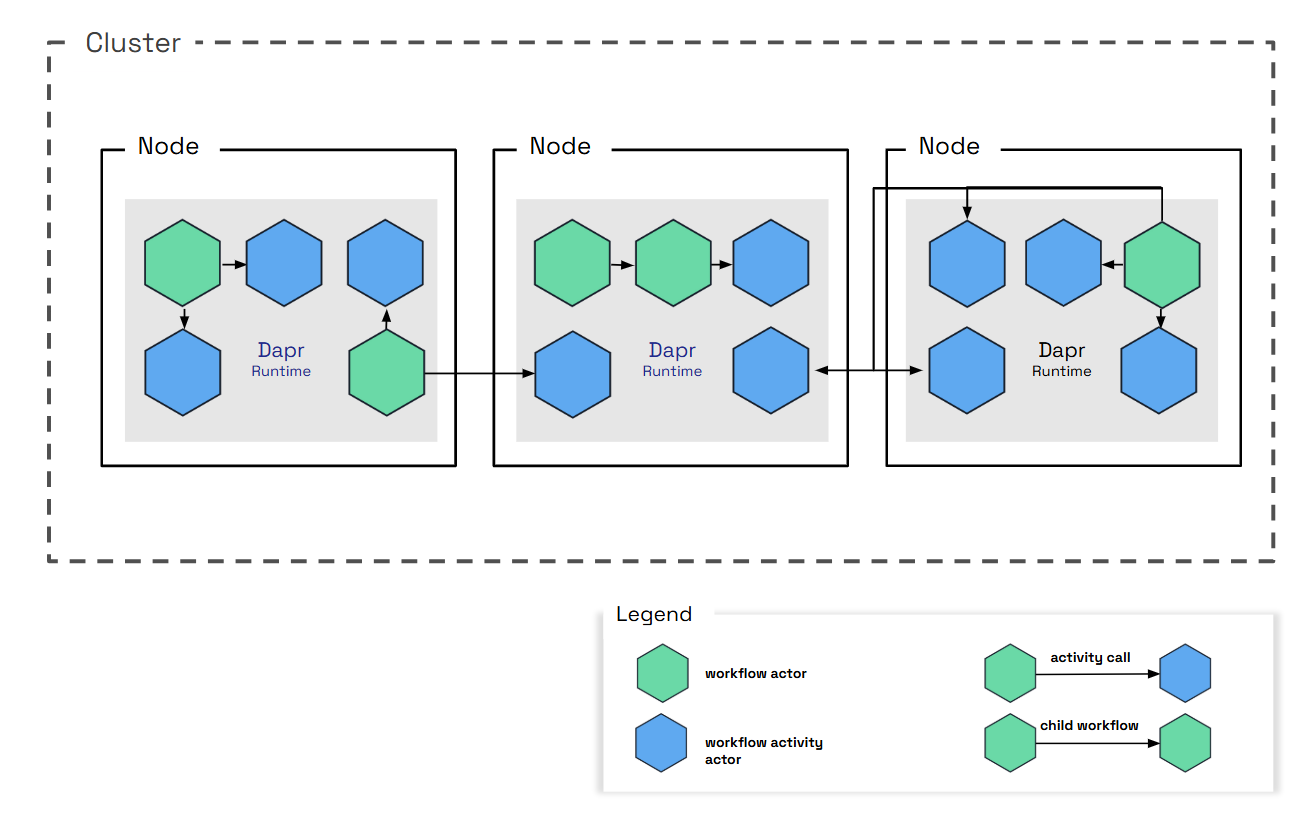
In order to provide guarantees around durability and resiliency, Dapr Workflows frequently write to the state store and rely on reminders to drive execution. Dapr Workflows therefore may not be appropriate for latency-sensitive workloads. Expected sources of high latency include:
See the Reminder usage and execution guarantees section for more details on how the design of workflow actors may impact execution latency.
The workflow fast path preview feature removes the per-event reminders and most of the state store commits from each turn. With it enabled, the first and third sources above apply mainly to recovery after a failure rather than to the steady-state turn.
By default, when a client schedules a workflow, the workflow engine waits for the workflow to be fully started before returning a response to the client. Waiting for the workflow to start before returning can decrease the scheduling throughput of workflows. When scheduling a workflow with a start time, the workflow engine does not wait for the workflow to start before returning a response to the client. To increase scheduling throughput, consider adding a start time of “now” when scheduling a workflow. An example of scheduling a workflow with a start time of “now” in the Go SDK is shown below:
client.ScheduleNewWorkflow(ctx, "MyCoolWorkflow", workflow.WithStartTime(time.Now()))
This tip speeds up how quickly the client’s scheduling call returns. To increase the throughput of the turns themselves, see the workflow fast path.
When using Dapr Shared, it can be the case that there are multiple daprd sidecars running behind a single load balancer or service.
As such, the instance to which a worker receiving work, may not be the same instance that receives the work result.
Dapr uses a third actor type to handle this scenario: dapr.internal.{namespace}.{appID}.executor.
The daprd that holds a pending work item registers a process-local waiter for its result. A result that lands on a different daprd is forwarded with a single internal call to the executor actor, which shares its ID with the workflow or activity actor that is waiting, so actor placement resolves it to the waiting host. On a single replica no forwarding call is made.
The dapr_runtime_workflow_completion_route_count metric, tagged with task_type and route (wait_local, wait_watch, complete_local, complete_actor), shows which path each result took; a sustained wait_watch rate indicates that results are not landing on the waiting host.
The workflow fast path is a set of three optimizations inside the Dapr sidecar that remove the per-event Scheduler reminders and most of the state store commits from every workflow turn, while keeping the same at-least-once execution guarantees as the default path. Workflows and activities are driven on the host that already holds the work, and activity completions are persisted inside the next turn’s single state store commit instead of in a commit of their own.
The fast path is available in Dapr v1.19 and later as a preview feature behind the WorkflowsFastPath feature gate. It is disabled by default and enabled per application through the Configuration features list.
The fast path is entirely sidecar-internal. No SDK upgrade or application change is required, and the protocol between the workflow SDK and the sidecar is unchanged.
A workflow makes progress in turns. A turn wakes the workflow actor, replays the workflow’s history plus the new events in your application code, and commits the outcome (new history events, and any activities or timers to schedule). Every activity completion, external event, timer or start request triggers a turn.
Without the fast path, each turn is driven through the Scheduler service and touches the state store several times:
new-event-<code>-<id> is created in the Scheduler (a job upsert), which fires back to the workflow actor and is then deleted.run-activity reminder on the activity actor before the activity body runs.For a sequential workflow this adds up to about four fsync’d state store commits, two Scheduler round trips and around nine gRPC hops per turn, and the Scheduler carries one job per event.
The fast path replaces this with three legs, all gated together:
run-activity reminder, when the dispatching workflow certifies that its recovery backstop is armed. Learn more.Durability moves from “one Scheduler job per event” to one repeating janitor reminder per live workflow instance. A wake whose local drive fails is recovered by that janitor, and a failed activity drive additionally escalates back to its durable run-activity reminder. At-least-once execution and event ordering are unchanged.
execution-claim key under the activity actor’s state prefix, written only during placement changes.Enable the fast path in the application’s Configuration resource:
apiVersion: dapr.io/v1alpha1
kind: Configuration
metadata:
  name: appconfig
spec:
  features:
    - name: WorkflowsFastPath
      enabled: true
The gate is read when the sidecar starts. After changing it, restart the sidecars of the application.
The setting is scoped to the application that uses the Configuration. In a multi-application workflow, an activity hosted by another application is driven locally only if that application’s Configuration also enables the fast path; otherwise it keeps the durable reminder path.
If the Configuration also sets Scheduler-enforced concurrency limits, the sidecar logs the following line at startup and runs the default reminder path instead:
WorkflowsFastPath is enabled but scheduler-enforced workflow concurrency limits are configured; disabling the fast path so the limits are enforced
Disabling the fast path again is safe at any time and does not require any migration. Janitor reminders left behind for running instances fire as a normal turn or a no-op and delete themselves once the instance completes, and any escalated run-activity reminders behave exactly as they do on the default path.
| Step | Without the fast path | With the fast path |
|---|---|---|
| Activity completion arrives | Committed to the inbox (one commit) | Held in memory; the activity actor’s call stays open until the turn commits |
| Wake the workflow actor | new-event reminder: job upsert (one commit), Scheduler trigger round trip, job delete | Local drive loop on the same host, no Scheduler call |
| Turn result | History commit (one commit) | One commit that includes the folded completion, then the activity actor is acked |
| Dispatch an activity | run-activity reminder: job upsert (one commit), trigger round trip, job delete | Detached local drive on the target host, no reminder |
| Durable backstop | Every reminder is its own backstop | One repeating janitor reminder per live instance, created once, firing every 20 seconds, a no-op while nothing is pending |
The following two diagrams show the same sequential step, an activity completing and the next activity being scheduled, on the default path and on the fast path.
Indicatively, in a same-cluster comparison on a hosted deployment, the number of state store commits for a five-activity sequential workflow fell from about 45 without the fast path to about 26 with the local wake and local activity legs, and to about 17 with completion folding as well. See Indicative performance for the caveats.
When an event has been committed to the workflow’s inbox, the workflow actor drives the turn itself instead of creating a per-event reminder:
If a turn fails, the loop retries it in place with a decorrelated jittered backoff between 50 ms and 2 s, for a total retry budget of about six seconds. If the turn still fails, the loop exits and the janitor takes over recovery at its next fire. A failed local wake never creates a per-event reminder; the janitor is its only durable backstop.
Two cases keep their Scheduler due time: a workflow scheduled with a start time in the future, and any wake whose due time is in the future. Only due-now work is driven locally.
Starting a new instance still creates the durable start reminder, but under the fast path it is armed five seconds in the future as a dormant backstop while the first turn is driven locally. Once the first turn commits, the start reminder is deleted. If the only worker holding the first turn disappears, the backstop fires after the grace and recovers the start. A backstop that outlives a lost delete fires into an empty inbox and acks as a no-op.
A running workflow that acks an empty-inbox reminder stays resident in memory with its cached history, instead of deactivating as on the default path, because its next event usually arrives shortly. Idle actors are unloaded by the actor factory’s idle reaper after about a minute, and a workflow’s terminal turn releases its cached history immediately.
The janitor is a repeating actor reminder named new-event-janitor, one per live workflow instance:
new-event prefix is deliberate: a Dapr sidecar older than 1.19 routes any new-event* reminder to a normal turn, so a janitor that fires against an instance that moved to an older host still drives any pending inbox.On every fire the janitor loads the instance state and does the least work needed:
| Instance state | Janitor action | Recorded as |
|---|---|---|
| Purged | Deletes itself | |
| Completed, failed or terminated | Settles anything owed after the terminal commit (parent notification, retention reminder), then deletes itself | |
| Inbox rows pending and no drive in sight | Drives a turn. This is the recovery event the janitor exists for | janitor_recovered |
| No inbox rows, but completions held for folding with no live driver | Drives a turn that commits the captive completions | janitor_fold_recovered |
No inbox rows, but TaskScheduled events with no resolution and no drive in flight | Re-dispatches the activities (see Leg 2) | janitor_redispatched and related statuses |
| Nothing pending | No-op, without deactivating the actor |
An idle janitor also guards against a stale in-memory cache: a peer host could have written an inbox row after this host loaded its state. Re-reading the store on every fire for every idle instance would be the dominant janitor cost, so the probe backs off across consecutive idle fires (the first, second, fourth and eighth fire, then every eighth). Recovery of that rare double failure therefore takes at most eight periods instead of one. Any real activity resets the cadence.
On the default path the workflow actor calls Execute on the activity actor, which creates a one-shot run-activity reminder and runs the activity body only when the Scheduler fires it. That reminder is what survives a crash of the activity host.
With the fast path:
Execute call with a localDrive signal. If the janitor cannot be armed, the activities are dispatched with durable reminders as before.run-activity reminder, restoring the retry-forever chain of the default path. If the escalation itself fails, the workflow’s janitor re-dispatches the activity within one period.The workflow’s janitor is the durable re-driver for activities whose host died before publishing a result. On each fire it looks for TaskScheduled events in history that have no resolution in history, in the inbox or among held completions:
localDrive signal. If the activity is in fact still executing, the running execution absorbs the duplicate as a follower and the result is published once; a duplicate completion is dropped by the workflow actor’s deduplication.localDrive signal, so the activity host creates the durable run-activity reminder that the fast path had elided. Escalation repeats every period until the task resolves; the reminder create is idempotent.janitor_redispatch_busy.ContinueAsNew, so the janitor’s per-task bookkeeping is reset for each generation.An escalated run-activity reminder is deleted as soon as its task resolves. Without this reaping, a leftover fire could run the body again on a host that no longer remembers the execution.
On the default path, the run-activity reminder is host-agnostic: whichever host owns the activity actor when it fires runs the body. With the fast path there is no reminder while a body executes, so a placement change during a long-running activity needs another way to tell a live execution on the previous owner from one that died with its host. The execution claim record provides it:
execution-claim, only when placement moves an actor with an unsettled execution away from its host. Steady-state fast path execution never touches the store for it, and a graceful shutdown does not write one either, because the execution dies with the process and a record would only delay the new owner.When the record is written, the result is a stronger guarantee than the default path offers: at most one live activity body across hosts during a placement handoff, with at-least-once execution preserved. If the write fails, the sidecar logs a warning and that handoff falls back to ordinary at-least-once behaviour, where two executions can overlap.
When an activity actor delivers a completion to the workflow actor on the default path, the workflow actor commits the event to its durable inbox and acks; the inbox commit is what makes the completion durable. The fast path removes that commit:
TaskCompleted, TaskFailed) whose task execution ID matches the scheduling event in history, arriving at a running, non-stalled instance, are eligible for folding. Everything else keeps the durable inbox path: external events raised through the API, child workflow completions, duplicates, and events for stalled or tombstoned instances.A retry that arrives while its completion is still held joins the pending entry and waits for the same commit; it is never acked early, because an early ack would stop the only durable re-driver. The wait is capped at two minutes, after which the sender receives a recoverable error and retries. If the workflow actor deactivates while completions are held (a placement change, for example), every held completion is nacked so that the senders retry against the new owner. Held completions from a previous ContinueAsNew generation are dropped and acked, because task IDs restart with every generation.
Child workflow completions never fold. A child publishes its completion while holding its own turn lock; parking that publish until the parent’s turn commits could deadlock when the parent’s turn dispatches back into the same child.
The fast path changes what provides durability, not whether work is durable. The following table lists the failure windows the default path’s reminders used to cover, what covers them on the fast path, and the metric status that records each recovery so you can see it happening.
| Failure | Recovery | Worst-case added latency | Evidence |
|---|---|---|---|
| Host dies after the inbox commit, before the turn commits | The janitor drives the pending inbox on the new owner | One janitor period (20 s) | dapr_runtime_workflow_local_wake_count{status="janitor_recovered"} |
| Same, and a peer wrote the inbox row into a stale cache | The janitor’s backed-off store re-read | Up to eight periods | Same |
| Local drive fails repeatedly | In-place retries (about 6 s), then the janitor | About 6 s plus one period | status="failed" then janitor_recovered |
| Janitor reminder cannot be created | Durable per-event reminder, exactly the default path | Scheduler trigger latency | Warning log failed to ensure janitor reminder, falling back to a durable wake-up reminder |
| The only worker holding a new instance’s first turn vanishes | The dormant start reminder, due 5 s after creation | 5 s plus trigger latency | status="pending_start_redriven" when a status read re-drives an overdue start |
| Instance saved but its start can never be processed | The instance is failed with error type DAPR_WORKFLOW_UNSTARTABLE_STATE instead of hanging | Immediate | status="unstartable_failed" |
| Activity host dies before publishing a result | Janitor re-dispatch, then escalation to the durable reminder | One to two periods | dapr_runtime_workflow_local_activity_count{status="janitor_redispatched"}, then janitor_redispatch_escalated |
| Local activity drive fails three times | Immediate escalation to the durable run-activity reminder | Seconds | status="escalated" |
| Body still running on the previous owner at a placement change | The claim record defers the new owner until completed or stale | Up to two periods (40 s) | status="claim_evicted" when a stale claim is reaped |
| Folding turn does not commit | Nack; the sender retries | Sender backoff, 50 ms to 2 s | dapr_runtime_workflow_completions_fold_count{status="fold_nacked"} |
| Sender dies and the folding drive is lost | The janitor drives a turn that commits the captive completions | One period | local_wake_count{status="janitor_fold_recovered"} |
| Actor deactivates with held completions | Flush; senders retry against the new owner | Sender backoff | fold_nacked |
At-least-once execution and the ordering of events within an instance are unchanged: every wake drains the whole durable inbox, the per-actor turn lock still serializes turns, and folded completions are appended after the inbox events inside the same work item. The execution claim record adds a guarantee the default path did not have, whenever the record is written: at most one live activity body across hosts during a placement handoff.
dapr_runtime_workflow_completions_fold_wait_latency and is bounded at two minutes, after which the sender retries.Scheduler-enforced concurrency limits gate each job delivery, and local drives bypass job delivery. To keep the limits effective, the fast path disables itself at sidecar startup when any of the following is set in spec.workflow:
globalMaxConcurrentWorkflowInvocationsglobalMaxConcurrentActivityInvocationsworkflowConcurrencyLimits or activityConcurrencyLimits entry with a name and a positive maxConcurrentThe per-sidecar limits maxConcurrentWorkflowInvocations and maxConcurrentActivityInvocations are enforced by the sidecar itself and are fully compatible with the fast path. See Workflow concurrency limits.
localDrive and janitorRedispatch signals travel as metadata on internal actor calls. A sidecar that does not understand them ignores them and creates the durable reminders, and the janitor’s new-event name is routed to a normal turn by older sidecars. Upgrade every sidecar of the application to 1.19 first, then enable the gate, so that all hosts take the fast path.run-activity reminder even when the calling workflow has the fast path enabled.The fast path adds the following sidecar metrics. The app_id and namespace tags are present on all of them.
| Metric | Type | Extra tags | Meaning |
|---|---|---|---|
dapr_runtime_workflow_local_wake_count | counter | status | Locally driven turns and wake recovery evidence |
dapr_runtime_workflow_local_wake_drive_latency | histogram (ms) | status | Time from the drive request until the locally driven turn returned |
dapr_runtime_workflow_local_activity_count | counter | status | Locally driven activity executions and activity recovery evidence |
dapr_runtime_workflow_local_activity_drive_latency | histogram (ms) | status | One local activity attempt, including the call into the application |
dapr_runtime_workflow_completions_fold_count | counter | status (folded, fold_nacked) | Completion folding outcomes, recorded on the commit side |
dapr_runtime_workflow_completions_fold_wait_latency | histogram (ms) | How long an activity actor waited for its completion’s folding turn to commit | |
dapr_runtime_workflow_lock_wait | histogram (ms) | operation | Time an invocation queued on the per-actor turn lock, by invocation kind |
The status values on the wake and activity counters are:
| Status | Counter | Meaning |
|---|---|---|
success, failed | both | Outcome of a local drive attempt |
janitor_recovered | wake | The janitor drove a turn for a pending inbox that had no driver |
janitor_fold_recovered | wake | The janitor drove a turn for held completions that had no driver |
stale_turn_rejected | wake | A turn computed from stale history was rejected and retried instead of committing a duplicate operation |
unstartable_failed | wake | An instance whose start can never be processed was terminally failed |
reminder_arm_detached, reminder_arm_detached_failed, reminder_arm_detached_skipped_shutdown | wake | A reminder create that failed after its inbox commit was retried detached, or that retry gave up |
pending_start_redriven | wake | A status read re-asserted the start reminder of an overdue pending start |
escalated, escalate_failed, escalate_skipped_shutdown | activity | A lost local drive was escalated to the durable run-activity reminder, or the escalation failed or was skipped at shutdown |
janitor_redispatched, janitor_redispatch_busy, janitor_redispatch_failed | activity | A janitor re-dispatch was sent, found the activity busy (healthy), or failed |
janitor_redispatch_escalated | activity | A re-dispatched task was still unresolved a period later and was escalated to the durable reminder |
janitor_redispatch_suppressed | activity | The re-dispatch check was skipped because a drive was in flight on the instance |
janitor_escalation_reaped | activity | An escalated run-activity reminder was deleted because its task resolved |
claim_evicted | activity | A stale in-flight claim held by a dead execution was evicted so that the arrival re-executes |
The recovery statuses (janitor_recovered, janitor_fold_recovered, stale_turn_rejected, unstartable_failed, reminder_arm_detached, reminder_arm_detached_failed, pending_start_redriven, janitor_redispatched, janitor_redispatch_escalated, janitor_escalation_reaped, claim_evicted) are registered at zero when the sidecar starts, so a series that is absent can always be told apart from a recovery path that never fired. In a healthy deployment they stay at zero. The latency histograms use the sidecar’s shared latencyDistributionBuckets; see Configure metrics.
# A janitor had to rescue a lost wake or a captive completion in the last 15 minutes.
sum by (app_id) (
  increase(dapr_runtime_workflow_local_wake_count{status=~"janitor_recovered|janitor_fold_recovered"}[15m])
) > 0
# An activity dispatch was lost and had to be re-dispatched or escalated to a durable reminder.
sum by (app_id) (
  increase(dapr_runtime_workflow_local_activity_count{status=~"janitor_redispatched|janitor_redispatch_escalated|escalated"}[15m])
) > 0
# More than 5% of folded completions were nacked back to their senders (overload or failing turns).
sum by (app_id) (rate(dapr_runtime_workflow_completions_fold_count{status="fold_nacked"}[5m]))
  /
sum by (app_id) (rate(dapr_runtime_workflow_completions_fold_count[5m])) > 0.05
| Scenario | Observed change |
|---|---|
| Sequential workflow, local activity drive added to local wake | About 50% higher sustained throughput; engine-side p50 latency at a fixed request rate down by 72% and 84% at two load points |
| Completion folding added on top of both | About 16% higher sustained throughput |
| Fan-out of 10 activities, sustained throughput across the whole stack | From 25 workflows per second to 167 |
| State store commits per five-activity sequential workflow | From about 45, to about 26, to about 17 |
| Recovery evidence during the runs | Zero lost drives and zero janitor rescues |
The gains come from removing work rather than from doing it faster: fewer fsync’d commits per turn, no Scheduler trigger on the hot path, and completions amortized into a single commit. Once those are gone, the next limit is usually the sidecar’s CPU or the state store’s commit rate.
fold_nacked ratio shows when this happens.No. Every failure window that a reminder covered on the default path is covered by the janitor, by escalation back to the durable reminders, or by the sender’s retry. Duplicate deliveries are still removed by the same deduplication as before. See Durability and recovery.
Yes, at any time, by setting the gate to false and restarting the sidecars. There is no persisted commitment. Janitor reminders of running instances fire as normal turns or no-ops and delete themselves when their instance completes.
Because the Configuration sets Scheduler-enforced concurrency limits. Remove the global or per-name limits, or keep the limits and accept the default path. See Concurrency limits.
The completion call now returns after the folding turn commits rather than after an inbox commit. This is the wait shown by dapr_runtime_workflow_completions_fold_wait_latency. The overall turn is faster; the acknowledgement moved to the end of it.
The previous owner writes an execution claim record and keeps heartbeating it. The new owner defers while the heartbeat is live, acks without executing once the result is published, and only re-executes if the heartbeat has been stale for two janitor periods. See Execution claim record.
No. The fast path is implemented entirely in the sidecar, and the protocol between the SDK and the sidecar is unchanged.
No. The janitor is deleted at the workflow’s terminal turn. If a fire arrives for a completed or purged instance anyway, the janitor settles anything still owed and deletes itself.
This article provides a high-level overview of how to author workflows that are executed by the Dapr Workflow engine.
Dapr Workflow logic is implemented using general purpose programming languages, allowing you to:
The Dapr sidecar doesn’t load any workflow definitions. Rather, the sidecar simply drives the execution of the workflows, leaving all the workflow activities to be part of the application.
Workflow activities are the basic unit of work in a workflow and are the tasks that get orchestrated in the business process.
Define the workflow activities you’d like your workflow to perform. Activities are a function definition and can take inputs and outputs. The following example creates a counter (activity) called hello_act that notifies users of the current counter value. hello_act is a function derived from a class called WorkflowActivityContext.
@wfr.activity(name='hello_act')
def hello_act(ctx: WorkflowActivityContext, wf_input):
    global counter
    counter += wf_input
    print(f'New counter value is: {counter}!', flush=True)
Define the workflow activities you’d like your workflow to perform. Activities are wrapped in the WorkflowActivityContext class, which implements the workflow activities.
export default class WorkflowActivityContext {
  private readonly _innerContext: ActivityContext;
  constructor(innerContext: ActivityContext) {
    if (!innerContext) {
      throw new Error("ActivityContext cannot be undefined");
    }
    this._innerContext = innerContext;
  }

  public getWorkflowInstanceId(): string {
    return this._innerContext.orchestrationId;
  }

  public getWorkflowActivityId(): number {
    return this._innerContext.taskId;
  }
}
Define the workflow activities you’d like your workflow to perform. Activities are a class definition and can take inputs and outputs. Activities also participate in dependency injection, like binding to a Dapr client.
The activities called in the example below are:
NotifyActivity: Receive notification of a new order.ReserveInventoryActivity: Check for sufficient inventory to meet the new order.ProcessPaymentActivity: Process payment for the order. Includes NotifyActivity to send notification of successful order.public class NotifyActivity : WorkflowActivity<Notification, object>
{
//...
public NotifyActivity(ILoggerFactory loggerFactory)
{
this.logger = loggerFactory.CreateLogger<NotifyActivity>();
}
//...
}
See the full NotifyActivity.cs workflow activity example.
public class ReserveInventoryActivity : WorkflowActivity<InventoryRequest, InventoryResult>
{
    //...

    public ReserveInventoryActivity(ILoggerFactory loggerFactory, DaprClient client)
    {
        this.logger = loggerFactory.CreateLogger<ReserveInventoryActivity>();
        this.client = client;
    }

    //...

}
See the full ReserveInventoryActivity.cs workflow activity example.
public class ProcessPaymentActivity : WorkflowActivity<PaymentRequest, object>
{
    //...
    public ProcessPaymentActivity(ILoggerFactory loggerFactory)
    {
        this.logger = loggerFactory.CreateLogger<ProcessPaymentActivity>();
    }

    //...

}
See the full ProcessPaymentActivity.cs workflow activity example.
Define the workflow activities you’d like your workflow to perform. Activities are wrapped in the public DemoWorkflowActivity class, which implements the workflow activities.
@JsonAutoDetect(fieldVisibility = JsonAutoDetect.Visibility.ANY)
public class DemoWorkflowActivity implements WorkflowActivity {

  @Override
  public DemoActivityOutput run(WorkflowActivityContext ctx) {
    Logger logger = LoggerFactory.getLogger(DemoWorkflowActivity.class);
    logger.info("Starting Activity: " + ctx.getName());

    var message = ctx.getInput(DemoActivityInput.class).getMessage();
    var newMessage = message + " World!, from Activity";
    logger.info("Message Received from input: " + message);
    logger.info("Sending message to output: " + newMessage);

    logger.info("Sleeping for 5 seconds to simulate long running operation...");

    try {
      TimeUnit.SECONDS.sleep(5);
    } catch (InterruptedException e) {
      throw new RuntimeException(e);
    }


    logger.info("Activity finished");

    var output = new DemoActivityOutput(message, newMessage);
    logger.info("Activity returned: " + output);

    return output;
  }
}
Define each workflow activity you’d like your workflow to perform. The Activity input can be unmarshalled from the context with ctx.GetInput. Activities should be defined as taking a ctx workflow.ActivityContext parameter and returning an interface and error.
func BusinessActivity(ctx workflow.ActivityContext) (any, error) {
	var input int
	if err := ctx.GetInput(&input); err != nil {
		return "", err
	}

	// Do something here
	return "result", nil
}
Define your workflow function with the parameter ctx *workflow.WorkflowContext and return any and error. Invoke your defined activities from within your workflow.
func BusinessWorkflow(ctx *workflow.WorkflowContext) (any, error) {
	var input int
	if err := ctx.GetInput(&input); err != nil {
		return nil, err
	}
	var output string
	if err := ctx.CallActivity(BusinessActivity, workflow.ActivityInput(input)).Await(&output); err != nil {
		return nil, err
	}
	if err := ctx.WaitForExternalEvent("businessEvent", time.Minute*60).Await(&output); err != nil {
		return nil, err
	}

	if err := ctx.CreateTimer(time.Second).Await(nil); err != nil {
		return nil, nil
	}
	return output, nil
}
Before your application can execute workflows, you must register both the workflow orchestrator and its activities with a workflow registry. This ensures Dapr knows which functions to call when executing your workflow.
func main() {
	// Create a workflow registry
	r := workflow.NewRegistry()

	// Register the workflow orchestrator
	if err := r.AddWorkflow(BusinessWorkflow); err != nil {
		log.Fatal(err)
	}
	fmt.Println("BusinessWorkflow registered")

	// Register the workflow activities
	if err := r.AddActivity(BusinessActivity); err != nil {
		log.Fatal(err)
	}
	fmt.Println("BusinessActivity registered")

	// Create workflow client and start worker
	wclient, err := client.NewWorkflowClient()
	if err != nil {
		log.Fatal(err)
	}
	fmt.Println("Worker initialized")

	ctx, cancel := context.WithCancel(context.Background())
	if err = wclient.StartWorker(ctx, r); err != nil {
		log.Fatal(err)
	}
	fmt.Println("runner started")

	// Your application logic continues here...
	// Example: Start a workflow
	instanceID, err := wclient.ScheduleWorkflow(ctx, "BusinessWorkflow", workflow.WithInput(1))
	if err != nil {
		log.Fatalf("failed to start workflow: %v", err)
	}
	fmt.Printf("workflow started with id: %v\n", instanceID)

	// Stop workflow worker when done
	cancel()
	fmt.Println("workflow worker successfully shutdown")
}
Key points about registration:
workflow.NewRegistry() to create a workflow registryr.AddWorkflow() to register workflow functionsr.AddActivity() to register activity functionsclient.NewWorkflowClient() to create a workflow clientwclient.StartWorker() to begin processing workflowswclient.ScheduleWorkflow to schedule a named instance of a workflowNext, register and call the activites in a workflow.
The hello_world_wf function is a function derived from a class called DaprWorkflowContext with input and output parameter types. It also includes a yield statement that does the heavy lifting of the workflow and calls the workflow activities.
@wfr.workflow(name='hello_world_wf')
def hello_world_wf(ctx: DaprWorkflowContext, wf_input):
    print(f'{wf_input}')
    yield ctx.call_activity(hello_act, input=1)
    yield ctx.call_activity(hello_act, input=10)
    yield ctx.call_activity(hello_retryable_act, retry_policy=retry_policy)
    yield ctx.call_child_workflow(child_retryable_wf, retry_policy=retry_policy)

    # Change in event handling: Use when_any to handle both event and timeout
    event = ctx.wait_for_external_event(event_name)
    timeout = ctx.create_timer(timedelta(seconds=30))
    winner = yield when_any([event, timeout])

    if winner == timeout:
        print('Workflow timed out waiting for event')
        return 'Timeout'

    yield ctx.call_activity(hello_act, input=100)
    yield ctx.call_activity(hello_act, input=1000)
    return 'Completed'
Next, register the workflow with the WorkflowRuntime class and start the workflow runtime.
export default class WorkflowRuntime {

  //..
  // Register workflow implementation for handling orchestrations
  public registerWorkflow(workflow: TWorkflow): WorkflowRuntime {
    const name = getFunctionName(workflow);
    const workflowWrapper = (ctx: OrchestrationContext, input: any): any => {
      const workflowContext = new WorkflowContext(ctx);
      return workflow(workflowContext, input);
    };
    this.worker.addNamedOrchestrator(name, workflowWrapper);
    return this;
  }

  // Register workflow activities
  public registerActivity(fn: TWorkflowActivity<TInput, TOutput>): WorkflowRuntime {
    const name = getFunctionName(fn);
    const activityWrapper = (ctx: ActivityContext, input: TInput): TOutput => {
      const wfActivityContext = new WorkflowActivityContext(ctx);
      return fn(wfActivityContext, input);
    };
    this.worker.addNamedActivity(name, activityWrapper);
    return this;
  }

  // Start the workflow runtime processing items and block.
  public async start() {
    await this.worker.start();
  }

}
The OrderProcessingWorkflow class is derived from a base class called Workflow with input and output parameter types. It also includes a RunAsync method that does the heavy lifting of the workflow and calls the workflow activities.
 class OrderProcessingWorkflow : Workflow<OrderPayload, OrderResult>
    {
        public override async Task<OrderResult> RunAsync(WorkflowContext context, OrderPayload order)
        {
            //...

            await context.CallActivityAsync(
                nameof(NotifyActivity),
                new Notification($"Received order {orderId} for {order.Name} at {order.TotalCost:c}"));

            //...

            InventoryResult result = await context.CallActivityAsync<InventoryResult>(
                nameof(ReserveInventoryActivity),
                new InventoryRequest(RequestId: orderId, order.Name, order.Quantity));
            //...

            await context.CallActivityAsync(
                nameof(ProcessPaymentActivity),
                new PaymentRequest(RequestId: orderId, order.TotalCost, "USD"));

            await context.CallActivityAsync(
                nameof(NotifyActivity),
                new Notification($"Order {orderId} processed successfully!"));

            // End the workflow with a success result
            return new OrderResult(Processed: true);
        }
    }
See the full workflow example in OrderProcessingWorkflow.cs.
Next, register the workflow with the WorkflowRuntimeBuilder and start the workflow runtime.
public class DemoWorkflowWorker {

  public static void main(String[] args) throws Exception {

    // Register the Workflow with the builder.
    WorkflowRuntimeBuilder builder = new WorkflowRuntimeBuilder().registerWorkflow(DemoWorkflow.class);
    builder.registerActivity(DemoWorkflowActivity.class);

    // Build and then start the workflow runtime pulling and executing tasks
    try (WorkflowRuntime runtime = builder.build()) {
      System.out.println("Start workflow runtime");
      runtime.start();
    }

    System.exit(0);
  }
}
Define your workflow function with the parameter ctx *workflow.WorkflowContext and return any and error. Invoke your defined activities from within your workflow.
func BusinessWorkflow(ctx *workflow.WorkflowContext) (any, error) {
	var input int
	if err := ctx.GetInput(&input); err != nil {
		return nil, err
	}
	var output string
	if err := ctx.CallActivity(BusinessActivity, workflow.ActivityInput(input)).Await(&output); err != nil {
		return nil, err
	}
	if err := ctx.WaitForExternalEvent("businessEvent", time.Minute*60).Await(&output); err != nil {
		return nil, err
	}

	if err := ctx.CreateTimer(time.Second).Await(nil); err != nil {
		return nil, nil
	}
	return output, nil
}
Finally, compose the application using the workflow.
In the following example, for a basic Python hello world application using the Python SDK, your project code would include:
DaprClient to receive the Python SDK capabilities.WorkflowRuntime: Allows you to register the workflow runtime.DaprWorkflowContext: Allows you to create workflowsWorkflowActivityContext: Allows you to create workflow activitiesfrom datetime import timedelta
from time import sleep
from dapr.ext.workflow import (
WorkflowRuntime,
DaprWorkflowContext,
WorkflowActivityContext,
RetryPolicy,
DaprWorkflowClient,
when_any,
)
from dapr.conf import Settings
from dapr.clients.exceptions import DaprInternalError
settings = Settings()
counter = 0
retry_count = 0
child_orchestrator_count = 0
child_orchestrator_string = ''
child_act_retry_count = 0
instance_id = 'exampleInstanceID'
child_instance_id = 'childInstanceID'
workflow_name = 'hello_world_wf'
child_workflow_name = 'child_wf'
input_data = 'Hi Counter!'
event_name = 'event1'
event_data = 'eventData'
non_existent_id_error = 'no such instance exists'
retry_policy = RetryPolicy(
first_retry_interval=timedelta(seconds=1),
max_number_of_attempts=3,
backoff_coefficient=2,
max_retry_interval=timedelta(seconds=10),
retry_timeout=timedelta(seconds=100),
)
wfr = WorkflowRuntime()
@wfr.workflow(name='hello_world_wf')
def hello_world_wf(ctx: DaprWorkflowContext, wf_input):
print(f'{wf_input}')
yield ctx.call_activity(hello_act, input=1)
yield ctx.call_activity(hello_act, input=10)
yield ctx.call_activity(hello_retryable_act, retry_policy=retry_policy)
yield ctx.call_child_workflow(child_retryable_wf, retry_policy=retry_policy)
# Change in event handling: Use when_any to handle both event and timeout
event = ctx.wait_for_external_event(event_name)
timeout = ctx.create_timer(timedelta(seconds=30))
winner = yield when_any([event, timeout])
if winner == timeout:
print('Workflow timed out waiting for event')
return 'Timeout'
yield ctx.call_activity(hello_act, input=100)
yield ctx.call_activity(hello_act, input=1000)
return 'Completed'
@wfr.activity(name='hello_act')
def hello_act(ctx: WorkflowActivityContext, wf_input):
global counter
counter += wf_input
print(f'New counter value is: {counter}!', flush=True)
@wfr.activity(name='hello_retryable_act')
def hello_retryable_act(ctx: WorkflowActivityContext):
global retry_count
if (retry_count % 2) == 0:
print(f'Retry count value is: {retry_count}!', flush=True)
retry_count += 1
raise ValueError('Retryable Error')
print(f'Retry count value is: {retry_count}! This print statement verifies retry', flush=True)
retry_count += 1
@wfr.workflow(name='child_retryable_wf')
def child_retryable_wf(ctx: DaprWorkflowContext):
global child_orchestrator_string, child_orchestrator_count
if not ctx.is_replaying:
child_orchestrator_count += 1
print(f'Appending {child_orchestrator_count} to child_orchestrator_string!', flush=True)
child_orchestrator_string += str(child_orchestrator_count)
yield ctx.call_activity(
act_for_child_wf, input=child_orchestrator_count, retry_policy=retry_policy
)
if child_orchestrator_count < 3:
raise ValueError('Retryable Error')
@wfr.activity(name='act_for_child_wf')
def act_for_child_wf(ctx: WorkflowActivityContext, inp):
global child_orchestrator_string, child_act_retry_count
inp_char = chr(96 + inp)
print(f'Appending {inp_char} to child_orchestrator_string!', flush=True)
child_orchestrator_string += inp_char
if child_act_retry_count % 2 == 0:
child_act_retry_count += 1
raise ValueError('Retryable Error')
child_act_retry_count += 1
def main():
wfr.start()
wf_client = DaprWorkflowClient()
print('==========Start Counter Increase as per Input:==========')
wf_client.schedule_new_workflow(
workflow=hello_world_wf, input=input_data, instance_id=instance_id
)
wf_client.wait_for_workflow_start(instance_id)
# Sleep to let the workflow run initial activities
sleep(12)
assert counter == 11
assert retry_count == 2
assert child_orchestrator_string == '1aa2bb3cc'
# Pause Test
wf_client.pause_workflow(instance_id=instance_id)
metadata = wf_client.get_workflow_state(instance_id=instance_id)
print(f'Get response from {workflow_name} after pause call: {metadata.runtime_status.name}')
# Resume Test
wf_client.resume_workflow(instance_id=instance_id)
metadata = wf_client.get_workflow_state(instance_id=instance_id)
print(f'Get response from {workflow_name} after resume call: {metadata.runtime_status.name}')
sleep(2) # Give the workflow time to reach the event wait state
wf_client.raise_workflow_event(instance_id=instance_id, event_name=event_name, data=event_data)
print('========= Waiting for Workflow completion', flush=True)
try:
state = wf_client.wait_for_workflow_completion(instance_id, timeout_in_seconds=30)
if state.runtime_status.name == 'COMPLETED':
print('Workflow completed! Result: {}'.format(state.serialized_output.strip('"')))
else:
print(f'Workflow failed! Status: {state.runtime_status.name}')
except TimeoutError:
print('*** Workflow timed out!')
wf_client.purge_workflow(instance_id=instance_id)
try:
wf_client.get_workflow_state(instance_id=instance_id)
except DaprInternalError as err:
if non_existent_id_error in err._message:
print('Instance Successfully Purged')
sleep(10000)
wfr.shutdown()
if __name__ == '__main__':
main()
The following example is a basic JavaScript application using the JavaScript SDK. As in this example, your project code would include:
WorkflowRuntime: Allows you to register workflows and workflow activitiesDaprWorkflowContext: Allows you to create workflowsWorkflowActivityContext: Allows you to create workflow activitiesmkdir my-wf && cd my-wf
npm init -y
npm i @dapr/dapr @microsoft/durabletask-js
npm i -D typescript ts-node @types/node
Create the following tsconfig.json file:
{
  "compilerOptions": {
    "target": "ES2020",
    "module": "CommonJS",
    "moduleResolution": "Node",
    "strict": true,
    "esModuleInterop": true,
    "skipLibCheck": true,
    "outDir": "dist"
  },
  "include": ["src"]
}
Create the following src/app.ts file:
import {
  WorkflowRuntime,
  WorkflowActivityContext,
  WorkflowContext,
  DaprWorkflowClient,
  TWorkflow
} from "@dapr/dapr";

const workflowClient = new DaprWorkflowClient();
const workflowRuntime = new WorkflowRuntime();

// simple activity
const hello = async (_: WorkflowActivityContext, name: string) => `Hello ${name}!`;

// simple workflow: call the activity 3 times
const sequence: TWorkflow = async function* (ctx: WorkflowContext): any {
  const out: string[] = [];
  out.push(yield ctx.callActivity(hello, "Tokyo"));
  out.push(yield ctx.callActivity(hello, "Seattle"));
  out.push(yield ctx.callActivity(hello, "London"));
  out.push(yield ctx.waitForExternalEvent("continue"));
  return out;
};

async function main() {
  workflowRuntime.registerWorkflow(sequence).registerActivity(hello);
  await workflowRuntime.start();

  const id = await workflowClient.scheduleNewWorkflow(sequence);
  console.log("Scheduled:", id);

  workflowClient.raiseEvent(id, "continue", "Go go go!");

  const state = await workflowClient.waitForWorkflowCompletion(id, undefined, 30);
  console.log("Done:", state?.runtimeStatus, "output:", state?.serializedOutput);

  await new Promise(f => setTimeout(f, 100000));

  await workflowRuntime.stop();
  await workflowClient.stop();

}

main().catch((e) => { console.error(e); });
In the following Program.cs example, for a basic ASP.NET order processing application using the .NET SDK, your project code would include:
Dapr.Workflow to receive the .NET SDK capabilitiesAddDaprWorkflowusing Dapr.Workflow;
//...
// Dapr Workflows are registered as part of the service configuration
builder.Services.AddDaprWorkflow(options =>
{
// Note that it's also possible to register a lambda function as the workflow
// or activity implementation instead of a class.
options.RegisterWorkflow<OrderProcessingWorkflow>();
// These are the activities that get invoked by the workflow(s).
options.RegisterActivity<NotifyActivity>();
options.RegisterActivity<ReserveInventoryActivity>();
options.RegisterActivity<ProcessPaymentActivity>();
});
WebApplication app = builder.Build();
// POST starts new order workflow instance
app.MapPost("/orders", async (DaprWorkflowClient client, [FromBody] OrderPayload orderInfo) =>
{
if (orderInfo?.Name == null)
{
return Results.BadRequest(new
{
message = "Order data was missing from the request",
example = new OrderPayload("Paperclips", 99.95),
});
}
//...
});
// GET fetches state for order workflow to report status
app.MapGet("/orders/{orderId}", async (string orderId, DaprWorkflowClient client) =>
{
WorkflowState state = await client.GetWorkflowStateAsync(orderId, true);
if (!state.Exists)
{
return Results.NotFound($"No order with ID = '{orderId}' was found.");
}
var httpResponsePayload = new
{
details = state.ReadInputAs<OrderPayload>(),
status = state.RuntimeStatus.ToString(),
result = state.ReadOutputAs<OrderResult>(),
};
//...
}).WithName("GetOrderInfoEndpoint");
app.Run();
As in the following example, a hello-world application using the Java SDK and Dapr Workflow would include:
io.dapr.workflows.client to receive the Java SDK client capabilities.io.dapr.workflows.WorkflowDemoWorkflow class which extends Workflowpackage io.dapr.examples.workflows;
import com.microsoft.durabletask.CompositeTaskFailedException;
import com.microsoft.durabletask.Task;
import com.microsoft.durabletask.TaskCanceledException;
import io.dapr.workflows.Workflow;
import io.dapr.workflows.WorkflowStub;
import java.time.Duration;
import java.util.Arrays;
import java.util.List;
/**
* Implementation of the DemoWorkflow for the server side.
*/
public class DemoWorkflow extends Workflow {
@Override
public WorkflowStub create() {
return ctx -> {
ctx.getLogger().info("Starting Workflow: " + ctx.getName());
// ...
ctx.getLogger().info("Calling Activity...");
var input = new DemoActivityInput("Hello Activity!");
var output = ctx.callActivity(DemoWorkflowActivity.class.getName(), input, DemoActivityOutput.class).await();
// ...
};
}
}
As in the following example, a hello-world application using the Go SDK and Dapr Workflow would include:
client to receive the Go SDK client capabilities.BusinessWorkflow methodpackage main
import (
"context"
"errors"
"fmt"
"log"
"strconv"
"time"
"github.com/dapr/durabletask-go/workflow"
"github.com/dapr/go-sdk/client"
)
var stage = 0
var failActivityTries = 0
func main() {
r := workflow.NewRegistry()
if err := r.AddWorkflow(BusinessWorkflow); err != nil {
log.Fatal(err)
}
fmt.Println("BusinessWorkflow registered")
if err := r.AddActivity(BusinessActivity); err != nil {
log.Fatal(err)
}
fmt.Println("BusinessActivity registered")
if err := r.AddActivity(FailActivity); err != nil {
log.Fatal(err)
}
fmt.Println("FailActivity registered")
wclient, err := client.NewWorkflowClient()
if err != nil {
log.Fatal(err)
}
fmt.Println("Worker initialized")
ctx, cancel := context.WithCancel(context.Background())
if err = wclient.StartWorker(ctx, r); err != nil {
log.Fatal(err)
}
fmt.Println("runner started")
// Start workflow test
// Set the start time to the current time to not wait for the workflow to
// "start". This is useful for increasing the throughput of creating
// workflows.
// workflow.WithStartTime(time.Now())
instanceID, err := wclient.ScheduleWorkflow(ctx, "BusinessWorkflow", workflow.WithInstanceID("a7a4168d-3a1c-41da-8a4f-e7f6d9c718d9"), workflow.WithInput("1"))
if err != nil {
log.Fatalf("failed to start workflow: %v", err)
}
fmt.Printf("workflow started with id: %v\n", instanceID)
// Pause workflow test
err = wclient.SuspendWorkflow(ctx, instanceID, "")
if err != nil {
log.Fatalf("failed to pause workflow: %v", err)
}
respFetch, err := wclient.FetchWorkflowMetadata(ctx, instanceID, workflow.WithFetchPayloads(true))
if err != nil {
log.Fatalf("failed to fetch workflow: %v", err)
}
if respFetch.RuntimeStatus != workflow.StatusSuspended {
log.Fatalf("workflow not paused: %s: %v", respFetch.RuntimeStatus, respFetch)
}
fmt.Printf("workflow paused\n")
// Resume workflow test
err = wclient.ResumeWorkflow(ctx, instanceID, "")
if err != nil {
log.Fatalf("failed to resume workflow: %v", err)
}
respFetch, err = wclient.FetchWorkflowMetadata(ctx, instanceID, workflow.WithFetchPayloads(true))
if err != nil {
log.Fatalf("failed to get workflow: %v", err)
}
if respFetch.RuntimeStatus != workflow.StatusRunning {
log.Fatalf("workflow not running")
}
fmt.Println("workflow resumed")
fmt.Printf("stage: %d\n", stage)
// Raise Event
err = wclient.RaiseEvent(ctx, instanceID, "businessEvent", workflow.WithEventPayload("testData"))
if err != nil {
fmt.Printf("failed to raise event: %v", err)
}
fmt.Println("workflow event raised")
time.Sleep(time.Second) // allow workflow to advance
fmt.Printf("stage: %d\n", stage)
_, err = wclient.WaitForWorkflowCompletion(ctx, instanceID)
if err != nil {
log.Fatalf("failed to wait for workflow: %v", err)
}
fmt.Printf("fail activity executions: %d\n", failActivityTries)
respFetch, err = wclient.FetchWorkflowMetadata(ctx, instanceID, workflow.WithFetchPayloads(true))
if err != nil {
log.Fatalf("failed to get workflow: %v", err)
}
fmt.Printf("workflow status: %v\n", respFetch.String())
// Purge workflow test
err = wclient.PurgeWorkflowState(ctx, instanceID)
if err != nil {
log.Fatalf("failed to purge workflow: %v", err)
}
respFetch, err = wclient.FetchWorkflowMetadata(ctx, instanceID, workflow.WithFetchPayloads(true))
if err == nil || respFetch != nil {
log.Fatalf("failed to purge workflow: %v", err)
}
fmt.Println("workflow purged")
fmt.Printf("stage: %d\n", stage)
// Terminate workflow test
id, err := wclient.ScheduleWorkflow(ctx, "BusinessWorkflow", workflow.WithInstanceID("a7a4168d-3a1c-41da-8a4f-e7f6d9c718d9"), workflow.WithInput("1"))
if err != nil {
log.Fatalf("failed to start workflow: %v", err)
}
fmt.Printf("workflow started with id: %v\n", instanceID)
metadata, err := wclient.WaitForWorkflowStart(ctx, id)
if err != nil {
log.Fatalf("failed to get workflow: %v", err)
}
fmt.Printf("workflow status: %s\n", metadata.String())
err = wclient.TerminateWorkflow(ctx, id)
if err != nil {
log.Fatalf("failed to terminate workflow: %v", err)
}
fmt.Println("workflow terminated")
err = wclient.PurgeWorkflowState(ctx, id)
if err != nil {
log.Fatalf("failed to purge workflow: %v", err)
}
fmt.Println("workflow purged")
<-ctx.Done()
cancel()
fmt.Println("workflow worker successfully shutdown")
}
func BusinessWorkflow(ctx *workflow.WorkflowContext) (any, error) {
var input string
if err := ctx.GetInput(&input); err != nil {
return nil, err
}
var output string
if err := ctx.CallActivity(BusinessActivity, workflow.WithActivityInput(input)).Await(&output); err != nil {
return nil, err
}
err := ctx.WaitForExternalEvent("businessEvent", time.Minute*60).Await(&output)
if err != nil {
return nil, err
}
if err := ctx.CallActivity(BusinessActivity, workflow.WithActivityInput(input)).Await(&output); err != nil {
return nil, err
}
if err := ctx.CallActivity(FailActivity, workflow.WithActivityRetryPolicy(&workflow.RetryPolicy{
MaxAttempts: 3,
InitialRetryInterval: 100 * time.Millisecond,
BackoffCoefficient: 2,
MaxRetryInterval: 1 * time.Second,
})).Await(nil); err == nil {
return nil, fmt.Errorf("unexpected no error executing fail activity")
}
return output, nil
}
func BusinessActivity(ctx workflow.ActivityContext) (any, error) {
var input string
if err := ctx.GetInput(&input); err != nil {
return "", err
}
iinput, err := strconv.Atoi(input)
if err != nil {
return "", err
}
stage += iinput
return fmt.Sprintf("Stage: %d", stage), nil
}
func FailActivity(ctx workflow.ActivityContext) (any, error) {
failActivityTries += 1
return nil, errors.New("dummy activity error")
}
Start the workflow application via your IDE or the Dapr CLI (Dapr multi-app run if you want to start multiple applications, or regular Dapr run command for one application, and schedule a new workflow instance.
Use the local Diagrid Dev Dashboard to visualize and inspect your workflow state, and drill down to see detailed workflow execution history. The dashboard runs as a standalone tool and is connected to the state store that is used by Dapr workflows (by default a local Redis instance).
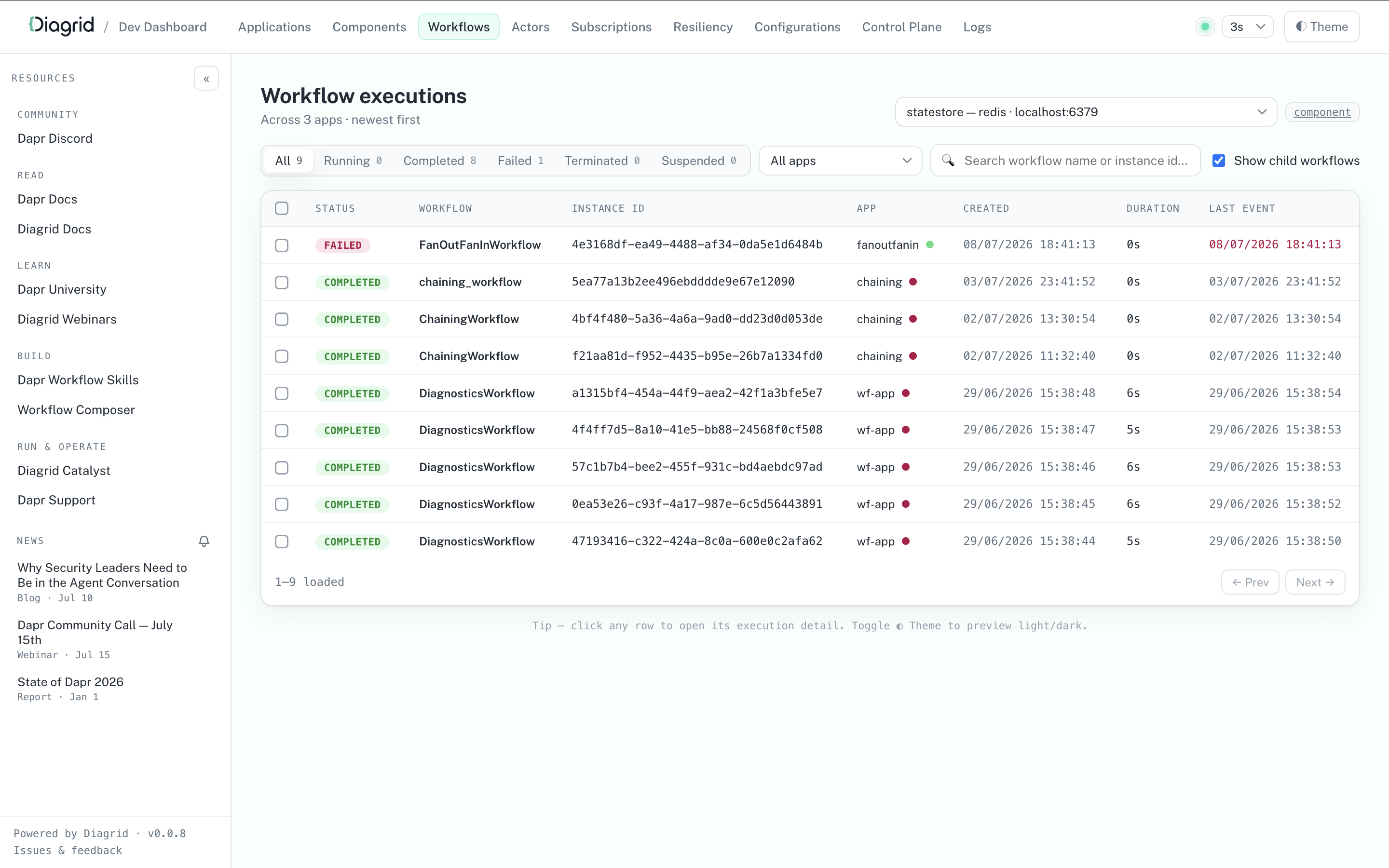
curl -sSL https://raw.githubusercontent.com/diagridio/dev-dashboard/main/scripts/install.sh | sh
iwr -useb https://raw.githubusercontent.com/diagridio/dev-dashboard/main/scripts/install.ps1 | iex
Start the Diagrid Dev Dashboard with:
diagrid-dev-dashboard
The dashboard will open in a browser at http://localhost:9090. Navigate to the Workflows page to inspect the workflows.
After authoring the workflow, you can test it using the Dapr CLI:
dapr run --app-id workflow-app python3 app.py
Make sure the application is running:
dapr list
dapr workflow run hello_world_wf --app-id workflow-app --input 'hello world' --instance-id test-run
dapr workflow list --app-id workflow-app -o wide
dapr workflow list --app-id workflow-app --filter-status COMPLETED -o wide
dapr workflow history --app-id workflow-app test-run
dapr run --app-id workflow-app npx ts-node src/app.ts
Make sure the application is running:
dapr list
dapr workflow run sequence --app-id workflow-app --input 'hello world' --instance-id test-run
dapr workflow list --app-id workflow-app -o wide
dapr workflow raise-event --app-id workflow-app test-run/businessEvent
dapr workflow list --app-id workflow-app --filter-status COMPLETED -o wide
dapr workflow history --app-id workflow-app test-run
dapr run --app-id workflow-app dotnet run
Make sure the application is running:
dapr list
dapr workflow run OrderProcessingWorkflow --app-id workflow-app --instance-id test-run --input '{"name": "Paperclips", "totalCost": 99.95}'
dapr workflow list --app-id workflow-app -o wide
dapr workflow raise-event --app-id workflow-app test-run/incoming-purchase-order --input '{"name": "Paperclips", "totalCost": 99.95}'
dapr workflow list --app-id workflow-app --filter-status COMPLETED -o wide
dapr workflow history --app-id workflow-app test-run
dapr run --app-id workflow-app -- java -jar target/WorkflowService-0.0.1-SNAPSHOT.jar
Make sure the application is running:
dapr list
dapr workflow run DemoWorkflow --app-id workflow-app --instance-id test-run --input "input data"
dapr workflow list --app-id workflow-app -o wide
dapr workflow raise-event --app-id workflow-app test-run/TestEvent --input 'TestEventPayload'
dapr workflow raise-event --app-id workflow-app test-run/event1 --input 'TestEvent 1 Payload'
dapr workflow raise-event --app-id workflow-app test-run/event2 --input 'TestEvent 2 Payload'
dapr workflow raise-event --app-id workflow-app test-run/event3 --input 'TestEvent 3 Payload'
dapr workflow list --app-id workflow-app --filter-status COMPLETED -o wide
dapr workflow history --app-id workflow-app test-run
dapr run --app-id workflow-app go run main.go
Make sure the application is running:
dapr list
dapr workflow run BusinessWorkflow --app-id workflow-app --input '1' --instance-id test-run
dapr workflow list --app-id workflow-app -o wide
dapr workflow raise-event --app-id workflow-app test-run/businessEvent
dapr workflow list --app-id workflow-app --filter-status COMPLETED -o wide
dapr workflow history test-run --app-id workflow-app
dapr workflow list --app-id workflow-app --filter-status RUNNING -o wide
dapr workflow list --app-id workflow-app --filter-status FAILED -o wide
dapr workflow list --app-id workflow-app --filter-status COMPLETED -o wide
# Raise an event your workflow is waiting for
dapr workflow raise-event <instance-id>/ApprovalReceived \
  --app-id workflow-app \
  --input '{"approved": true, "approver": "manager@company.com"}'
# List failed workflows
dapr workflow list --app-id workflow-app --filter-status FAILED --output wide

# Get detailed history of a failed workflow
dapr workflow history <failed-instance-id> --app-id workflow-app --output json

# Re-run the workflow after fixing issues
dapr workflow rerun <failed-instance-id> --app-id workflow-app --input '<new-input-json-data>'
Now that you’ve authored a workflow, learn how to manage it.
Manage workflows >>Now that you’ve authored the workflow and its activities in your application, you can start, terminate, rerun, and get information about the workflow using the CLI or API calls.
The SDK clients and the HTTP API can also target a workflow owned by another application in the same namespace, by sending that application’s ID with the request. (The CLI’s --app-id flag is different: it selects which sidecar to talk to, so those calls stay local to that application.) The target application’s workflow access policy decides whether the call is permitted. See Multi Application Workflows for the full picture.
The Dapr CLI provides commands for managing workflow instances in both self-hosted and Kubernetes environments.
See also Workflow Retention Policy for information on how to configure retention policies for completed workflows.
# Using the `orderprocessing` application, start a new workflow instance with input data
dapr workflow run OrderProcessingWorkflow \
  --app-id orderprocessing \
  --input '{"orderId": "12345", "amount": 100.50}'

# Start with a new workflow with a specific instance ID
# Note: an instance ID is only reusable once the existing workflow
# and all of its child workflows have reached a terminal state;
# otherwise the request is rejected. Purge a workflow to free up
# its instance ID unconditionally.
dapr workflow run OrderProcessingWorkflow \
  --app-id orderprocessing \
  --instance-id order-12345 \
  --input '{"orderId": "12345"}'

# Schedule a new workflow to start at 10:00:00 AM on December 25, 2024, Coordinated Universal Time (UTC).
dapr workflow run OrderProcessingWorkflow \
  --app-id orderprocessing \
  --start-time "2024-12-25T10:00:00Z"
# List all workflows for an app
dapr workflow list

# Filter by status
dapr workflow list --filter-status RUNNING

# Filter by workflow name and app ID
dapr workflow list --app-id orderprocessing --filter-name OrderProcessingWorkflow

# Filter by age (workflows started in last 24 hours)
dapr workflow list --filter-max-age 24h

# Get detailed output
dapr workflow list -o wide
# Get execution history
dapr workflow history order-12345

# Get history in JSON format on a particular app ID.
dapr workflow history order-12345 --app-id orderprocessing --output json
# Suspend a running workflow
dapr workflow suspend order-12345 \
  --app-id orderprocessing \
  --reason "Waiting for manual approval"

# Resume a suspended workflow
dapr workflow resume order-12345 \
  --app-id orderprocessing \
  --reason "Approved by manager"

# Terminate a workflow
dapr workflow terminate order-12345 \
  --app-id orderprocessing \
  --output '{"reason": "Cancelled by customer"}'
# Raise an event for a waiting workflow
dapr workflow raise-event order-12345/PaymentReceived \
  --app-id orderprocessing \
  --input '{"paymentId": "pay-67890", "amount": 100.50}'
# Re-run from the beginning
dapr workflow rerun order-12345

# Re-run from a specific event ID, discovered via the history command
dapr workflow rerun order-12345 --event-id 5

# Re-run with a new specified instance ID
dapr workflow rerun order-12345 --new-instance-id order-12345-retry
Note that purging a workflow from the CLI will also delete all associated Scheduler reminders.
<p>It is required that a workflow client is running in the application to perform purge operations.</p>
The workflow client connection is required in order to preserve the workflow state machine integrity and prevent corruption. Errors like the following suggest that the workflow client is not running:
failed to purge orchestration state: rpc error: code = FailedPrecondition desc = failed to purge orchestration state: failed to lookup actor: api error: code = FailedPrecondition desc = did not find address for actor
It is possible to purge a workflow without a workflow application running by using the --force flag; however, this should only be used when you are certain that no workflow instances are currently running, as it will otherwise corrupt the workflow state machine.
# Purge a specific instance
dapr workflow purge order-12345

# Purge all completed workflows older than 30 days
dapr workflow purge --all-older-than 720h

# Purge only FAILED workflows older than 30 days
dapr workflow purge --all-older-than 720h --all-filter-status FAILED

# Purge all terminal workflows (use with caution!)
dapr workflow purge --app-id orderprocessing --all

# Force a purge without a running workflow client (use with extreme caution!)
dapr workflow purge order-12345 --force
All commands support the -k flag for Kubernetes deployments:
# List workflows in Kubernetes
dapr workflow list \
  --kubernetes \
  --namespace production \
  --app-id orderprocessing

# Suspend a workflow in Kubernetes
dapr workflow suspend order-12345 \
  --kubernetes \
  --namespace production \
  --app-id orderprocessing \
  --reason "Maintenance window"
In self-hosted mode, simply run:
dapr workflow list
In Kubernetes mode, specify the --kubernetes/-k flag along with the namespace and app ID:
dapr workflow list -k
Monitor Running Workflows: Use filtered lists to track long-running instances
dapr workflow list --app-id orderprocessing --filter-status RUNNING --filter-max-age 24h
Use Instance IDs: Assign meaningful instance IDs for easier tracking
dapr workflow run OrderWorkflow --app-id orderprocessing --instance-id "order-$(date +%s)"
Export for Analysis: Export workflow data for analysis
dapr workflow list --app-id orderprocessing --output json > workflows.json
For local development, you can use the Dapr Dev Dashboard as a visual alternative to the dapr workflow list and dapr workflow history commands. The dashboard lists the workflow instances of your running apps with their status, and shows the full event history of each instance, including activity inputs and outputs, timers, and external events. The Dev Dashboard is intended for local development and does not run inside Kubernetes.
Workflow reminders are stored in the Scheduler and can be managed using the dapr scheduler CLI.
dapr scheduler list --filter workflow
NAME                                           BEGIN     COUNT  LAST TRIGGER
workflow/my-app/instance1/timer-0-ABC123       +50.0h    0
workflow/my-app/instance2/timer-0-XYZ789       +50.0h    0
Get reminder details
dapr scheduler get workflow/my-app/instance1/timer-0-ABC123 -o yaml
Delete a single reminder:
dapr scheduler delete workflow/my-app/instance1/timer-0-ABC123
Delete all reminders for a given workflow app"
dapr scheduler delete-all workflow/my-app
Delete all reminders for a specific workflow instance:
dapr scheduler delete-all workflow/my-app/instance1
Export all reminders:
dapr scheduler export -o workflow-reminders-backup.bin
Restore from a backup file:
dapr scheduler import -f workflow-reminders-backup.bin
Manage your workflow within your code. In the workflow example from the Author a workflow guide, the workflow is registered in the code using the following APIs:
from dapr.ext.workflow import WorkflowRuntime, DaprWorkflowContext, WorkflowActivityContext
from dapr.clients import DaprClient

# Sane parameters
instanceId = "exampleInstanceID"
workflowComponent = "dapr"
workflowName = "hello_world_wf"
eventName = "event1"
eventData = "eventData"

# Start the workflow
wf_client.schedule_new_workflow(
        workflow=hello_world_wf, input=input_data, instance_id=instance_id
    )

# Get info on the workflow
wf_client.get_workflow_state(instance_id=instance_id)

# Pause the workflow
wf_client.pause_workflow(instance_id=instance_id)
    metadata = wf_client.get_workflow_state(instance_id=instance_id)

# Resume the workflow
wf_client.resume_workflow(instance_id=instance_id)

# Raise an event on the workflow.
wf_client.raise_workflow_event(instance_id=instance_id, event_name=event_name, data=event_data)

# Purge the workflow
wf_client.purge_workflow(instance_id=instance_id)

# Wait for workflow completion
wf_client.wait_for_workflow_completion(instance_id, timeout_in_seconds=30)
Pass app_id to any of these operations to act on a workflow owned by another application. The target’s workflow access policy decides whether the call is allowed:
wf_client.terminate_workflow(instance_id=instance_id, app_id='app2')
Manage your workflow within your code. In the workflow example from the Author a workflow guide, the workflow is registered in the code using the following APIs:
import { DaprClient } from "@dapr/dapr";

async function printWorkflowStatus(client: DaprClient, instanceId: string) {
  const workflow = await client.workflow.get(instanceId);
  console.log(
    `Workflow ${workflow.workflowName}, created at ${workflow.createdAt.toUTCString()}, has status ${
      workflow.runtimeStatus
    }`,
  );
  console.log(`Additional properties: ${JSON.stringify(workflow.properties)}`);
  console.log("--------------------------------------------------\n\n");
}

async function start() {
  const client = new DaprClient();

  // Start a new workflow instance
  const instanceId = await client.workflow.start("OrderProcessingWorkflow", {
    Name: "Paperclips",
    TotalCost: 99.95,
    Quantity: 4,
  });
  console.log(`Started workflow instance ${instanceId}`);
  await printWorkflowStatus(client, instanceId);

  // Pause a workflow instance
  await client.workflow.pause(instanceId);
  console.log(`Paused workflow instance ${instanceId}`);
  await printWorkflowStatus(client, instanceId);

  // Resume a workflow instance
  await client.workflow.resume(instanceId);
  console.log(`Resumed workflow instance ${instanceId}`);
  await printWorkflowStatus(client, instanceId);

  // Terminate a workflow instance
  await client.workflow.terminate(instanceId);
  console.log(`Terminated workflow instance ${instanceId}`);
  await printWorkflowStatus(client, instanceId);

  // Wait for the workflow to complete, 30 seconds!
  await new Promise((resolve) => setTimeout(resolve, 30000));
  await printWorkflowStatus(client, instanceId);

  // Purge a workflow instance
  await client.workflow.purge(instanceId);
  console.log(`Purged workflow instance ${instanceId}`);
  // This will throw an error because the workflow instance no longer exists.
  await printWorkflowStatus(client, instanceId);
}

start().catch((e) => {
  console.error(e);
  process.exit(1);
});
Manage your workflow within your code. In the OrderProcessingWorkflow example from the Author a workflow guide, the workflow is registered in the code. You can now start, terminate, and get information about a running workflow:
string orderId = "exampleOrderId";
OrderPayload input = new OrderPayload("Paperclips", 99.95);
Dictionary<string, string> workflowOptions; // This is an optional parameter

// Start the workflow using the orderId as our workflow ID. This returns a string containing the instance ID for the particular workflow instance, whether we provide it ourselves or not.
await daprWorkflowClient.ScheduleNewWorkflowAsync(nameof(OrderProcessingWorkflow), orderId, input, workflowOptions);

// Get information on the workflow. This response contains information such as the status of the workflow, when it started, and more!
WorkflowState currentState = await daprWorkflowClient.GetWorkflowStateAsync(orderId, orderId);

// Terminate the workflow
await daprWorkflowClient.TerminateWorkflowAsync(orderId);

// Raise an event (an incoming purchase order) that your workflow will wait for
await daprWorkflowClient.RaiseEventAsync(orderId, "incoming-purchase-order", input);

// Pause
await daprWorkflowClient.SuspendWorkflowAsync(orderId);

// Resume
await daprWorkflowClient.ResumeWorkflowAsync(orderId);

// Purge the workflow, removing all inbox and history information from associated instance
await daprWorkflowClient.PurgeInstanceAsync(orderId);
Pass targetAppId to act on a workflow owned by another application. The target’s workflow access policy decides whether the call is allowed:
await client.TerminateWorkflowAsync(instanceId, null, "app2");
Manage your workflow within your code. In the workflow example from the Java SDK, the workflow is registered in the code using the following APIs:
package io.dapr.examples.workflows;

import io.dapr.workflows.client.DaprWorkflowClient;
import io.dapr.workflows.client.WorkflowInstanceStatus;

// ...
public class DemoWorkflowClient {

  // ...
  public static void main(String[] args) throws InterruptedException {
    DaprWorkflowClient client = new DaprWorkflowClient();

    try (client) {
      // Start a workflow
      String instanceId = client.scheduleNewWorkflow(DemoWorkflow.class, "input data");

      // Get status information on the workflow
      WorkflowInstanceStatus workflowMetadata = client.getInstanceState(instanceId, true);

      // Wait or pause for the workflow instance start
      try {
        WorkflowInstanceStatus waitForInstanceStartResult =
            client.waitForInstanceStart(instanceId, Duration.ofSeconds(60), true);
      }

      // Raise an event for the workflow; you can raise several events in parallel
      client.raiseEvent(instanceId, "TestEvent", "TestEventPayload");
      client.raiseEvent(instanceId, "event1", "TestEvent 1 Payload");
      client.raiseEvent(instanceId, "event2", "TestEvent 2 Payload");
      client.raiseEvent(instanceId, "event3", "TestEvent 3 Payload");

      // Wait for workflow to complete running through tasks
      try {
        WorkflowInstanceStatus waitForInstanceCompletionResult =
            client.waitForInstanceCompletion(instanceId, Duration.ofSeconds(60), true);
      }

      // Purge the workflow instance, removing all metadata associated with it
      boolean purgeResult = client.purgeInstance(instanceId);

      // Terminate the workflow instance
      client.terminateWorkflow(instanceToTerminateId, null);

    System.exit(0);
  }
}
Pass the target application’s ID to act on a workflow it owns. The target’s workflow access policy decides whether the call is allowed:
client.terminateWorkflow(instanceId, null, "app2");
Manage your workflow within your code. In the workflow example from the Go SDK, the workflow is registered in the code using the following APIs:
// Start workflow
type StartWorkflowRequest struct {
	InstanceID        string // Optional instance identifier
	WorkflowComponent string
	WorkflowName      string
	Options           map[string]string // Optional metadata
	Input             any               // Optional input
	SendRawInput      bool              // Set to True in order to disable serialization on the input
}

type StartWorkflowResponse struct {
	InstanceID string
}

// Get the workflow status
type GetWorkflowRequest struct {
	InstanceID        string
	WorkflowComponent string
}

type GetWorkflowResponse struct {
	InstanceID    string
	WorkflowName  string
	CreatedAt     time.Time
	LastUpdatedAt time.Time
	RuntimeStatus string
	Properties    map[string]string
}

// Purge workflow
type PurgeWorkflowRequest struct {
	InstanceID        string
	WorkflowComponent string
}

// Terminate workflow
type TerminateWorkflowRequest struct {
	InstanceID        string
	WorkflowComponent string
}

// Pause workflow
type PauseWorkflowRequest struct {
	InstanceID        string
	WorkflowComponent string
}

// Resume workflow
type ResumeWorkflowRequest struct {
	InstanceID        string
	WorkflowComponent string
}

// Raise an event for the running workflow
type RaiseEventWorkflowRequest struct {
	InstanceID        string
	WorkflowComponent string
	EventName         string
	EventData         any
	SendRawData       bool // Set to True in order to disable serialization on the data
}
Pass the matching app ID option to act on a workflow owned by another application. The target’s workflow access policy decides whether the call is allowed:
err = client.TerminateWorkflow(ctx, instanceID, workflow.WithTerminateAppID("app2"))
Manage your workflow using HTTP calls. The example below plugs in the properties from the Author a workflow example with a random instance ID number.
To start your workflow with an ID 12345678, run:
curl -X POST "http://localhost:3500/v1.0/workflows/dapr/OrderProcessingWorkflow/start?instanceID=12345678"
Note that workflow instance IDs can only contain alphanumeric characters, underscores, and dashes.
It is strongly recommended to give every execution a new instance ID rather than reusing an old one. See <a href="https://v1-19.docs.dapr.io/developing-applications/building-blocks/workflow/workflow-features-concepts/#implications-of-instance-id-reuse">Implications of instance ID reuse</a>. An instance ID can only be reused once the existing workflow with that ID, and every child workflow it created (checked recursively), has reached a terminal state (<code>COMPLETED</code>, <code>FAILED</code>, or <code>TERMINATED</code>). Otherwise the request fails with HTTP <code>500</code> and error code <code>ERR_START_WORKFLOW</code>. SDK workflow clients get the gRPC <code>AlreadyExists</code> status code instead. To free up an instance ID unconditionally, first purge the existing workflow using the <a href="https://v1-19.docs.dapr.io/reference/api/workflow_api/#purge-workflow-request">purge API</a> or configure a <a href="https://v1-19.docs.dapr.io/developing-applications/building-blocks/workflow/workflow-history-retention-policy/">retention policy</a>.
The app that owns the workflow must be running with its workflow worker connected to its Dapr sidecar. Otherwise the start request fails at once with no workflow worker is connected for app '<app-id>', instead of retrying and then returning an actor routing error.
To terminate your workflow with an ID 12345678, run:
curl -X POST "http://localhost:3500/v1.0/workflows/dapr/12345678/terminate"
For workflow components that support subscribing to external events, such as the Dapr Workflow engine, you can use the following “raise event” API to deliver a named event to a specific workflow instance.
curl -X POST "http://localhost:3500/v1.0/workflows/<workflowComponentName>/<instanceID>/raiseEvent/<eventName>"
An
eventNamecan be any function.
To plan for down-time, wait for inputs, and more, you can pause and then resume a workflow. To pause a workflow with an ID 12345678 until triggered to resume, run:
curl -X POST "http://localhost:3500/v1.0/workflows/dapr/12345678/pause"
To resume a workflow with an ID 12345678, run:
curl -X POST "http://localhost:3500/v1.0/workflows/dapr/12345678/resume"
The purge API can be used to permanently delete workflow metadata from the underlying state store, including any stored inputs, outputs, and workflow history records. This is often useful for implementing data retention policies and for freeing resources.
Only workflow instances in the COMPLETED, FAILED, or TERMINATED state can be purged. If the workflow is in any other state, calling purge returns an error.
curl -X POST "http://localhost:3500/v1.0/workflows/dapr/12345678/purge"
To fetch workflow information (outputs and inputs) with an ID 12345678, run:
curl -X GET "http://localhost:3500/v1.0/workflows/dapr/12345678"
Add the appID query parameter to any of the calls above to act on a workflow owned by another application. Every operation in the workflow API reference accepts it, and the target’s workflow access policy decides whether the call is allowed:
curl -X POST "http://localhost:3500/v1.0/workflows/dapr/12345678/terminate?appID=app2"
Now that you’ve learned how to manage workflows, learn how to execute workflows across multiple applications
Multi Application Workflows>>It is often the case that a single workflow spans multiple applications, microservices, or programming languages. This is where an activity or a child workflow will be executed on a different application than the one hosting the parent workflow.
Some scenarios where this is useful include:
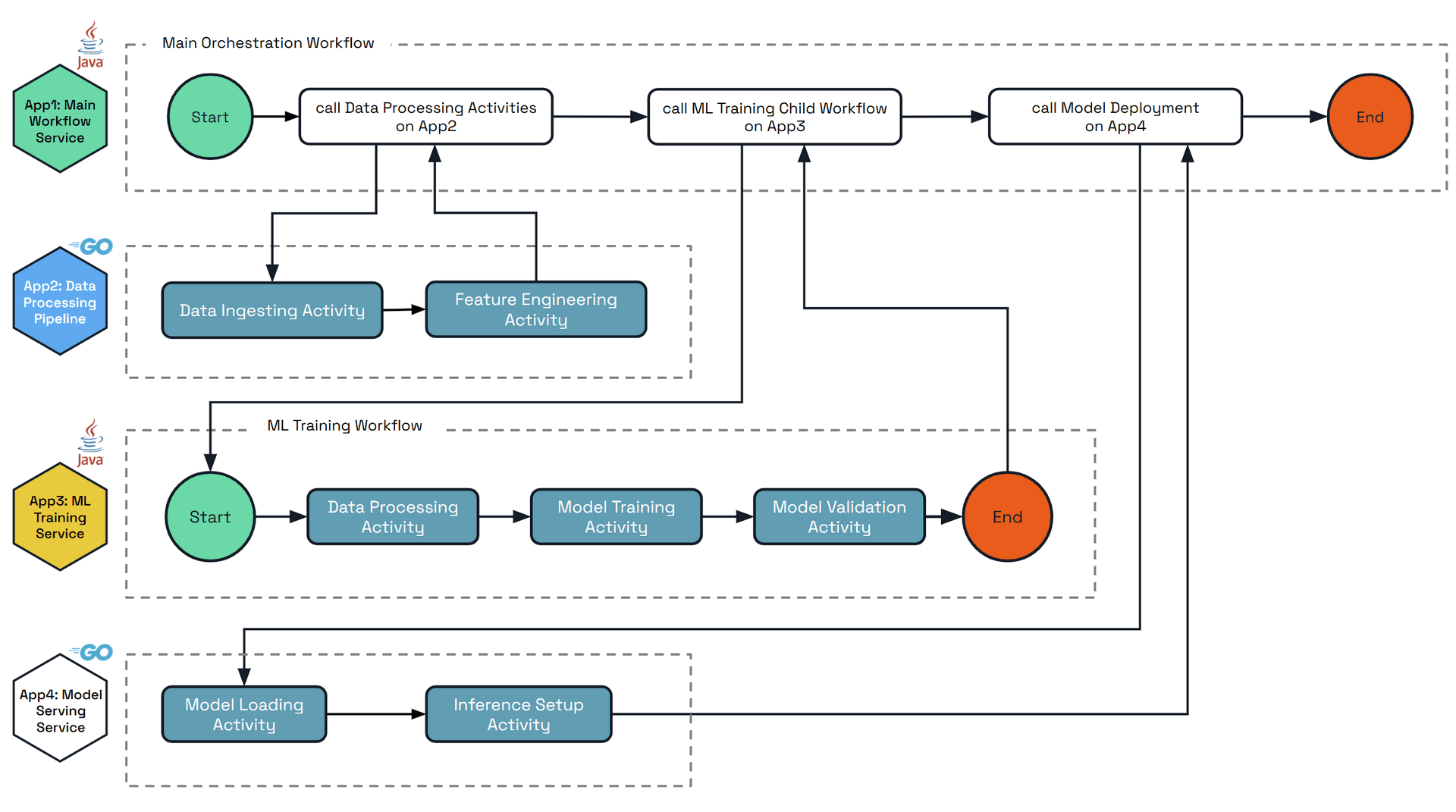
The diagram below shows an example scenario of a complex workflow that orchestrates across multiple applications that are written in different languages. Each applications’ main steps and activities are:
• App1: Main Workflow Service - Top-level orchestrator that coordinates the entire ML pipeline
• App2: Data Processing Pipeline - GPU activities only
• App3: ML Training Child Workflow - Contains a child workflow and activities
• App4: Model Serving Service - Beefy GPU app with activities only
Workflow execution routing is based on the App ID of the hosting Dapr application. By default, the full workflow execution is hosted on the app ID that started the workflow. This workflow can be executed across any replicas of that app ID, not just the single replica which scheduled the workflow.
It is possible to execute activities and child workflows on different app IDs by specifying the target app ID parameter, inside the workflow execution code. Upon execution, the target app ID executes the activity or child workflow, and returns the result to the parent workflow of the originating app ID.
The entire Workflow execution may be distributed across multiple app IDs with no limit, with each activity or child workflow specifying the target app ID. The final history of the workflow will be saved by the app ID that hosts the very parent (or can consider it the root) workflow.
SDKs supporting multi-application workflows - Multi-application workflows are used via the SDKs. Currently the following are supported:
When calling multi-application activities or child workflows:
Client operations fail at once when no workflow worker is connected for the target application, local or remote, with the error no workflow worker is connected for app '<app-id>'. This tells you to start the app, or wait for its worker to connect, instead of returning an actor routing error such as did not find address for actor. Starting a workflow no longer retries in this case, so the error comes about 20 seconds sooner. The original error stays wrapped, so existing error code checks still match.
It is paramount that there is coordination between the teams owning the different app IDs to ensure that the activities and child workflows are defined and available when needed.
It is often the case that Activities take some amount of time to complete, or similarly are expensive to execute in resource or dollar cost. It is therefore undesirable to execute these activities more than once for the same round, even in unhappy paths. Before 1.17 in multi-application scenarios, Activities would publish responses over a network call to the other application which is hosting the owning Workflow. In the case where the hosting workflow application is down or otherwise unreachable, the result would be lost and the Activity would be retried, leading to duplicate execution of the Activity.
In 1.17, enabling the WorkflowsRemoteActivityReminder feature gate will make the activity result be sent to the owning workflow application with a reminder in the event that the workflow application is offline or unreachable, ensuring that the result is not lost and duplicate execution is avoided.
This option should be enabled by all users who have all applications running Dapr version 1.17 or later.
As of 1.18 it is enabled by default. In 1.17 it was disabled by default for backwards compatibility between Dapr versions, and can be opted into via the feature gate.
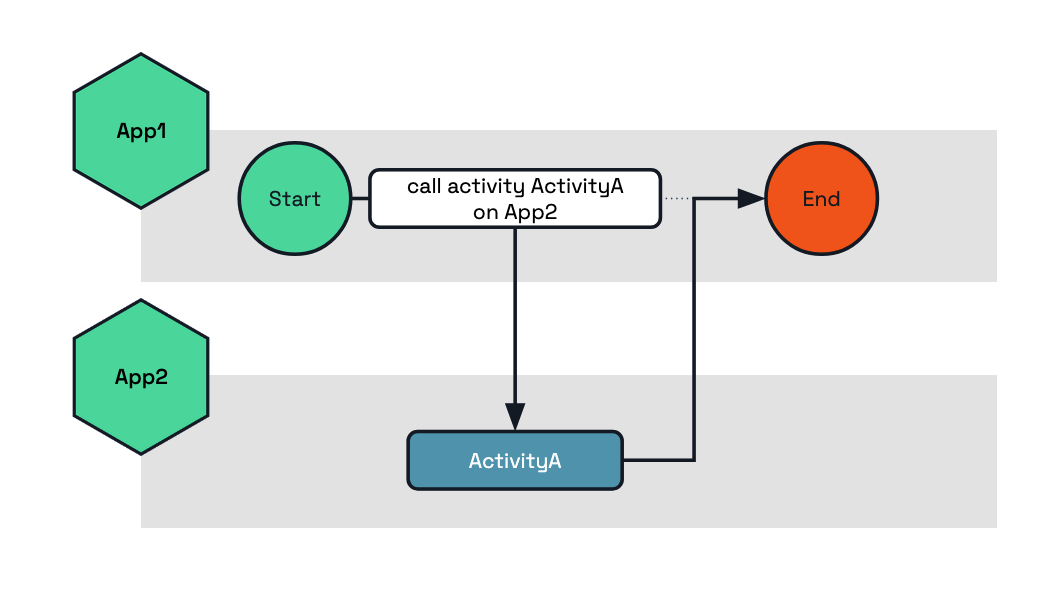
The following example shows how to execute the activity ActivityA on the target app App2.
func BusinessWorkflow(ctx *workflow.WorkflowContext) (any, error) {
	var output string
	err := ctx.CallActivity("ActivityA",
		workflow.WithActivityInput("my-input"),
		workflow.WithActivityAppID("App2"), // Here we set the target app ID which will execute this activity.
	).Await(&output)

	if err != nil {
		return nil, err
	}

	return output, nil
}
public class BusinessWorkflow implements Workflow {
  @Override
  public WorkflowStub create() {
      return ctx -> {
          String output = ctx.callActivity(
                  ActivityA.class.getName(),
                  "my-input",
                  new WorkflowTaskOptions("App2"), // Here we set the target app ID which will execute this activity.
                  String.class
          ).await();

          ctx.complete(output);
      };
  }
}
@wfr.workflow
def app1_workflow(ctx: wf.DaprWorkflowContext):
  output = yield ctx.call_activity('ActivityA', input='my-input', app_id='App2')
  return output
public sealed class BusinessWorkflow : Workflow<string, string>
{
    public override async Task<string> RunAsync(WorkflowContext context, string input)
    {
        var options = new WorkflowTaskOptions { TargetAppId = "App2" };
        var output = await context.CallActivityAsync<string>(nameof(ActivityA), input, options);
        return output;
    }
}
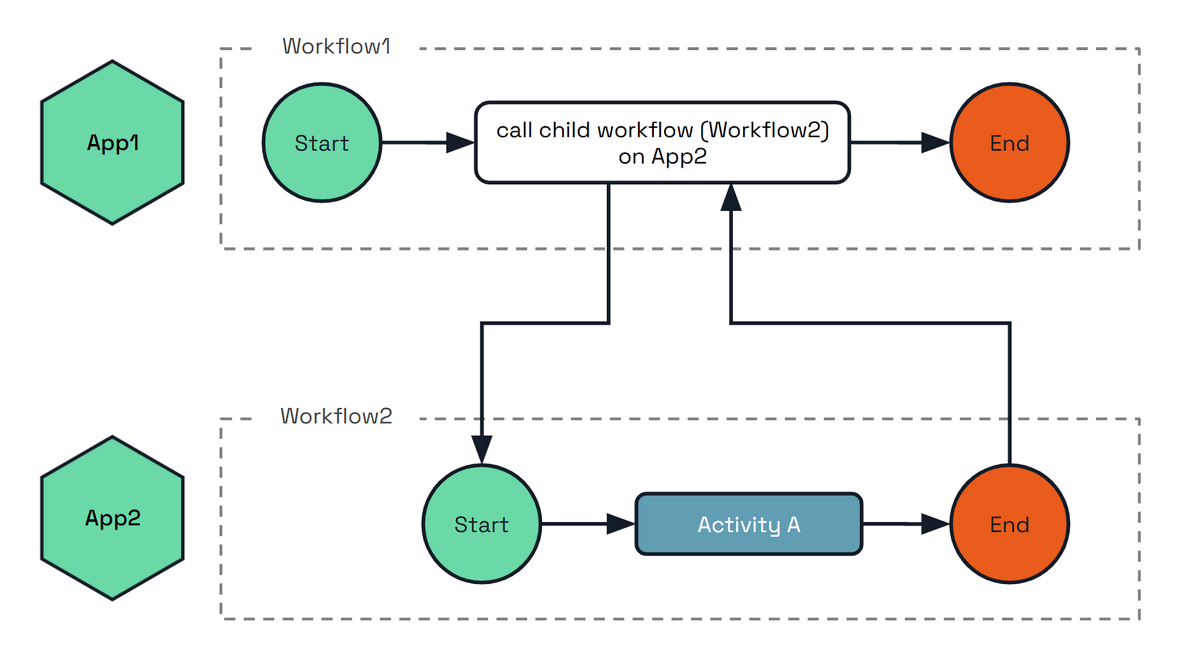
The following example shows how to execute the child workflow Workflow2 on the target app App2.
func BusinessWorkflow(ctx *workflow.WorkflowContext) (any, error) {
	var output string
	err := ctx.CallChildWorkflow("Workflow2",
		workflow.WithChildWorkflowInput("my-input"),
		workflow.WithChildWorkflowAppID("App2"), // Here we set the target app ID which will execute this child workflow.
	).Await(&output)

	if err != nil {
		return nil, err
	}

	return output, nil
}
@wfr.workflow
def workflow1(ctx: wf.DaprWorkflowContext):
  output = yield ctx.call_child_workflow(workflow='Workflow2', input='my-input', app_id='App2')
  return output
public sealed class BusinessWorkflow : Workflow<string, string>
{
    public override async Task<string> RunAsync(WorkflowContext context, string input)
    {
        var options = new ChildWorkflowTaskOptions { TargetAppId = "App2" };
        var output = await context.CallChildWorkflowAsync<string>(nameof(Workflow2), input, options);
        return output;
    }
}
The examples above compose work across applications from inside a running workflow. Client-level operations can cross applications too: an application that holds nothing but a workflow client can start, inspect and control an instance owned by another application in the same namespace.
This means the application that owns a workflow does not have to build and maintain its own API for other teams to drive it. An operations tool can terminate a stuck order by its instance ID, a support tool can raise an approval event on it, and a front-end service can start a workflow it does not host, all through the standard workflow API. The owning application stays in control: its workflow access policy decides which callers may perform which operation on which workflow. See the WorkflowAccessPolicy spec for the resource format.
Take an application app-a that terminates the workflow instance order-1, which is owned by app-b:
app-a hosts no workflow code at all. It names the owning application, and its sidecar does the rest: it stamps app-a as the caller, and app-b’s sidecar checks that identity against its own access policy before the operation reaches the instance. Only app-b ever runs the workflow.
Because the caller’s identity is what the policy is evaluated against, mTLS must be enabled for cross-application enforcement. With a policy loaded and mTLS off, the target cannot verify who is calling and denies the request.
Leaving the app ID unset, or setting it to the calling application’s own ID, is the ordinary local operation. Against a runtime that predates this feature the app ID is ignored and the operation applies to the local application.
Start, get, raise event, pause, resume, terminate, purge and rerun can target another application. Rerun is available through the SDK workflow clients only, not the HTTP or gRPC workflow API. Listing instance IDs and reading instance history always apply to the local application.
Add the appID query parameter to any call in the workflow API reference:
# Start a workflow hosted by app2
curl -X POST "http://localhost:3500/v1.0-beta1/workflows/dapr/OrderWF/start?appID=app2&instanceID=order-1"

# Inspect it, raise an event, and terminate it on app2
curl "http://localhost:3500/v1.0-beta1/workflows/dapr/order-1?appID=app2"
curl -X POST "http://localhost:3500/v1.0-beta1/workflows/dapr/order-1/raiseEvent/approval?appID=app2" -d '"approved"'
curl -X POST "http://localhost:3500/v1.0-beta1/workflows/dapr/order-1/terminate?appID=app2"
Set the app_id field (JSON name appID) on the workflow request messages: StartWorkflowRequest, GetWorkflowRequest, TerminateWorkflowRequest, RaiseEventWorkflowRequest, PauseWorkflowRequest, ResumeWorkflowRequest and PurgeWorkflowRequest. Each corresponds to an operation in the workflow API reference: start, get, terminate, raise event, pause, resume and purge.
app_id is a keyword-only argument on every client operation.
instance_id = client.schedule_new_workflow(workflow=order_wf, app_id='app2')

state = client.get_workflow_state(instance_id, app_id='app2')
client.raise_workflow_event(instance_id, 'approval', data='approved', app_id='app2')
client.pause_workflow(instance_id, app_id='app2')
client.resume_workflow(instance_id, app_id='app2')
client.terminate_workflow(instance_id, app_id='app2')
client.purge_workflow(instance_id, app_id='app2')
The async client in dapr.ext.workflow.aio takes the same argument. See the Python workflow examples.
Scheduling takes the target through StartWorkflowOptions; the other operations take a targetAppId argument.
var options = new StartWorkflowOptionsBuilder().WithTargetAppId("app2").Build();
var instanceId = await client.ScheduleNewWorkflowAsync("OrderWF", input: null, options: options);

var state = await client.GetWorkflowStateAsync(instanceId, "app2");
await client.RaiseEventAsync(instanceId, "approval", "approved", "app2");
await client.SuspendWorkflowAsync(instanceId, null, "app2");
await client.ResumeWorkflowAsync(instanceId, null, "app2");
await client.TerminateWorkflowAsync(instanceId, null, "app2");
await client.PurgeInstanceAsync(instanceId, "app2");
Scheduling takes the target through NewWorkflowOptions; the other operations have an overload with a trailing appId.
NewWorkflowOptions options = new NewWorkflowOptions().setAppId("app2");
String instanceId = client.scheduleNewWorkflow(OrderWorkflow.class, options);

WorkflowState state = client.getWorkflowState(instanceId, true, "app2");
client.raiseEvent(instanceId, "approval", "approved", "app2");
client.suspendWorkflow(instanceId, null, "app2");
client.resumeWorkflow(instanceId, null, "app2");
client.terminateWorkflow(instanceId, null, "app2");
client.purgeWorkflow(instanceId, "app2");
Each operation has its own app ID option.
instanceID, err := client.ScheduleWorkflow(ctx, "OrderWF", workflow.WithAppID("app2"))

meta, err := client.FetchWorkflowMetadata(ctx, instanceID, workflow.WithFetchAppID("app2"))
err = client.RaiseEvent(ctx, instanceID, "approval", workflow.WithRaiseEventAppID("app2"))
err = client.SuspendWorkflow(ctx, instanceID, "", workflow.WithSuspendAppID("app2"))
err = client.ResumeWorkflow(ctx, instanceID, "", workflow.WithResumeAppID("app2"))
err = client.TerminateWorkflow(ctx, instanceID, workflow.WithTerminateAppID("app2"))
err = client.PurgeWorkflowState(ctx, instanceID, workflow.WithPurgeAppID("app2"))
Client-level cross-application operations require Dapr runtime v1.19 or later, and the SDK support shipping alongside it. The arguments and options shown above are not present in earlier SDK releases: check that your SDK version includes them before using these snippets.
The JavaScript SDK does not support cross-application client operations.
The target application’s workflow access policy governs whether each operation is permitted, per operation and per workflow name, using the rules defined in the WorkflowAccessPolicy spec. Cross-namespace targeting is not supported.
When using multi-application workflows, you may want to restrict which applications can schedule activities or child workflows on a target application. Dapr provides the WorkflowAccessPolicy resource for this purpose.
Policies are a pure allow-list and self-calls are always permitted, so the target application does not need to list itself in the callers to execute its own activities. The following example of a workflow access policy is applied to the ml-worker application. All policies that target a given appID (in this case ml-worker) are loaded by the sidecar when the application is instantiated.
This policy allows the orchestrator-app application to schedule the TrainModel and ValidateModel activities on the ml-worker application.
apiVersion: dapr.io/v1alpha1
kind: WorkflowAccessPolicy
metadata:
  name: ml-worker-policy
  namespace: production
scopes:
  - ml-worker
spec:
  rules:
    - callers:
        - appID: orchestrator-app
      activities:
        - name: TrainModel
        - name: ValidateModel
Read How-To: Apply workflow access policies for more examples and details on the cross-app enforcement model.
Dapr workflow state is stored in the actor state store. By default, Dapr Workflows retains the complete history of workflow state changes indefinitely. This means historical workflows can be queried and inspected at any time. Running many workflows or workflows which generate large amounts of state change history can lead to increased storage usage, which can eventually fill up the state store disk space.
To help manage storage usage, Dapr Workflows supports configuring a history retention policy.
The retention policy defines how long to retain workflow state change history before it is deleted.
Workflows will only be eligible for deletion once it has reached a terminal state (Completed, Failed, or Terminated).
Each workflow terminal state can have a custom retention duration, as well as a default retention duration for any terminal states not explicitly configured.
The duration is defined as a Go duration string (for example, 72h for 72 hours, or 30m for 30 minutes).
Completed workflows, while retaining Failed and Terminated workflows for longer periods to allow for investigation.When adding or changing a retention policy, the policy only applies to workflows that newly reach a configured terminal state after the policy is in effect. It does not retroactively clean up workflows that are already in a terminal state.
To retroactively purge existing terminal workflows, use the Dapr CLI:
# Purge all terminal workflows older than a specific duration
dapr workflow purge --app-id <app-id> --all-older-than <duration>

# Purge only workflows with a specific status older than a duration
dapr workflow purge --app-id <app-id> --all-older-than <duration> --all-filter-status COMPLETED
dapr workflow purge --app-id <app-id> --all-older-than <duration> --all-filter-status FAILED
dapr workflow purge --app-id <app-id> --all-older-than <duration> --all-filter-status TERMINATED
When purging workflows, ensure that a workflow client is running for the same app-id so the workflow state machine can advance correctly. Avoid using the --force option while workflow instances may still be active, as this can corrupt the workflow state machine.
See How to: Manage workflows for more details on the purge command and additional cautions.
The following example configuration sets each of the terminal states.
The anyTerminal property set here would take no effect as all terminal states are explicitly configured, however it is included for reference.
See the Dapr Configuration documentation for more information on how to apply configuration to your Dapr applications.
kind: Configuration
metadata:
  name: appconfig
spec:
  workflow:
    stateRetentionPolicy:
      anyTerminal: "360h"
      completed: "1m"
      failed: "720h"
      terminated: "360h"
Dapr provides concurrency limits for workflows and activities at two levels:
Both levels can be configured independently and work together. Global limits enforce namespace-wide capacity constraints, for example, to respect rate limits on downstream services. Per-sidecar limits protect individual instances from resource exhaustion.
Prefer global limits when you want to express a true concurrency limit. Because a per-sidecar limit applies to each instance independently, the effective namespace-wide limit is the per-sidecar value multiplied by the number of replicas, so it drifts every time you scale up or down. A global limit holds the same total regardless of how many replicas are running, which is usually what you mean when you say “at most N at a time”.
Global limits enforce a maximum across all replicas of your application. The Dapr scheduler divides the limit among its instances and holds back triggers when the limit is reached, dispatching them as capacity becomes available.
Because the total is fixed regardless of how many replicas are running, a global limit is the most accurate way to express a true concurrency limit. This is the recommended starting point for most workloads.
WorkflowsFastPath preview feature disables itself at
sidecar startup (an Info log is emitted) so that the limits remain effective. Per-sidecar limits are compatible with
the fast path.apiVersion: dapr.io/v1alpha1
kind: Configuration
metadata:
name: appconfig
spec:
workflow:
globalMaxConcurrentWorkflowInvocations: 50
globalMaxConcurrentActivityInvocations: 200
| Property | Type | Description |
|---|---|---|
globalMaxConcurrentWorkflowInvocations | int32 | Max concurrent workflow executions across all replicas. Default: unlimited. |
globalMaxConcurrentActivityInvocations | int32 | Max concurrent activity executions across all replicas. Default: unlimited. |
You can set concurrency limits for specific workflow or activity names. This is useful when certain workflows or activities call rate-limited external services.
apiVersion: dapr.io/v1alpha1
kind: Configuration
metadata:
  name: appconfig
spec:
  workflow:
    globalMaxConcurrentActivityInvocations: 200
    activityConcurrencyLimits:
      - name: SendEmail
        maxConcurrent: 5
      - name: CallPaymentAPI
        maxConcurrent: 10
    workflowConcurrencyLimits:
      - name: OrderProcess
        maxConcurrent: 20
| Property | Type | Description |
|---|---|---|
activityConcurrencyLimits | array | Per-activity-name concurrency limits. |
workflowConcurrencyLimits | array | Per-workflow-name concurrency limits. |
activityConcurrencyLimits[].name | string | Activity name to limit. |
activityConcurrencyLimits[].maxConcurrent | int32 | Max concurrent executions across all replicas for this activity. |
workflowConcurrencyLimits[].name | string | Workflow name to limit. |
workflowConcurrencyLimits[].maxConcurrent | int32 | Max concurrent executions across all replicas for this workflow. |
A trigger must satisfy all applicable limits. For example, if globalMaxConcurrentActivityInvocations is 200 and SendEmail has a per-name limit of 5, then at most 5 SendEmail activities can run, and all activities combined cannot exceed 200.
Per-sidecar limits restrict concurrency within a single Dapr sidecar. Because they apply to each instance independently, the effective namespace-wide capacity scales with the number of replicas: if you have 10 replicas with a per-sidecar limit of 100, the effective namespace-wide capacity is up to 1000. For this reason, reach for per-sidecar limits to protect individual instances from resource exhaustion rather than to enforce a true namespace-wide concurrency limit.
apiVersion: dapr.io/v1alpha1
kind: Configuration
metadata:
  name: appconfig
spec:
  workflow:
    maxConcurrentWorkflowInvocations: 100
    maxConcurrentActivityInvocations: 1000
| Property | Type | Description |
|---|---|---|
maxConcurrentWorkflowInvocations | int32 | Max concurrent workflow executions per sidecar. Default: unlimited. |
maxConcurrentActivityInvocations | int32 | Max concurrent activity executions per sidecar. Default: unlimited. |
These limits do not distinguish between different workflow or activity names. They apply to all workflows and activities running in the sidecar.
| Limit type | Scope | Enforcement point | Effect of scaling replicas |
|---|---|---|---|
| Global (type) | All replicas | Scheduler | Fixed total regardless of replicas |
| Global (per-name) | All replicas | Scheduler | Fixed total regardless of replicas |
| Per-sidecar | Single instance | Dapr sidecar | Effective max = limit x replicas |
When both per-sidecar and global limits are configured, both apply. The global limit prevents the namespace-wide total from exceeding the configured value, while the per-sidecar limit prevents any single instance from consuming too much local resources.
The scheduler divides global limits evenly among its instances using floor division. With a global limit of 100 and 3 scheduler replicas, each scheduler enforces a local limit of 33, for an effective namespace max of 99. This ensures the configured limit is never exceeded.
Dapr provides several ways to control concurrency and rate limiting:
| Approach | What it controls | Granularity | Scope |
|---|---|---|---|
| Workflow concurrency limits | Workflow and activity executions | Per-type or per-name | Per-sidecar or global |
app-max-concurrency | All requests and events to an app | All traffic | Per-sidecar |
| Rate limit middleware | HTTP requests per second | Per remote IP | Per-sidecar |
Dapr workflow history signing provides cryptographic tamper detection for workflow execution histories. Every history event produced during a workflow’s lifetime is signed using the sidecar’s mTLS identity (X.509 SPIFFE Verifiable Identity Document (SVID)), creating an auditable chain of signatures that is verified each time the workflow state is loaded.
Workflow history signing trusts your Dapr root CA. The default Dapr-generated
self-signed root is valid for one year. If that root expires, or if you
rotate to a new root with a different private key, every signed workflow
issued under the old root stops verifying and fails to load with error type
SignatureVerificationFailed. There is no re-sign path.
Before turning the feature on, decide which of the following you will commit to:
If you cannot guarantee one of these for the full lifetime of your longest workflow, do not enable signing yet. See long-running workflows and root CA expiry for the full guidance.
An SVID is the workload’s digital passport. Each Dapr sidecar gets one from Sentry and uses it both for mTLS and for signing workflow history.
spiffe://<trust-domain>/ns/<namespace>/<app-id>. It
identifies the workload that produced the signature.For background on Sentry, mTLS, and trust domains, see setup & configure mTLS and security concepts.
Workflows in Dapr execute as a series of deterministic replay steps. Each step appends history events to the actor state store. History signing ensures that those events have not been modified, reordered, or removed after they were written.
When signing is active, Dapr:
On every subsequent load of that workflow’s state, Dapr walks the full signature chain and verifies every link before allowing execution to continue.
Each signature covers a contiguous range of events and references the previous signature’s digest, forming a hash chain. A certificate table stores the DER-encoded X.509 certificate chains used for signing, indexed by position. When the sidecar’s SVID rotates (for example, after a restart), a new certificate entry is appended and subsequent signatures reference the new index.
History signing requires mTLS to be enabled. mTLS provides the SPIFFE X.509 identity that is used as the signing key. Without mTLS, there is no identity material available and signing is silently disabled.
In a standard Dapr deployment with the Sentry service, mTLS is enabled by default.
History signing is controlled by the WorkflowHistorySigning feature flag. It is
disabled by default and must be explicitly enabled.
To enable signing, set the feature flag to true in your Dapr configuration:
apiVersion: dapr.io/v1alpha1
kind: Configuration
metadata:
  name: my-config
spec:
  features:
    - name: WorkflowHistorySigning
      enabled: true
Both conditions must be true for signing to occur:
| Condition | How to check |
|---|---|
| mTLS is enabled | Sentry service is running and the sidecar has a valid SVID |
WorkflowHistorySigning is enabled | Feature flag is explicitly set to true |
If mTLS is disabled (no Sentry), the signer is nil regardless of the feature
flag, and signing does not occur.
Signing is applied at the sidecar level. When the feature flag is enabled on a Dapr configuration, every workflow that runs on a sidecar using that configuration is signed - there is no per-workflow-type or per-instance opt-in. If you need to introduce signing only for a subset of workflows, run those workflows under a separate appID with a configuration that enables the feature.
Because signing is a one-way commitment, turning the feature on against a cluster that already has running unsigned workflows will cause those in-flight workflows to fail to load. You do not need a brand new deployment, but you do need to drain unsigned work before flipping the flag. A typical rollout looks like:
WorkflowHistorySigning to true.If you cannot drain in-flight workflows, run a parallel appID (with signing enabled) for new work and let the original appID complete its workflows without signing. Once the original appID has no remaining instances, retire it.
Signing is a permanent commitment per workflow. Once a workflow is created with signing enabled, all subsequent operations on that workflow must occur on signing-enabled hosts. There are two invariants:
Signed workflow on non-signing host: If a workflow has signed history but the current host does not have a signer configured (mTLS is off or the feature flag is disabled), loading the workflow fails. The workflow cannot execute and is effectively terminated.
Unsigned workflow on signing host: If a workflow was created without signing (the feature flag was off) and is later loaded by a signing-enabled host, loading fails. The unsigned history has no integrity proof and cannot be retroactively signed.
Dapr handles certificate rotation transparently. When the sidecar’s SVID rotates (for example, after a restart where Sentry issues a new short-lived certificate, or when the SVID naturally expires), the signing system:
Previous signatures remain valid because they reference their original certificate, which is still in the table and verifiable against the CA trust anchors.
Both Cert A and Cert B chain to the same Sentry CA, so all signatures remain valid.
In multi-replica deployments, each replica has its own private key and SVID certificate. When the workflow runtime migrates between replicas (for example, due to scaling or rebalancing), the new replica’s certificate is appended to the table. All certificates are validated as belonging to the same app ID via SPIFFE identity binding.
Certificate rotation (new leaf SVID, same CA root) works seamlessly.
A full CA rotation (completely different root CA) will cause verification to fail for workflows signed under the old CA, because the old signing certificates will not chain to the new trust anchors. This is by design: if the trust root changes, previously signed data cannot be verified.
This is the operational consideration that has the biggest practical impact on signed workflows, and is worth calling out separately.
By default Dapr generates a self-signed root CA that is valid for one year.
If that root expires (or is replaced with a CA built from a different private
key), any workflow whose signature chain trusts the old root stops being
verifiable. Signed long-running workflows that outlive a CA rotation will
fail to load and surface as FAILED with SignatureVerificationFailed.
To keep long-running signed workflows healthy across CA renewals, do one of the following:
dapr mtls renew-certificate -k --private-key <existing-root-key> (see
renew certificates).
Existing signed workflows continue to verify against the same root.After each workflow execution step, Dapr signs the newly appended history events.
The signing process works as follows:
Deterministic marshaling: Each new HistoryEvent is marshaled using
protobuf’s deterministic mode, producing stable bytes for the same message.
These exact bytes are both signed and persisted to the state store.
Events digest: A SHA-256 hash is computed over the batch of marshaled events, with each event length-prefixed (big-endian uint64) to prevent concatenation ambiguity.
Chain linkage: The SHA-256 digest of the previous HistorySignature
protobuf message is computed. The root signature (first in the chain) has
no previous digest.
Signature input: The final signing input is
SHA-256(previousSignatureDigest || eventsDigest).
Cryptographic signing: The input is signed using the sidecar’s SPIFFE X.509 private key. The signing key type is whatever Sentry issues to the sidecar; Dapr supports Ed25519, ECDSA P-256, and RSA. You don’t choose the key type per workflow: it follows from the mTLS setup (Dapr-generated keys default to Ed25519 from 1.18 onwards, custom CAs sign with whatever algorithm the issuer key uses).
Certificate resolution: If the current SVID certificate matches the last entry in the certificate table, the existing index is reused. Otherwise, a new entry is appended. This handles certificate rotation transparently.
Persistence: The signature, any new certificate entry, and the history events are all persisted to the state store in a single transactional write, ensuring atomicity.
Every time workflow state is loaded (whether for execution or a metadata query) the full signature chain is verified.
The verification steps for each signature in the chain are:
| Step | Check | Detects |
|---|---|---|
| Chain linkage | previousSignatureDigest matches SHA-256(previous signature) | Reordered or inserted signatures |
| Contiguity | Event ranges are adjacent with no gaps | Missing signatures |
| Events digest | Recompute SHA-256 from raw stored bytes | Tampered, inserted, or deleted events |
| Cryptographic signature | Verify against public key from the signing certificate | Forged signatures |
| Certificate validity | Certificate was valid at the time of the last signed event | Expired or backdated certificates |
| Chain-of-trust | Certificate chains to a trusted Sentry CA root | Signing by untrusted identity |
| App identity | SPIFFE ID in certificate matches the workflow’s owning app | Cross-app signature forgery |
| Full coverage | Signatures cover every event from index 0 to the end | Partially unsigned history |
Verification uses the raw bytes from the state store, not re-marshaled events. This ensures that any byte-level modification to persisted events is detected.
When signing is enabled, the Dapr workflow runtime validates inbox events before
processing them. Result events (TaskCompleted, TaskFailed,
ChildWorkflowInstanceCompleted, ChildWorkflowInstanceFailed) must reference
an operation that was actually scheduled in the signed history. Events that
reference non-existent operations, such as a TaskCompleted for a task ID
that was never scheduled, are considered injected and are purged from the
inbox. This prevents an attacker with state store access from injecting fake
activity or child workflow results that would otherwise be signed into the
history chain.
The same-workflow signature chain only protects history that the workflow itself produced. Cross-identity completion events (a child workflow or activity running under a different SPIFFE identity reporting back to the parent) need their own cryptographic proof. Dapr emits an attestation on every cross-identity completion and verifies it before the event enters the parent’s inbox.
When a child workflow or activity completes, the executor attaches one of:
ChildCompletionAttestation (on ChildWorkflowInstanceCompleted /
ChildWorkflowInstanceFailed).ActivityCompletionAttestation (on TaskCompleted / TaskFailed).Each attestation commits to a deterministic, language-independent payload:
| Field | Description |
|---|---|
parentInstanceId + parentTaskScheduledId | Bind the proof to a specific invocation. Prevents cross-instance and cross-task replay. |
ioDigest | SHA-256 over canonicalized, NFC-normalized input and output bytes. Identical across SDKs because the encoding is wire-format-independent and spec-versioned. |
signerCertDigest | SHA-256 of the signer’s DER-encoded X.509 chain. The chain itself travels alongside the attestation as a wire-only companion field. |
terminalStatus | The workflow or activity outcome. For activities, the activity name is also committed. |
On receipt, the parent’s Dapr workflow runtime runs verifyInboxAttestation before the
event is appended to the inbox:
signerCertDigest.parentInstanceId must equal the receiving workflow’s actor ID.parentTaskScheduledId must resolve to a TaskScheduled or
ChildWorkflowInstanceCreated event already present in the signed history.ioDigest must equal the canonical digest of the parent’s scheduling input
together with the reported output.terminalStatus must match the enclosing event type.If any check fails, the inbound completion is rejected and the workflow is
tombstoned into failure. Once verified, the foreign certificate is absorbed
into a content-addressed ext-sigcert-NNNNNN table on the receiver so the same
signer is not re-validated on every subsequent completion. The chain-of-trust
result is also cached per workflow instance for the lifetime of that instance,
so a workflow that calls the same foreign signer repeatedly pays chain
validation cost only once.
When a workflow’s history is forwarded to another workflow as
IncomingHistory under PropagateLineage (typically multi-hop child
invocations across apps), the receiving workflow needs to verify the forwarded
content. Because the propagated bytes do not become part of the receiver’s own
signed History, an independent per-chunk signature is attached at dispatch
time.
Each PropagatedHistoryChunk carries:
On ingestion, every chunk is verified independently:
| Check | Detects |
|---|---|
| Chain-of-trust to a Sentry trust anchor (reusing the per-instance cache) | Forged or self-signed lineage |
Leaf SPIFFE ID’s app component matches the chunk’s declared appId | Lineage produced by the wrong app |
| Per-chunk signature covers exactly the events in the chunk, contiguously | Splicing, gaps, or partial omission |
| Empty-with-signatures, missing-signatures, missing-certificate variants | Malformed chunks that would otherwise short-circuit verification |
Verified foreign certificates are absorbed into the same ext-sigcert-NNNNNN
table used by completion attestations, so downstream attestation lookups can
content-address them.
On Kubernetes, from Dapr 1.19, every SVID that Sentry issues carries the
container image references of the requesting pod
as a custom X.509 extension (OID 1.3.6.1.4.1.57683.100.1): the daprd sidecar
image, every application container image, and best effort resolved digests.
Sentry reads this data from the Kubernetes API server’s pod object during
certificate issuance; the workload cannot influence it.
Because workflow history signing persists the full certificate chain of every signer alongside the history, each signed workflow automatically accumulates a cryptographically bound record of exactly which software executed it:
sigcert-NNNNNN table holds the certificates the workflow’s own
executor signed with. Every signature references its certificate, and every
certificate names the daprd and app images of the pod that held the private
key. For any range of history events, you can determine the images of the
pod that produced them.ext-sigcert-NNNNNN table holds the verified certificates of foreign
identities: every attested child workflow and activity completion, and every
verified lineage chunk, references a certificate in this table. For each
cross-identity completion, you can determine the images of the app that
executed that child workflow or activity.This enables, without any application changes:
To inspect, decode any certificate from the sigcert-NNNNNN or
ext-sigcert-NNNNNN entries (protobuf SigningCertificate, DER-encoded X.509
chain) and read the extension from the leaf certificate as described in the
security concepts page.
When signature verification fails, Dapr’s response depends on whether the workflow is still in custody of the executor, and on whether the failure is a genuine tamper or a host configuration mismatch. In every case the original history, signatures, and inbox are never modified; the untrusted data is preserved for forensic analysis.
When the Dapr workflow runtime loads a running workflow and detects tampering,
Dapr stops the executor from acting on forged input by appending a single
unsigned terminal ExecutionCompleted event marked with the well-known
error type DAPR_WORKFLOW_HISTORY_TAMPERED. This:
DAPR_WORKFLOW_HISTORY_TAMPERED).From an application perspective the workflow surfaces as FAILED, and any
client that calls GetWorkflow (or the equivalent SDK method) on the instance
receives the failure with the DAPR_WORKFLOW_HISTORY_TAMPERED error type in
the failure details. SDKs raise this as the same exception type that a normal
workflow failure would raise, so existing error-handling paths can match on
the error type to specifically detect tampering. The Dapr sidecar also emits
an error-level log entry naming the workflow instance ID and the specific
verification check that failed.
LoadWorkflowState recognises the tamper marker and bypasses signature
verification on subsequent loads, so the workflow can be read back and surfaced
as FAILED rather than failing to load entirely. Reminders for the workflow
and its activities are deleted to stop the engine from endlessly retrying a
compromised workflow.
The tamper-recovery path is scoped to workflows still in custody of the executor. Workflows that had already completed before the tamper happened are left untouched: there is nothing for the executor to do, and the verification error is surfaced to readers (metadata queries) who are responsible for detecting the tampering at read time.
A mismatch between signed history and host signing configuration (signed
workflow loaded by a host without a signer, or unsigned workflow loaded by a
signing-enabled host) is reported as a distinct ConfigurationError, not as
tampering. The tamper-recovery path described above does not run against these
intact-but-unloadable workflows: their history is byte-identical to what was
written, so appending a tamper-terminal event would itself be a destructive
edit. Fix the host configuration, or purge the workflow, to recover.
The error is visible in two places: the Dapr sidecar logs an error-level entry
on the failed load (naming the workflow instance ID and whether the host was
expected to have or not have a signer), and callers that issue a workflow
metadata query (GET /v1.0/workflows/<id> or the SDK equivalent) receive the
ConfigurationError directly in the response, allowing programmatic detection.
When a workflow metadata query (such as GET /v1.0/workflows/<id> or
FetchWorkflowMetadata) encounters a verification error, the error is returned
directly to the caller. The error message contains the specific reason for
failure (for example, digest mismatch, attestation verification failure, or
certificate trust failure).
| Cause | What happened | Detection |
|---|---|---|
| Tampered history | A history event was modified directly in the state store | Events digest mismatch |
| Deleted event | A history event was removed from the state store | Event count or coverage mismatch |
| Inserted event | An event was added outside of normal workflow execution | Events digest mismatch |
| Reordered events | Events were rearranged in the state store | Events digest mismatch |
| Injected inbox event | A fake result was written to the inbox in the state store | Inbox validation: no matching scheduled operation |
| CA change | Sentry CA was rotated to a completely new root | Certificate chain-of-trust failure |
| Cross-app forgery | A certificate from a different app was used to sign | SPIFFE app identity mismatch |
| Corrupted signature | A signature entry was modified in the state store | Cryptographic signature verification failure or chain linkage mismatch |
| Forged child or activity completion | A cross-identity completion event was injected without a valid attestation | Inbox attestation verification fails (missing attestation, bad signature, wrong parent ID or task scheduled ID, ioDigest mismatch) |
| Tampered propagated lineage | A PropagatedHistoryChunk was modified, swapped, or signed by the wrong app | Per-chunk signature, chain-of-trust, or SPIFFE app-ID check fails |
| Signing disabled (ConfigurationError) | A signed workflow was loaded by a non-signing host | “signed history but no signer is configured” |
| Signing enabled on unsigned (ConfigurationError) | An unsigned workflow was loaded by a signing host | “unsigned history events but signing is enabled” |
Workflow signing data is stored alongside the workflow state using the following key prefixes. All keys are scoped to the workflow instance’s ID.
| Key pattern | Content | Format |
|---|---|---|
history-NNNNNN | History events | Protobuf HistoryEvent |
signature-NNNNNN | Signature entries | Protobuf HistorySignature |
sigcert-NNNNNN | Signing certificates (own SPIFFE identity) | Protobuf SigningCertificate (DER-encoded X.509 chain) |
ext-sigcert-NNNNNN | Foreign signing certificates absorbed from verified completion attestations and lineage chunks (deduped by digest) | Protobuf SigningCertificate (DER-encoded X.509 chain) |
metadata | Counts and generation | Protobuf WorkflowStateMetadata |
The NNNNNN suffix is a zero-padded 6-digit index (for example, signature-000000,
signature-000001).
The metadata entry tracks the count of each entry type so the loader knows
exactly how many keys to fetch. All writes (history events, signatures,
certificates, metadata) are persisted in a single transactional state
operation, ensuring atomicity.
| Property | Guarantee |
|---|---|
| Tamper detection | Any modification to persisted history events changes the events digest, breaking verification |
| Chain integrity | The previousSignatureDigest linkage prevents reordering, inserting, or removing signatures |
| Non-repudiation | Each signature is bound to a specific X.509 identity (SPIFFE SVID) |
| App identity binding | The SPIFFE ID in each signing certificate is validated against the workflow’s owning app ID, preventing cross-app forgery |
| Time binding | Certificate validity is checked against the event timestamp, preventing use of expired credentials |
| Trust anchoring | All signing certificates are verified against the Sentry CA trust bundle |
| Inbox validation | Activity and child workflow results are validated against scheduled operations in signed history, preventing injection of fake results |
| Cross-identity attestation | Child workflow and activity completions are cryptographically attested by the executing identity and verified by the parent before they enter the inbox |
| Lineage integrity | Forwarded PropagatedHistoryChunks are individually signed and verified against the producing app’s SPIFFE identity |
| Immutable history | Dapr never modifies the existing workflow history, signatures, or inbox; the only write on tamper detection is an unsigned terminal ExecutionCompleted event with error type DAPR_WORKFLOW_HISTORY_TAMPERED |
| One-way commitment | Signing cannot be disabled for signed workflows or enabled for unsigned workflows |
| Software provenance (Kubernetes, 1.19+) | Every persisted signing certificate names the container images of the pod that executed the signed events, stamped by Sentry from the Kubernetes pod object and unforgeable by the workload |
The signing operation itself (SHA-256 hashing and ECDSA/Ed25519/RSA signing) is fast and adds negligible CPU latency. The measurable cost is on the state store side: each workflow step now persists additional entries (a signature entry, and on certificate rotation a new certificate entry) alongside the history events. These extra entries are written in the same transactional batch as the history events, so they cost one larger transaction rather than additional round-trips, but they do increase the payload size and the storage footprint per workflow. The exact impact depends on your state store’s pricing and write characteristics.
The workflow fails to load. Signing is a one-way commitment: once a workflow has signed history, it must always run on a signing-enabled host. This prevents an attacker from disabling signing to bypass verification.
No. Enabling signing on a host that loads unsigned workflow history causes a verification error. The unsigned history has no integrity proof and cannot be retroactively signed, because events written without signing could have been tampered with. Ensure all unsigned workflows complete or are purged before enabling signing cluster-wide.
Certificate rotation (new leaf SVID, same CA root): works seamlessly. Multiple certificates are stored in the certificate table and each signature references its specific certificate. All certificates chain to the same CA.
CA rotation (completely new root CA): verification fails for workflows
whose signing certificates were issued by the old CA. The workflow is
reported as FAILED with SignatureVerificationFailed. This is intentional:
the trust root has changed and previously signed data cannot be verified
against the new trust anchors. See long-running workflows and root CA
expiry for the operational
guidance to avoid this.
Each replica of the same app ID has its own private key and SVID certificate. When the workflow runtime migrates between replicas, each replica’s certificate is stored in the certificate table and the signature chain remains valid. All certificates are verified as belonging to the same app ID via SPIFFE identity binding.
Yes, on Kubernetes with Dapr 1.19+. Every signing certificate persisted
with the workflow (both the workflow’s own in sigcert-NNNNNN and foreign
executors’ in ext-sigcert-NNNNNN) carries the container image references of
the pod that held the signing key, stamped by Sentry from the Kubernetes pod
object. Decode the extension from the stored certificates to see which daprd
and application images executed each part of the workflow. See
software provenance.
History signing works with any state store that supports the actor state transactional API. The signing data is stored as additional key-value entries alongside the existing workflow state.
The dispatch between a Dapr sidecar and the workflow SDK is a single bidirectional gRPC stream (GetWorkItems). Each dispatch sends a WorkflowRequest or ActivityRequest over that stream, which carries the workflow’s PastEvents, NewEvents, and (for multi-app workflows) the PropagatedHistory. The maximum size of a single message on this stream is bounded by the sidecar’s --max-body-size flag (and equivalent dapr.io/max-body-size annotation), which defaults to 4 MiB.
The orchestrator pre-checks the size of each dispatch before it is written to the stream. The size budget is 95% of --max-body-size; the remaining 5% is headroom that covers the engine’s WorkflowStarted event injection and gRPC framing overhead.
When a dispatch would exceed the budget:
ResourceExhausted is raised on the stream.This is a per-workflow safety mechanism only, not a backpressure or quota feature. The intended response is for the operator to either:
--max-body-size on the affected sidecar (and restart it). The next dispatch will pass the pre-check and the workflow resumes. Activity dispatches inherit the same headroom rule, so consider the activity input/output size as well.The .NET SDK’s workflow data references (alpha) provide opt-in binary-store offloading and explicit references for this third approach. Both the binary store and the SDK integration are alpha and subject to change. Cross-app use requires compatible, payload-aware .NET applications with access to the same referenced objects; other Dapr language SDKs do not presently support data references. Offloading does not raise dispatch limits or remove the size of other history events.
The same pre-check applies to activity dispatches; an oversized activity request stalls only that activity, not the parent workflow.
Because stalls are silent at the application layer, two histogram metrics expose how close payloads are to the threshold before a workflow trips it. Both metrics record a ratio (payload size / --max-body-size) rather than an absolute byte count. The ratio is portable across sidecars configured with different --max-body-size values, scales beyond the 4 GiB ceiling of a raw byte distribution, and makes proximity-to-stall queries trivial.
| Metric | Tags | Recorded on |
|---|---|---|
runtime/workflow/payload/size_ratio | app_id, namespace, workflow_name | Every workflow dispatch (runWorkflow) |
runtime/workflow/activity/payload/size_ratio | app_id, namespace, workflow_name, activity_name | Every activity dispatch (including the one that trips the stall) |
Both histograms share buckets concentrated around the 0.95 stall threshold:
0.1, 0.25, 0.5, 0.75, 0.9, 0.95, 0.99, 1.0, 1.5, 2.0
Values at or above 1.0 correspond to dispatches that exceeded --max-body-size itself. Values in the (0.95, 1.0] range correspond to dispatches that tripped the safety threshold and were stalled.
Recording is skipped entirely when --max-body-size is set to a non-positive value (0 or negative), which signals “no limit” and matches the convention used by the Dapr HTTP server. The ratio is undefined without a limit. With the default 4Mi (or any explicit positive value) recording is always active.
A practical baseline using Prometheus:
# Any workflow whose 99th-percentile dispatch is within 5% of the stall threshold.
histogram_quantile(0.99,
  sum by (le, app_id, workflow_name) (
    rate(runtime_workflow_payload_size_ratio_bucket[5m])
  )
) > 0.9
# Any activity that has already stalled at least once in the last 5 minutes.
sum by (app_id, workflow_name, activity_name) (
  increase(runtime_workflow_activity_payload_size_ratio_bucket{le="+Inf"}[5m])
  -
  increase(runtime_workflow_activity_payload_size_ratio_bucket{le="0.95"}[5m])
) > 0
Both queries are independent of the actual --max-body-size setting, so they continue to work after you raise the limit.
--max-body-size)