Multi Application Workflows
It is often the case that a single workflow spans multiple applications, microservices, or programming languages. This is where an activity or a child workflow will be executed on a different application than the one hosting the parent workflow.
Some scenarios where this is useful include:
- A Machine Learning (ML) training activity must be executed on GPU-enabled machines, while the rest of the workflow runs on CPU-only orchestration machines.
- Activities need access to sensitive data or credentials that are only available to particular identities or locales.
- Different parts of the workflow need to be executed in different trust zones or networks.
- Different parts of the workflow need to be executed in different geographic regions due to data residency requirements.
- An involved business process spans multiple teams or departments, each owning their own application.
- Implementation of a workflow spans different programming languages based on team expertise or existing codebases.
- Different team boundaries or microservice ownership.
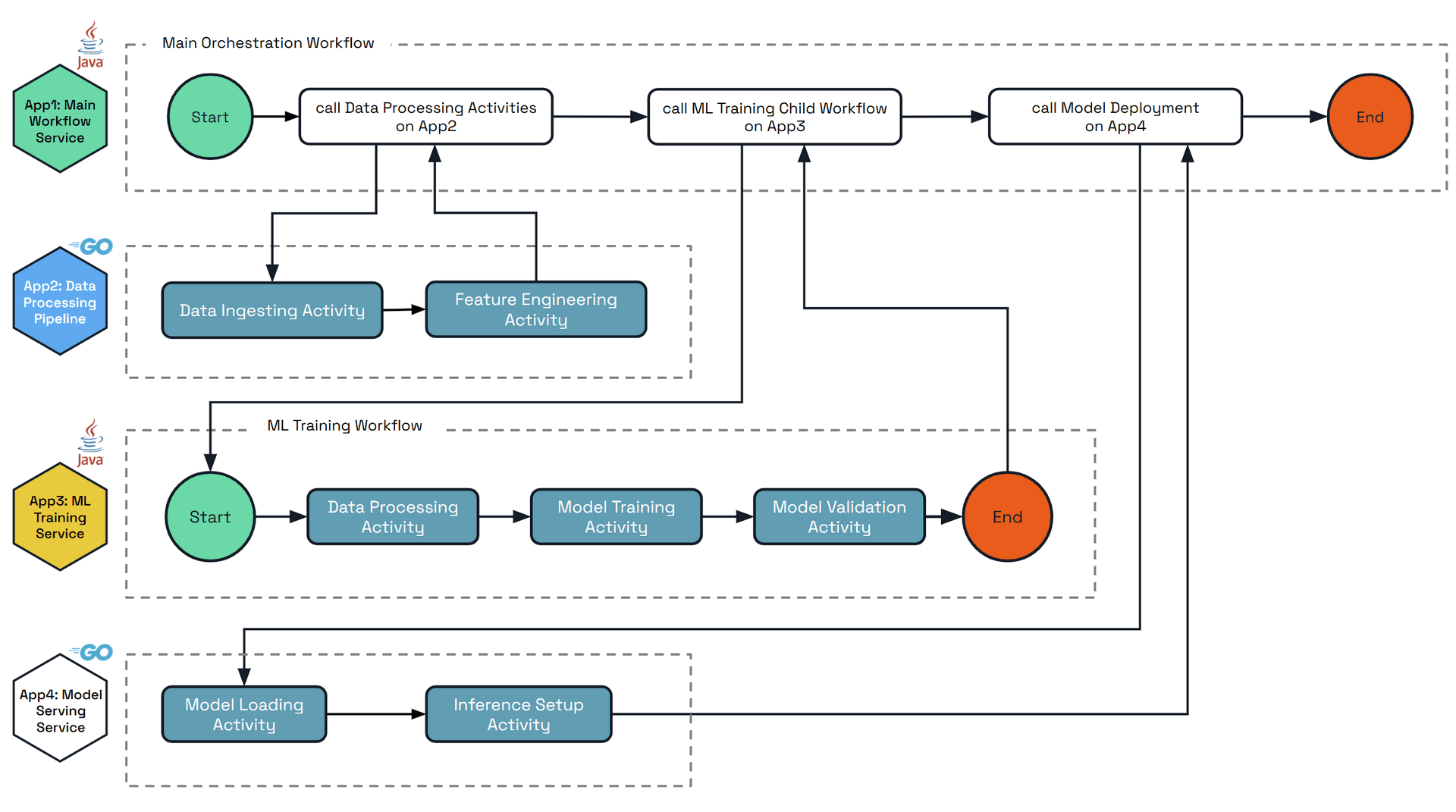
The diagram below shows an example scenario of a complex workflow that orchestrates across multiple applications that are written in different languages. Each applications’ main steps and activities are:
• App1: Main Workflow Service - Top-level orchestrator that coordinates the entire ML pipeline
- Starts the process
- Calls data processing activities on App2
- Calls ML training child workflow on App3
- Calls model deployment on App4
- Ends the complete workflow
- Language: Java
• App2: Data Processing Pipeline - GPU activities only
- Data Ingesting Activity (GPU-accelerated)
- Feature Engineering Activity (GPU-accelerated)
- Returns completion signal to Main Workflow
- Language: Go
• App3: ML Training Child Workflow - Contains a child workflow and activities
- Child workflow orchestrates:
- Data Processing Activity
- Model Training Activity (GPU-intensive)
- Model Validation Activity
- Triggered by App2’s activities completing
- Returns completion signal to Main Workflow
- Language: Java
• App4: Model Serving Service - Beefy GPU app with activities only
- Model Loading Activity (GPU memory intensive)
- Inference Setup Activity (GPU-accelerated inference)
- Triggered by App3’s workflow completing
- Returns completion signal to Main Workflow
- Language: Go
Multi-application workflows
Workflow execution routing is based on the App ID of the hosting Dapr application. By default, the full workflow execution is hosted on the app ID that started the workflow. This workflow can be executed across any replicas of that app ID, not just the single replica which scheduled the workflow.
It is possible to execute activities and child workflows on different app IDs by specifying the target app ID parameter, inside the workflow execution code. Upon execution, the target app ID executes the activity or child workflow, and returns the result to the parent workflow of the originating app ID.
The entire Workflow execution may be distributed across multiple app IDs with no limit, with each activity or child workflow specifying the target app ID. The final history of the workflow will be saved by the app ID that hosts the very parent (or can consider it the root) workflow.
Restrictions
Like other API building blocks and resources in Dapr, workflows are scoped to a single namespace. This means that all app IDs involved in a multi-application workflow must be in the same namespace. Cross-namespace workflows are not supported: any workflow or activity call from a caller in a different namespace than the target is always denied. Similarly, all app IDs must use the same workflow (or actor) state store. Finally, the target app ID must have the activity or child workflow defined and registered, otherwise the parent workflow retries indefinitely.Note
Multi-application workflows require Dapr runtime v1.16.0 or later. .NET SDK support is available starting with v1.17.0.Important Limitations
SDKs supporting multi-application workflows - Multi-application workflows are used via the SDKs. Currently the following are supported:
- Java (only activity calls)
- Go (both activity and child workflow calls)
- Python (both activity and child workflow calls)
- .NET (both activity and child workflow calls, requires .NET SDK v1.17.0+)
- JavaScript SDK support is planned for a future release
Error handling
When calling multi-application activities or child workflows:
- If the target application does not exist, the call will be retried using the provided retry policy.
- If the target application exists but doesn’t contain the specified activity or workflow, the call will return an error.
- Standard workflow retry policies apply to multi-application calls.
Client operations fail at once when no workflow worker is connected for the target application, local or remote, with the error no workflow worker is connected for app '<app-id>'. This tells you to start the app, or wait for its worker to connect, instead of returning an actor routing error such as did not find address for actor. Starting a workflow no longer retries in this case, so the error comes about 20 seconds sooner. The original error stays wrapped, so existing error code checks still match.
It is paramount that there is coordination between the teams owning the different app IDs to ensure that the activities and child workflows are defined and available when needed.
Durable Activity Results
It is often the case that Activities take some amount of time to complete, or similarly are expensive to execute in resource or dollar cost. It is therefore undesirable to execute these activities more than once for the same round, even in unhappy paths. Before 1.17 in multi-application scenarios, Activities would publish responses over a network call to the other application which is hosting the owning Workflow. In the case where the hosting workflow application is down or otherwise unreachable, the result would be lost and the Activity would be retried, leading to duplicate execution of the Activity.
In 1.17, enabling the WorkflowsRemoteActivityReminder feature gate will make the activity result be sent to the owning workflow application with a reminder in the event that the workflow application is offline or unreachable, ensuring that the result is not lost and duplicate execution is avoided.
This option should be enabled by all users who have all applications running Dapr version 1.17 or later.
As of 1.18 it is enabled by default. In 1.17 it was disabled by default for backwards compatibility between Dapr versions, and can be opted into via the feature gate.
Multi-application activity example
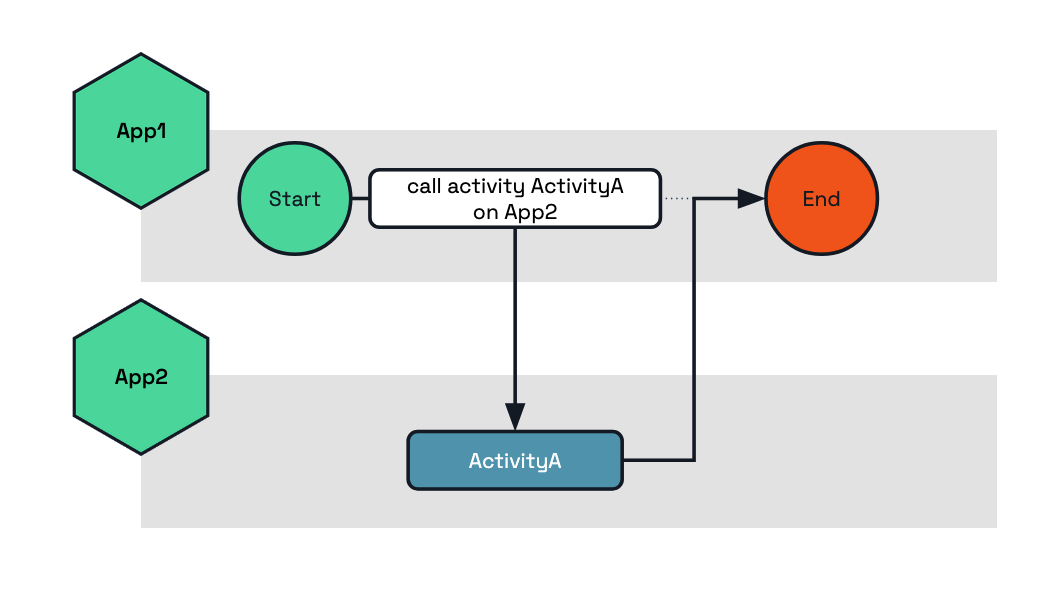
The following example shows how to execute the activity ActivityA on the target app App2.
func BusinessWorkflow(ctx *workflow.WorkflowContext) (any, error) {
	var output string
	err := ctx.CallActivity("ActivityA",
		workflow.WithActivityInput("my-input"),
		workflow.WithActivityAppID("App2"), // Here we set the target app ID which will execute this activity.
	).Await(&output)

	if err != nil {
		return nil, err
	}

	return output, nil
}
public class BusinessWorkflow implements Workflow {
  @Override
  public WorkflowStub create() {
      return ctx -> {
          String output = ctx.callActivity(
                  ActivityA.class.getName(),
                  "my-input",
                  new WorkflowTaskOptions("App2"), // Here we set the target app ID which will execute this activity.
                  String.class
          ).await();

          ctx.complete(output);
      };
  }
}
@wfr.workflow
def app1_workflow(ctx: wf.DaprWorkflowContext):
  output = yield ctx.call_activity('ActivityA', input='my-input', app_id='App2')
  return output
public sealed class BusinessWorkflow : Workflow<string, string>
{
    public override async Task<string> RunAsync(WorkflowContext context, string input)
    {
        var options = new WorkflowTaskOptions { TargetAppId = "App2" };
        var output = await context.CallActivityAsync<string>(nameof(ActivityA), input, options);
        return output;
    }
}
Multi-application child workflow example
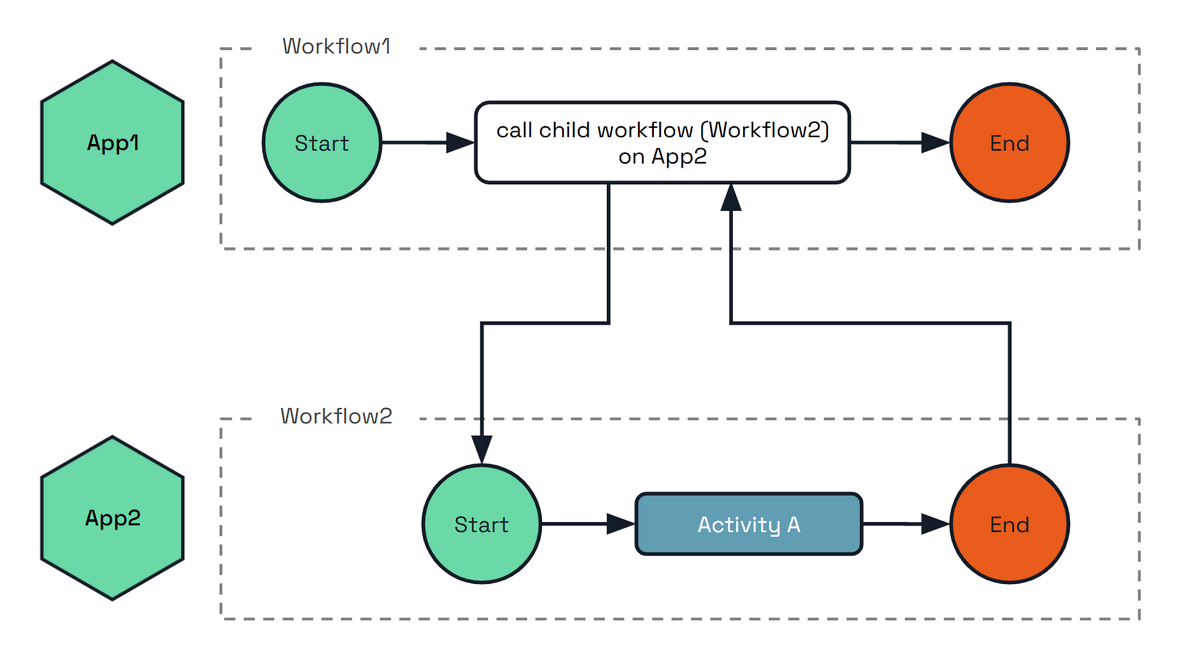
The following example shows how to execute the child workflow Workflow2 on the target app App2.
func BusinessWorkflow(ctx *workflow.WorkflowContext) (any, error) {
	var output string
	err := ctx.CallChildWorkflow("Workflow2",
		workflow.WithChildWorkflowInput("my-input"),
		workflow.WithChildWorkflowAppID("App2"), // Here we set the target app ID which will execute this child workflow.
	).Await(&output)

	if err != nil {
		return nil, err
	}

	return output, nil
}
@wfr.workflow
def workflow1(ctx: wf.DaprWorkflowContext):
  output = yield ctx.call_child_workflow(workflow='Workflow2', input='my-input', app_id='App2')
  return output
public sealed class BusinessWorkflow : Workflow<string, string>
{
    public override async Task<string> RunAsync(WorkflowContext context, string input)
    {
        var options = new ChildWorkflowTaskOptions { TargetAppId = "App2" };
        var output = await context.CallChildWorkflowAsync<string>(nameof(Workflow2), input, options);
        return output;
    }
}
Managing workflows across applications
The examples above compose work across applications from inside a running workflow. Client-level operations can cross applications too: an application that holds nothing but a workflow client can start, inspect and control an instance owned by another application in the same namespace.
This means the application that owns a workflow does not have to build and maintain its own API for other teams to drive it. An operations tool can terminate a stuck order by its instance ID, a support tool can raise an approval event on it, and a front-end service can start a workflow it does not host, all through the standard workflow API. The owning application stays in control: its workflow access policy decides which callers may perform which operation on which workflow. See the WorkflowAccessPolicy spec for the resource format.
When to use it
- Client-level operations (this section) — the caller is not inside a workflow. An HTTP handler, an operations tool acting on a known instance ID, or a service that starts work it does not host.
- Child workflows and activities — the caller is a workflow, composing another application’s work into its own execution and awaiting the result.
How it works
Take an application app-a that terminates the workflow instance order-1, which is owned by app-b:
app-a hosts no workflow code at all. It names the owning application, and its sidecar does the rest: it stamps app-a as the caller, and app-b’s sidecar checks that identity against its own access policy before the operation reaches the instance. Only app-b ever runs the workflow.
Because the caller’s identity is what the policy is evaluated against, mTLS must be enabled for cross-application enforcement. With a policy loaded and mTLS off, the target cannot verify who is calling and denies the request.
Leaving the app ID unset, or setting it to the calling application’s own ID, is the ordinary local operation. Against a runtime that predates this feature the app ID is ignored and the operation applies to the local application.
Start, get, raise event, pause, resume, terminate, purge and rerun can target another application. Rerun is available through the SDK workflow clients only, not the HTTP or gRPC workflow API. Listing instance IDs and reading instance history always apply to the local application.
HTTP
Add the appID query parameter to any call in the workflow API reference:
# Start a workflow hosted by app2
curl -X POST "http://localhost:3500/v1.0-beta1/workflows/dapr/OrderWF/start?appID=app2&instanceID=order-1"

# Inspect it, raise an event, and terminate it on app2
curl "http://localhost:3500/v1.0-beta1/workflows/dapr/order-1?appID=app2"
curl -X POST "http://localhost:3500/v1.0-beta1/workflows/dapr/order-1/raiseEvent/approval?appID=app2" -d '"approved"'
curl -X POST "http://localhost:3500/v1.0-beta1/workflows/dapr/order-1/terminate?appID=app2"
gRPC
Set the app_id field (JSON name appID) on the workflow request messages: StartWorkflowRequest, GetWorkflowRequest, TerminateWorkflowRequest, RaiseEventWorkflowRequest, PauseWorkflowRequest, ResumeWorkflowRequest and PurgeWorkflowRequest. Each corresponds to an operation in the workflow API reference: start, get, terminate, raise event, pause, resume and purge.
SDKs
app_id is a keyword-only argument on every client operation.
instance_id = client.schedule_new_workflow(workflow=order_wf, app_id='app2')

state = client.get_workflow_state(instance_id, app_id='app2')
client.raise_workflow_event(instance_id, 'approval', data='approved', app_id='app2')
client.pause_workflow(instance_id, app_id='app2')
client.resume_workflow(instance_id, app_id='app2')
client.terminate_workflow(instance_id, app_id='app2')
client.purge_workflow(instance_id, app_id='app2')
The async client in dapr.ext.workflow.aio takes the same argument. See the Python workflow examples.
Scheduling takes the target through StartWorkflowOptions; the other operations take a targetAppId argument.
var options = new StartWorkflowOptionsBuilder().WithTargetAppId("app2").Build();
var instanceId = await client.ScheduleNewWorkflowAsync("OrderWF", input: null, options: options);

var state = await client.GetWorkflowStateAsync(instanceId, "app2");
await client.RaiseEventAsync(instanceId, "approval", "approved", "app2");
await client.SuspendWorkflowAsync(instanceId, null, "app2");
await client.ResumeWorkflowAsync(instanceId, null, "app2");
await client.TerminateWorkflowAsync(instanceId, null, "app2");
await client.PurgeInstanceAsync(instanceId, "app2");
Scheduling takes the target through NewWorkflowOptions; the other operations have an overload with a trailing appId.
NewWorkflowOptions options = new NewWorkflowOptions().setAppId("app2");
String instanceId = client.scheduleNewWorkflow(OrderWorkflow.class, options);

WorkflowState state = client.getWorkflowState(instanceId, true, "app2");
client.raiseEvent(instanceId, "approval", "approved", "app2");
client.suspendWorkflow(instanceId, null, "app2");
client.resumeWorkflow(instanceId, null, "app2");
client.terminateWorkflow(instanceId, null, "app2");
client.purgeWorkflow(instanceId, "app2");
Each operation has its own app ID option.
instanceID, err := client.ScheduleWorkflow(ctx, "OrderWF", workflow.WithAppID("app2"))

meta, err := client.FetchWorkflowMetadata(ctx, instanceID, workflow.WithFetchAppID("app2"))
err = client.RaiseEvent(ctx, instanceID, "approval", workflow.WithRaiseEventAppID("app2"))
err = client.SuspendWorkflow(ctx, instanceID, "", workflow.WithSuspendAppID("app2"))
err = client.ResumeWorkflow(ctx, instanceID, "", workflow.WithResumeAppID("app2"))
err = client.TerminateWorkflow(ctx, instanceID, workflow.WithTerminateAppID("app2"))
err = client.PurgeWorkflowState(ctx, instanceID, workflow.WithPurgeAppID("app2"))
SDK availability
Client-level cross-application operations require Dapr runtime v1.19 or later, and the SDK support shipping alongside it. The arguments and options shown above are not present in earlier SDK releases: check that your SDK version includes them before using these snippets.
The JavaScript SDK does not support cross-application client operations.
The target application’s workflow access policy governs whether each operation is permitted, per operation and per workflow name, using the rules defined in the WorkflowAccessPolicy spec. Cross-namespace targeting is not supported.
Security: Workflow access policies
When using multi-application workflows, you may want to restrict which applications can schedule activities or child workflows on a target application. Dapr provides the WorkflowAccessPolicy resource for this purpose.
Policies are a pure allow-list and self-calls are always permitted, so the target application does not need to list itself in the callers to execute its own activities. The following example of a workflow access policy is applied to the ml-worker application. All policies that target a given appID (in this case ml-worker) are loaded by the sidecar when the application is instantiated.
This policy allows the orchestrator-app application to schedule the TrainModel and ValidateModel activities on the ml-worker application.
apiVersion: dapr.io/v1alpha1
kind: WorkflowAccessPolicy
metadata:
  name: ml-worker-policy
  namespace: production
scopes:
  - ml-worker
spec:
  rules:
    - callers:
        - appID: orchestrator-app
      activities:
        - name: TrainModel
        - name: ValidateModel
Read How-To: Apply workflow access policies for more examples and details on the cross-app enforcement model.